
Personalized popups use behavioral and demographic data—like cart value, geographic location, or purchase history—to show specific offers to different customer segments.
This relevance reduces “popup fatigue” and can increase conversion rates by up to 3x compared to generic campaigns.
Key Takeaways
- Move away from “one-size-fits-all” popups that annoy visitors and reduce brand trust.
- Shopify merchants looking to scale conversions through advanced behavioral targeting.
- Segmenting popups by customer type (New vs. Returning) or behavior (Cart Value) can triple engagement rates.
- Higher AOV, reduced abandonment, and a more professional storefront experience.
Why Your Generic “10% Off” Popup is Leaving Money on the Table
We’ve all seen it: you land on a Shopify store, and before you can even see a product, a generic “Join our newsletter for 10% off” modal hits your screen. For a first-time visitor, it’s a minor annoyance.
For a returning VIP customer who just spent $500 last month, it’s a sign that the brand doesn’t actually know who they are.
In the modern ecommerce landscape, “relevance” is the only currency that matters. According to the Baymard Institute, the average cart abandonment rate hovers around 70%.
A generic popup rarely moves the needle on that stat because it doesn’t address why that specific user is leaving.
Personalization isn’t just a buzzword; it’s a conversion necessity. When you segment your Shopify popups, you stop shouting at a crowd and start talking to individuals.
This article will show you how to move from “annoying” to “essential” by targeting the right segments at the perfect moment.
How Personalized Popups Solve the “One-Size-Fits-All” Trap
When every visitor sees the same message, you are effectively treating your most loyal customers like strangers. This creates a “One-Size-Fits-All” trap where your marketing becomes white noise.
What this looks like in the real world:
Imagine a merchant selling high-end coffee equipment. A first-time visitor needs education and a “Welcome” incentive. A returning subscriber who already has a machine might need a “Subscription Refill” reminder.
Showing the same welcome discount to both results in missed revenue from the first and a redundant experience for the second.
By implementing segmented popups, you ensure that:
- New Visitors see trust-building content and lead magnets.
- Returning Customers see “Welcome Back” offers or loyalty rewards.
- High-Intent Shoppers (those with items in their cart) see urgency-driven recovery messages.
Recommended Blogs for You:
👉 Monitor Shopify Popup Performance in Real-Time
👉Show the Right Popup at the Right Moment
👉 Shopify Announcement Bar Best Practices
👉 How to Catch Shoppers Before They Leave
👉 The Ultimate Seasonal Popup Strategy for Shopify
Why Relevant Messaging is the Antidote to “Popup Fatigue”
“Popup fatigue” happens when users feel bombarded by irrelevant interruptions. This leads to immediate “X” clicking and, in worse cases, site abandonment.
The antidote is context. Industry data suggests that targeted, behavior-based popups can convert up to 3x better than generic ones. Why? Because they solve a problem the user is currently facing.
For instance, if a user is browsing from the UK but your store defaults to USD, a geo-targeted announcement bar or popup informing them of international shipping rates is helpful, not annoying. It reduces friction instead of creating it.
Setting Up High-Converting Segments on Shopify
You don’t need a degree in data science to segment your Shopify store. Follow this workflow to get started:
- Identify Your Priority Segments: Start with the “Big Three”: New Visitors, Returning Customers, and Cart Abandoners.
- Define the Trigger: When should the message appear? For exit intent, it should be the moment the cursor leaves the window. For welcome offers, a 5-10 second delay allows the page to load first.
- Align the Offer with the Intent: * New Visitor: Email capture for a discount.
- Exit Intent: A “Wait! Don’t go” offer or a free shipping threshold.
- Cart Event: “You’re only $10 away from free shipping.”
- Set Page Rules: Don’t show a “Shop Now” popup on the Checkout page where it might distract the user from completing their purchase.
3 High-Impact Use Cases for Personalized Shopify Campaigns
Scenario A: The “First-Purchase” Accelerator
Target visitors who have no prior orders and have spent at least 30 seconds on a product page.
- The Message: “New here? Take 15% off your first bag of beans.”
- The Goal: Lower the barrier to entry for a first-time purchase.
Scenario B: The High-Value Cart Recovery
Target users with a cart value over $100 who show exit intent.
- The Message: “We noticed you left something behind. Finish your order in the next 15 minutes and we’ll upgrade you to Priority Shipping.”
- The Goal: Use a high-value incentive to save a high-value sale. Research shows exit-intent popups can recover up to 15% of abandoning visitors.
Scenario C: The Geo-Specific Flash Sale
Target users in a specific country (e.g., Canada) during a local holiday.
- The Message: “Happy Victoria Day! Enjoy 20% off all orders today only.”
- The Goal: Create a sense of local relevance and urgency.
How SalesPulse Simplifies Advanced Audience Targeting
Implementing these strategies manually would require complex coding. This is where tools like SalesPulse ‑ Sales Pop Up come in.
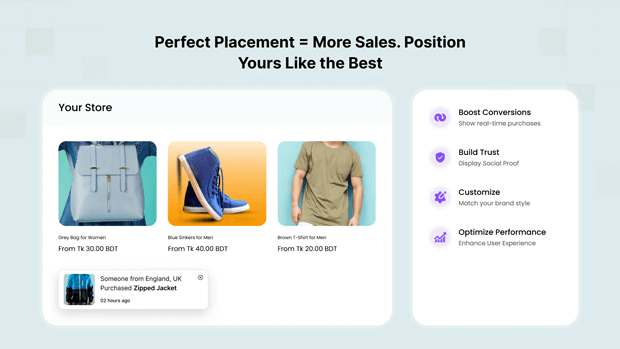
SalesPulse is designed specifically for Shopify merchants who need professional-grade targeting without the technical overhead. It includes:
- 7 Smart Triggers: Including exit intent, scroll depth (e.g., showing a popup after someone reads 50% of a blog post), and cart value events.
- Advanced Segmentation: Easily toggle between “New Visitors” and “Returning Customers” with a single click.
- 21 Professional Templates: From “VIP Exclusive” to “Cart Abandonment,” these designs match the aesthetic of modern Shopify themes.
For merchants scaling their stores, SalesPulse also offers A/B testing on its Pro plan, allowing you to test whether a “10% off” or “Free Shipping” message performs better for your specific audience.
Balancing Personalization with Shopify Mobile UX Guidelines
Google and Shopify both place a high priority on mobile user experience. Intrusive popups that cover the entire screen on mobile can lead to SEO penalties and high bounce rates.
Expert Tips for Mobile Segmentation:
- Use Slide-ins: Instead of a centered modal, use a “Slide-in Bottom” style. It’s less intrusive and easier for users to close with one thumb.
- Delay the Trigger: Never show a popup the moment a mobile page loads. Wait for at least 15 seconds or a 50% scroll.
- Keep it Simple: Mobile forms should have a maximum of two fields (e.g., Name and Email).
Measuring Revenue Attribution and A/B Testing
Once your segmented popups are live, your work isn’t done. You must track Revenue Attribution.
A common mistake is looking only at “Conversion Rate.” Instead, look at the Revenue Per Mille (RPM)—how much money did that specific popup generate for every 1,000 views? If your “Returning Customer” popup has a lower conversion rate but a much higher AOV, it might actually be more valuable than your “New Visitor” discount.
Pro Tip: Use the built-in analytics in SalesPulse to see exactly which campaigns are driving sales and which are just driving clicks.
Frequently Asked Questions
Are popups bad for my Shopify store’s SEO?
Only if they are intrusive. Google penalizes sites that use large “interstitials” on mobile that block content. Use subtle slide-ins or time-delayed popups to stay compliant.
Can I target popups to customers from specific countries?
Yes. Advanced apps like SalesPulse allow for Geo-Targeting, enabling you to show specific messages to users in over 200 countries.
What is the best trigger for a cart abandonment popup?
Exit Intent is the most effective. It detects when a user’s mouse moves toward the “close” button or address bar, providing a final opportunity to offer an incentive before they leave.
How many popups should I have active at once?
Usually, only one per user session is recommended. If you have multiple segments, ensure your app has “Priority Display” logic so a user doesn’t see three different popups at the same time.




