
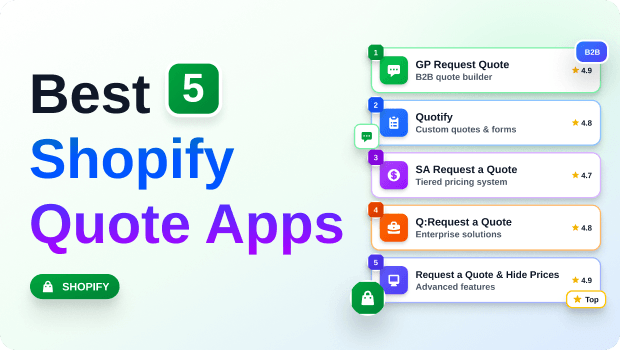
Moving high-ticket or custom B2B orders through a standard Shopify checkout rarely works.
Wholesale buyers need custom pricing, bulk discounts, and shipping negotiations before they commit. That’s where a dedicated quote request workflow comes in
By swapping your standard “Add to Cart” button for a custom inquiry form, you can capture leads, negotiate terms, and close complex deals directly within your Shopify dashboard.
If you’re losing potential wholesale buyers because your store forces them into rigid, unchangeable retail pricing, you are leaving money on the table.
B2B buyers expect a conversation. They expect volume pricing. They expect to negotiate terms.
Trying to force these complex transactions through a standard retail cart often leads to abandoned sessions and lost accounts.
In this guide, we break down how to choose the right Shopify quote app to streamline your B2B sales funnel without breaking your storefront’s user experience or cluttering your admin panel.
Table of Contents
Summary:
- Adding a quote request system bridges the gap between B2B negotiation and frictionless ecommerce checkout.
- The best Shopify request a quote apps allow you to hide prices, customize forms, and convert approved quotes directly into draft orders.
- If you run a hybrid D2C/B2B store, look for tools with advanced targeting rules that only show quote buttons to specific customer tags or on specific collections.
- Pricing for these tools ranges from free basic tiers for low-volume merchants to premium plans suited for wholesale operations requiring PDF generation and CRM integrations.
The best Shopify request a quote apps let you hide product prices, collect buyer requirements via custom forms, and automatically convert approved quotes into draft orders. Choosing the right one depends on your need for B2B login rules and PDF invoicing.
How to choose the right Shopify request a quote app
When evaluating a custom quote form for Shopify, it is easy to get distracted by bloated feature lists.
However, a highly functional B2B quote app Shopify integration only needs to excel at a few critical workflows:
- Display Logic and Targeting: Can you show the “Request a Quote” button only on specific collections, or only to customers tagged as “B2B?
- Frictionless Conversion: The app must seamlessly turn an approved quote into a Shopify Draft Order, complete with custom shipping, taxes, and negotiated discounts.
- Form Customization: Wholesale orders require specific details (e.g., company name, tax ID, deadline, file uploads for custom specs). Your app should offer a drag-and-drop form builder.
- Notification Workflows: Timely automated email responses to the customer, coupled with instant admin alerts, are non-negotiable for closing high-value deals quickly.
Recommended Blogs for You:
👉 7 Costly Free Shipping Bar Mistakes Killing Your Shopify AOV
👉 How to Sync Shopify Products to Facebook Catalogs: Boost ROAS
👉 5 Smart Ways to Build Urgency on Shopify (That Actually Convert)
👉 TikTok Pixel for Shopify: Complete Step-by-Step Guide
👉 How to Create a Cart Drawer Free Shipping Bar in Shopify
Comparison table of the best Shopify request a quote apps
| App Name | Starting Price | Best Feature | Draft Order Conversion |
| GP Request Quote | Free | Seamless draft order creation with tax/shipping | Yes |
| SB Request a Quote, Hide Price | Free | Flexible B2B quote workflow with hide-price rules, quote negotiation, and branded PDF proposals | Yes |
| Quotes Guru: RFQ & Hide Prices | Free | Well-suited for B2C stores selling products | Yes |
| SA Request a Quote | Free | Advanced B2B login-to-see-price rules | Yes (Premium tiers) |
| Q:Request a Quote | Free | HubSpot & Mailchimp integrations | Yes |
| Quotify | $17/mo | Google Analytics funnel tracking | Yes |
| Request a Quote (Madgic) | Free | Unlimited quote numbers on free plan | Yes |
Best Shopify request a quote apps reviewed
Here is an in-depth breakdown of the best wholesale quote apps currently available on the Shopify App Store, focusing strictly on verified features to help you make an informed decision.
1. GP Request Quote
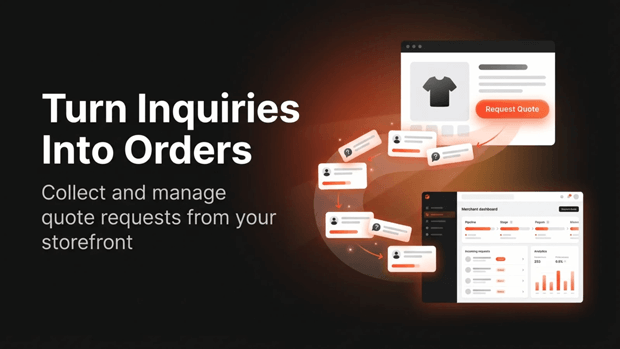
What it does: GP Request Quote adds a highly customizable quote request button to your storefront, funneling customer inquiries directly into a clean dashboard where you can price items, apply discounts, and convert the negotiation into a draft order.
Best for: Merchants who want a streamlined, easy-to-use quote-to-order pipeline without navigating an overly complex interface.
Key features:
- Turns quotes into draft orders with discounts, tax, and shipping applied.
- Control button visibility using rules based on products, collections, or tags.
- Customizable form text, field reordering, and button styling.
- Automated email alerts for both merchants and customers.
Pros:
- Very affordable growth plans.
- Intuitive dashboard that keeps quote management simple.
- Does not require coding to match the button style to your theme.
Cons:
- The top public tier caps at 500 quotes/month, which may not suit massive enterprise catalogs.
Pricing:
- Free: 20 quotes/month.
- Growth: $9.99/month (100 quotes/month).
- Scale: $24.99/month (500 quotes/month).
2. SB Request a Quote, Hide Price
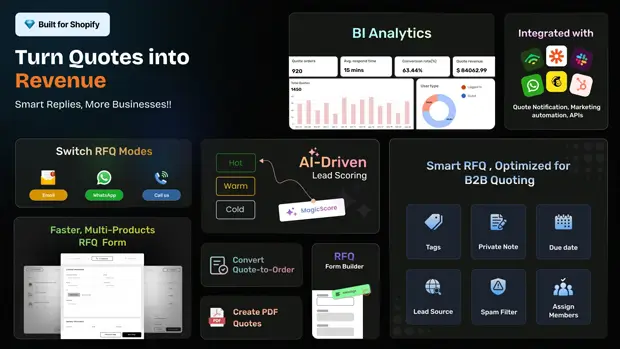
What it Does: SB Request a Quote, Hide Price by SetuBridge is a complete B2B quoting workflow that lets buyers request pricing via a multi-step form, WhatsApp, or call, then negotiate in-app before merchants convert the accepted quote into an order with one click. AI scores lead quality automatically to keep the pipeline clean.
Best for: B2B and wholesale merchants who want to combine price-hiding, multi-channel quote capture, and AI-driven lead scoring in a single workflow, without stitching together separate apps for chat, PDF proposals, and CRM sync.
Key Features:
- Hide product prices and the Add to Cart button by product, collection, tag, or customer group.
- Buyers can request quotes via form, WhatsApp, or call, with quick and multi-item request options.
- AI lead-quality scoring and spam protection to filter low-intent inquiries.
- In-quote negotiation with chat and branded PDF proposal generation.
- One-click conversion of accepted quotes into draft orders.
- Business intelligence dashboard with quote source tracking and integrations for HubSpot, Klaviyo, Zapier, Mailchimp, and more.
- Multi-language support across quote forms, PDFs, and emails.
Pros:
- Combines WhatsApp, call, and form-based quote intake in one app rather than requiring separate tools.
- AI lead scoring helps prioritize high-intent B2B buyers.
- Deep third-party integrations (HubSpot, Klaviyo, Zapier, Slack, Twilio) on higher tiers.
Cons:
- The free Lite plan is capped at 5 quote requests/month and 20 products, so growing stores will likely need to upgrade quickly.
Pricing:
- Lite: Free (5 quotes/month, 20 products).
- Startup: $7.99/month (50 quotes/month, 100 products).
- Growth: $12.99/month (500 quotes/month, 500 products).
- Premium: $19.99/month (unlimited quotes and products).
3. Quotes Guru: RFQ & Hide Prices
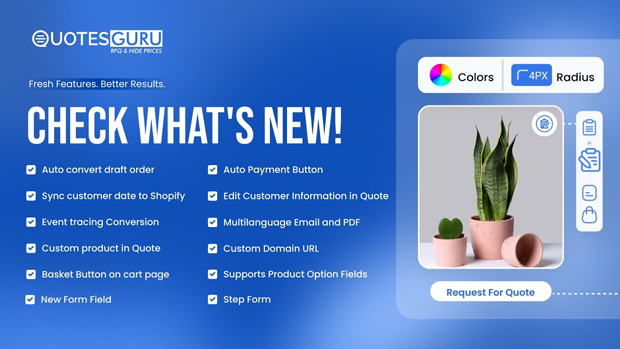
What it Does: Quotes Guru is a powerful Shopify quote management app that enables merchants to hide product prices, replace the Add to Cart button with a Request a Quote option, and manage customer inquiries through customizable quote forms.
Best for: B2B wholesalers, manufacturers, distributors, custom product sellers, and Shopify merchants that require flexible pricing, negotiated orders, customer-specific quotations, multi-market pricing rules, or advanced inquiry management. It is also well-suited for B2C stores selling custom-made, high-ticket, made-to-order, or consultation-based products.
Key Features:
- Customer-Based Conditions for Quote Forms – Display different quote forms based on customer tags, login status, or country to deliver personalized quoting experiences.
- Manage Taxes & Shipping in Your Quotes – Add custom taxes and shipping charges or automatically calculate Shopify shipping rates and taxes within quotes.
- Shipping Options in Quotes (Custom & Shopify Rates) – Offer flexible delivery pricing using custom shipping fees or real-time Shopify shipping rates.
- Klaviyo Integration – Sync quote requests with Klaviyo to automate follow-ups, customer notifications, and targeted marketing campaigns.
- Customer Quote Portal – Allow customers to view quotes, download PDFs, approve quotations, track status updates, and complete payments online.
- Assign Quotes to Staff or Sales Representatives – Route quote requests to specific team members for faster responses, better organization, and improved accountability.
- Zapier Integration – Connect quote data with thousands of business applications to automate workflows and eliminate manual data entry.
Pros:
- Integrated Shopify shipping and tax calculation for accurate quotations
- Includes Zapier, Klaviyo, SMTP, export tools, and sales team assignment features.
- Competitive pricing with extensive features available across plans.
- Free access to Shopify development and partner stores for testing.
- Backed by responsive 24/7 VIP customer support and a 4.9-star rating from Shopify merchants.
Cons:
- The free plan includes 50 quote requests, which may be limiting for fast-growing startups or stores with higher inquiry volumes.
- Some advanced features are available only on the Pro and Premium plans. However, these plans remain more affordable than many competing quote apps while offering a comprehensive feature set.
Pricing:
- Free Plan
- Basic: $5.99/month or $59.99/year (save 17%)
- Pro: $14.99/month or $149.99/year (save 17%)
- Premium: $24.99/month or $249.99/year (save 17%)
4. SA Request a Quote, Hide Price

What it does: This app acts as a comprehensive quote request solution for B2B stores, allowing merchants to hide prices, hide the Add to Cart button, and require a customer login to view pricing.
Best for: Established B2B catalogs that require granular control over product visibility and complex pricing structures based on customer tags.
Key features:
- Hide product prices based on tags, vendors, or collections.
- Allows customers to suggest their own “best-suited” prices.
- Auto-fills logged-in B2B customer data (on higher tiers).
- Exports quotes and attaches PDFs to emails.
Pros:
- Highly rated by a large volume of Shopify merchants.
- Strong functionality for hybrid D2C/B2B stores.
- Includes a Zapier integration for connecting external CRMs.
Cons:
- Crucial B2B features (like auto-filling customer data and specific B2B quote settings) are locked behind the most expensive tier.
Pricing:
- Free Plan: Basic quotes and email templates.
- Premium: $16.99/month.
- Pro: $36.99/month.
- Advanced: $96.99/month.
5. Q: Request a Quote & Hide Price

What it does: Also known as Quote Snap, this tool provides a flexible drag-and-drop form builder, allowing customers to request quotes while giving merchants the ability to track negotiations and sync data to external marketing tools.
Best for: Sales teams that collaborate on quotes and merchants who rely heavily on external CRMs like HubSpot.
Key features:
- Drag-and-drop form editor with file upload support.
- Team seats with specific member permissions.
- Syncs quote and contact data to Mailchimp and HubSpot.
- Manages quotes directly in the customer profile.
Pros:
- Excellent collaboration features for sales teams (unlimited seats on the Pro plan).
- Deep marketing integration options.
- Provides PDF generation for professional proposals.
Cons:
- To apply payment terms and sync company info to orders, you must be on Shopify Plus and use the highest tier.
Pricing:
- Free Plan: Limited quotes, max 5MB file upload.
- Starter: $16.99/month.
- Pro: $36.99/month.
- Plus: $96.99/month.
6. Quotify: Request a Quote

What it does: Quotify is designed to handle custom requests and features unique integrations like Google Analytics for funnel tracking and an AI text writer to speed up personalized proposals.
Best for: Data-driven e-commerce managers who want to treat their quote requests like a standard conversion funnel and track drop-offs.
Key features:
- Google Analytics and Zapier/Klaviyo integrations.
- AI text writer for fast proposal generation.
- Translatable into multiple languages (Spanish, French, German, etc.).
- Pre-fills quote forms with existing customer data.
Pros:
- Offers a one-time lifetime payment option, which is rare.
- Excellent analytics capabilities for conversion rate optimization.
- Unlimited quotes starting on the base paid plan.
Cons:
- No free forever plan; it only offers a 7-day free trial.
Pricing:
- Pro: $17/month.
- Premium: $34/month.
- Lifetime: $700 (one-time charge).
7. Request a Quote & Hide Prices

What it does: A straightforward tool built to collect important details through customizable forms, hide prices for guest users, and convert quick orders to draft orders.
Best for: Budget-conscious store owners who need reliable form building and price-hiding functionality without paying for expensive enterprise features.
Key features:
- Hide product price visibility for guest users or tagged groups.
- Convert RFQ quotes to draft orders automatically.
- Multi-language advanced form builder.
- File uploads (PDF, Image) supported on the paid plan.
Pros:
- The free plan offers an unlimited number of quotes.
- The paid plan is highly cost-effective compared to competitors.
Cons:
- Lacks the advanced third-party CRM syncing found in higher-priced apps.
Pricing:
- Free Plan: Unlimited quotes, basic form customization.
- Pro: $9.99/month.
Which wholesale quote app is best for each merchant type?
- For simple setups and rapid workflow conversion: GP Request Quote provides an incredibly clean, native-feeling dashboard to turn requests into draft orders instantly.
- For complex catalog visibility: SA Request a Quote excels at hiding prices based on complex tagging rules for hybrid catalogs.
- For data and analytics tracking: Quotify is the best choice if you rely on Google Analytics to track your B2B funnel.
- For sales team collaboration: Q:Request a Quote (Omega) offers excellent team seating and CRM syncing for active sales departments.
- For tight budgets: Request a Quote gives you unlimited quotes on their generous free tier.
Common mistakes merchants make when comparing B2B quote apps
- Ignoring Theme Compatibility: Always verify that the app supports Online Store 2.0 app blocks. If it relies on injected code, it could slow down your site or break upon a theme update.
- Overpaying for Unused Integrations: Don’t pay $90/month for advanced CRM integrations if your current workflow only requires a notification email and a Shopify draft order.
- Forgetting the Mobile Experience: B2B buyers increasingly source products on mobile devices. Ensure the custom quote form for Shopify you choose is responsive and doesn’t feature unclickable file upload buttons on mobile.
A simple framework for choosing your quoting tool
To avoid analysis paralysis, follow this three-step framework:
- Assess Your Volume: How many quotes do you process monthly? If it’s under 20, a free tier will suffice. If it’s hundreds, you need unlimited plans or high-tier caps.
- Determine Your Visibility Rules: Do you need to hide the “Add to Cart” button store-wide, or only on specific high-ticket collections? Choose an app that supports granular targeting.
- Map Your Post-Quote Workflow: Once you agree on a price, how does the customer pay? Apps that auto-convert quotes into draft orders with pre-filled checkout links save hours of manual data entry.
FAQs about Shopify request a quote apps
Can I use a Shopify quote app to hide prices on specific products only?
Yes. Most top-tier apps allow you to set visibility rules. You can apply a “Request a Quote” button exclusively to specific collections, product tags, or individual items while leaving the rest of your catalog available for standard checkout.
Will adding a request a quote Shopify app slow down my store?
If the app is built for Online Store 2.0 and uses App Embeds rather than injecting legacy JavaScript into your theme.liquidfile, the impact on your site speed should be negligible.
How do wholesale quote apps handle shipping and taxes?
When you convert a quote into a draft order within the app’s dashboard, you can manually apply custom shipping rates, percentage discounts, and let Shopify’s native tax settings calculate the final total before sending the invoice link to the buyer.
Final verdict on the best Shopify request a quote apps
Upgrading your store with a dedicated quote system is one of the highest-ROI changes you can make for a B2B or high-ticket catalog. By removing the friction of standard retail pricing, you invite negotiation, capture high-intent leads, and ultimately close larger volume deals.
Whether you opt for a streamlined, draft-order-focused tool like GP Request Quote, or a data-heavy analytics engine like Quotify, ensure the tool aligns with the actual day-to-day workflow of your sales team.




