
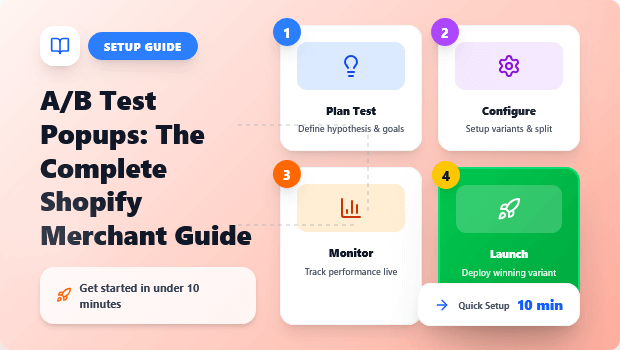
Every Shopify merchant knows popups work—they are the single fastest way to grow your email list and capture otherwise lost revenue.
But if you’re guessing whether exit-intent or a 10-second delay is better, or which discount will convert more, you’re leaving money on the table.
This isn’t about throwing two versions at the wall and seeing what sticks. It’s about implementing a structured, conversion rate optimization (CRO) strategy.
This complete guide is for the scaling Shopify merchant who wants to move beyond the defaults and deploy a data-driven testing plan that guarantees a measurable increase in email subscribers and sales, all while ensuring your popups adhere to modern UX standards and keep your SEO score safe.
Key Takeaways: A/B Testing Popups for Shopify
- Stop guessing: Implement a structured A/B testing workflow for all Shopify popups to move from guesswork to guaranteed conversions.
- Prioritize wisely: Always test high-impact variables first, starting with the popup trigger (e.g., exit-intent vs. time-delay) before tackling copy or color.
- Statistical significance is non-negotiable: Never end a popup test early. Use a calculator to confirm a statistically significant winner before rolling out the change.
- Mobile-first testing: Design and test mobile popups separately to ensure they don’t violate Google’s UX standards or damage your SEO performance.
What is A/B Testing Popups?
A/B testing popups is the process of comparing two versions (A and B) of a Shopify popup (e.g., email capture or discount offer) with live traffic to determine which one performs better, measured by metrics like the conversion rate or click-through rate.
What You Must Prepare Before Starting Popup A/B Testing
Before launching your first split test, you need to set a baseline and define your goals. Skipping these steps is the most common reason Shopify merchants waste time on inconclusive tests.
Establishing Your Current Popup Conversion Rate
You cannot define a win if you don’t know the current score. Pull the last 30-90 days of data for your current popup:
- Impressions: How many times the popup was displayed.
- Conversions: How many visitors completed the action (e.g., signed up for email, claimed discount).
- Conversion Rate (CR): Conversions / Impressions.
- Expert Tip: A good Shopify email capture popup converts between 2% and 5%. If you’re below 2%, your potential for gain is huge, making A/B testing a high-leverage activity.
Defining Your A/B Testing Goal and Metrics
Your primary goal is usually an increase in lead generation or a specific sale metric.
| Test Goal | Primary Metric to Track | Secondary Metrics |
| Grow Email List | Email Submission Rate (Conversion Rate) | Bounce Rate, Session Duration |
| Increase Sales/AOV | Discount Claim Rate, Revenue per Session | Exit Rate |
| Reduce Cart Abandonment | Return-to-Cart Rate | Cart Value |
Which Elements to A/B Test for Maximum Popup Conversion Lift
To maximize your CRO efforts, focus on the variables that have the largest psychological impact on the user. Follow this prioritization sequence.
1. The Popup Trigger: Exit-Intent vs. Time-Delay
The when is often more powerful than the what. Testing the exit-intent trigger (which detects when a user is about to leave) against a time-delay (e.g., 5, 10, or 15 seconds) is the highest-impact test for most stores.
2. The Value Proposition: Offer & Headline Copy
What are you offering? Is it 10% off, free shipping, or a valuable content upgrade? The main headline and the offer are the core of the popup. Test clear, benefit-driven headlines that speak to the user’s immediate pain point.
3. The Visual Design: High-Contrast Layout vs. Subtle Style
While you should avoid testing colors in isolation (too low impact), test a completely different visual approach. Does a full-screen, high-contrast popup convert better than a subtle, bottom-corner flyout? Test size and placement, especially on mobile.
4. Form Fields & Call-to-Action (CTA)
Test reducing the number of form fields (fewer fields almost always increases conversion) or changing the CTA button text.
- “Subscribe” vs. “Get My 15% Discount” (The latter is always better).
- “Email and Name” vs. “Email Only”.
Step-by-Step Guide for Running Your First Shopify Popup A/B Test
Assuming you are using a dedicated Shopify popup app that offers native A/B testing functionality:
1. How to Formulate a Strong Popup Hypothesis on Shopify
A good A/B test is built on a strong hypothesis—an educated guess about why a change will lead to a specific result.
- Hypothesis Template: “By changing [Element] from [A Version] to [B Version], we expect to see a [Result] in our [Metric] because [Reason/Psychological Principle].”
- Example: “By changing the popup trigger from a 10-second delay to exit-intent, we expect to see a 15% increase in our email submission rate because the exit-intent captures otherwise lost traffic without interrupting the initial shopping experience.”
2. Designing the ‘B’ Variant: Copy, Design, and Lead Generation Offers
Inside your chosen popup tool, clone your existing popup (A) to create the variant (B).
- The Golden Rule: Only change the single variable you defined in your hypothesis. If you are testing the headline, everything else (image, colors, trigger, discount) must be identical to Version A.
- Mobile View: Design and preview the B version on mobile. Ensure it does not cover more than 25% of the screen or create a difficult-to-dismiss experience.
3. Setting Up the Test Parameters: Traffic Split, Duration, and Sample Size
If you’re using a dedicated popup tool like SalesPulse – Sales Pop Up, setting up A/B testing becomes incredibly easy.
The app provides a built-in A/B testing system that allows you to test different popup variations without any technical work.
Simply go to your popup settings, navigate to the A/B Testing section, and enable the feature.
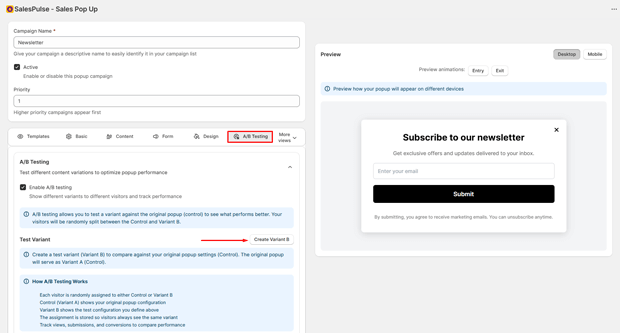
Once activated, you can configure all essential test parameters:
Traffic Split
Decide how many visitors will see each version of the popup.
For example:
- Variant A: 60%
- Variant B: 40%
You can adjust Variant B’s percentage as needed, and the remaining traffic automatically goes to Control. This helps ensure accurate and balanced testing.
Test Duration
While SalesPulse doesn’t force a fixed timeframe, you should let your test run long enough to collect meaningful data. Typically:
- Run the test until you have a statistically reliable number of views and conversions.
- Avoid ending the test too early, as results may be misleading.
Sample Size
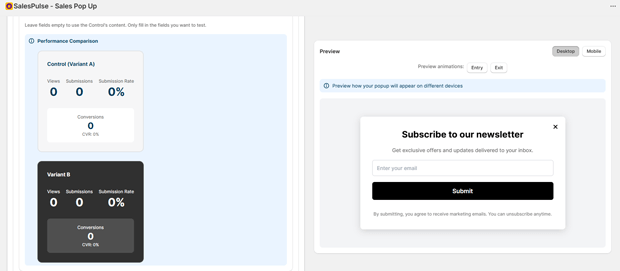
The larger your audience, the more reliable your results. With SalesPulse’s real-time analytics, you can easily monitor:
- View
- Submissions
- Conversion rates
- Overall performance of each variant
Once both variants reach a healthy sample size, you can identify which popup performs better.
With these built-in A/B testing features, SalesPulse helps you optimize your popup’s design, content, and call-to-action based on real user behavior—not guesswork.
Advanced Tips That Improve Shopify Popup A/B Test Results
Why You Must Check for Statistical Significance (And When to Stop)
Ending a test after a few days because “B looks better” is a huge mistake. Random chance can create apparent winners early on.
Statistical significance ensures the difference in performance between A and B is real, not random. You must aim for 95% significance.
- Use a calculator: Search for “A/B test statistical significance calculator” (many are free).
- Input Data: Enter the total conversions and total impressions for both Variant A and Variant B.
- Wait for 95%: Only stop the test and declare a winner once the calculator confirms the winner has reached 95% statistical significance. This could take one week, or six weeks, depending on your traffic volume.
Troubleshooting: Why Your Shopify Popup Test Results Are Flat
If your test runs for a long time and the result is inconclusive, consider these possibilities:
- Testing Low-Impact Variables: You tested button color instead of the value proposition. The change was too subtle to affect user behavior. Fix: Test the main offer or trigger next.
- Insufficient Traffic/Conversions: Your store is too small or the test needs more time to hit the required sample size. Fix: Extend the test duration or accept a lower statistical significance level (e.g., 90%).
- Poor Test Segmentation: You are showing the test to the wrong segment (e.g., existing customers who are already on your email list). Fix: Ensure the popup tool excludes known subscribers and repeat purchasers.
Next Steps After Completing This Popup Optimization Tutorial
- Implement the Winner: Once 95% statistical significance is confirmed, roll out the winner (Version A or B) to 100% of your traffic.
- Document and Iterate: Log your test, the hypothesis, and the results. Use this data to inform your next test. If the Exit-Intent won, your next test should be focused on improving the headline copy for that specific trigger.
- Segment and Personalize: The next evolution of your popup strategy is to stop showing a single popup to everyone. Test showing a discount popup to first-time visitors and a “VIP early access” popup to returning visitors. This micro-optimization is where advanced CRO leads to massive gains.
Freequently Asked Questions
How long should I run an A/B test on a Shopify popup?
You should run the test until you reach the necessary sample size and statistical significance (ideally 95%), which is determined by your traffic volume and current conversion rate. Do not use a fixed time limit, as high-traffic stores may need only a week, while lower-traffic stores may need a month or more.
Which elements of a popup have the biggest impact on the conversion rate?
The two elements with the biggest impact are the trigger mechanism (like exit-intent vs. time-delay) and the value proposition (the offer or benefit in the headline). Always prioritize testing these elements first for maximum CRO lift.
Are popups bad for Shopify SEO?
Popups can be bad for SEO if they are intrusive, especially on mobile devices (Google’s aggressive interstitial policy). To protect your rankings, ensure your popups are easy to close, do not cover the majority of the screen, and follow Google’s best practices for mobile usability.
What is the primary metric to track when A/B testing email capture popups?
The primary metric is the conversion rate (number of sign-ups divided by the number of impressions). This is a clean measure of the popup’s effectiveness for lead generation.




