
Imagine paying for 100 people to walk into a physical retail store. They look at the shelves, pick up a few items, check the price tags, and then walk right out the door without speaking to anyone.
In the physical world, a sales associate would likely approach them before they left, asking, “Did you find everything you were looking for?”
On Shopify, this happens silently thousands of times a day.
While merchants obsess over Cart Abandonment (people leaving at checkout), they often ignore the much larger leak: Browse Abandonment. These are visitors who viewed specific products or categories but left before showing clear purchase intent.
According to widely accepted ecommerce benchmarks, roughly 96-98% of traffic will not convert on their first visit. If you don’t have a strategy to catch these “window shoppers” before they vanish, your Customer Acquisition Cost (CAC) will remain unsustainably high.
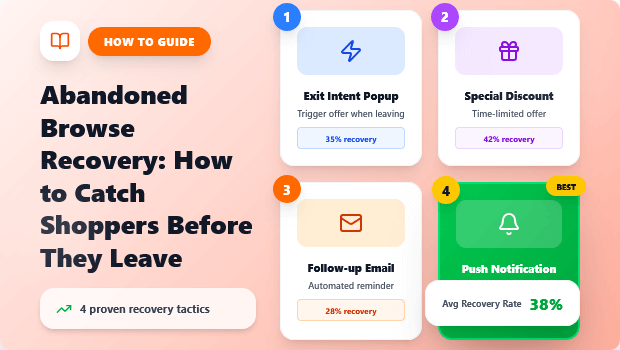
This guide covers exactly how to set up an abandoned browse recovery system that feels helpful, not spammy.
- The Problem: Most visitors leave your store without even adding an item to their cart—this is “browse abandonment,” and it kills ROI.
- The Difference: unlike cart abandonment (high intent), browse abandonment requires a softer, more persuasive approach.
- The Fix: You need a mix of on-site retention (smart pop-ups, announcement bars) and off-site recovery (email/SMS flows).
- Key Insight: Timing is everything. Triggering a recovery message too early annoys visitors; triggering it too late misses them entirely.
What is Abandoned Browse Recovery?
Abandoned browse recovery refers to marketing strategies aimed at re-engaging visitors who view products on an ecommerce site but leave without adding anything to their cart. Unlike cart recovery, which targets high-intent shoppers, browse recovery focuses on capturing “window shoppers” using exit-intent popups, retargeting ads, and personalized email flows.
Browse Abandonment vs. Cart Abandonment
To fix the problem, we first have to define it correctly. Many Shopify merchants treat all “leavers” the same, but the psychology is completely different.
- Cart Abandonment (High Intent): The user added an item, perhaps even started checkout. They want the product but stopped due to friction (unexpected shipping costs, difficult checkout).
- Strategy: Remove friction, offer free shipping, remind them the item is waiting.
- Browse Abandonment (Medium Intent): The user looked at a product page (PDP) but didn’t commit. They are likely price-checking, researching, or just didn’t feel enough urgency.
- Strategy: Build desire, capture contact info (email/SMS), and provide social proof.
Why this matters: If you hit a browse abandoner with a hard-sell message like “Complete your purchase now!”, it won’t make sense to them—they haven’t committed to a purchase yet. You need a gentler nudge.
Recommended Blogs for You:
👉 Complete Guide to Shopify Abandoned Cart Recovery
👉 A/B Test Popups: The Complete Shopify Merchant Guide
👉 Popups vs Announcement Bars: When to Use Each on Shopify
👉 Why Guest Wishlists Convert Better Than Account-Only Wishlists
👉 Wishlist vs Cart: Behavioral Differences & Conversion Strategy
Why Do Shopify Shoppers Leave Without Buying?
Understanding the “why” helps us craft the “how.” Based on user experience (UX) research across the DTC space, browse abandonment usually stems from three root causes:
- Price Shock or Comparison Shopping: They like the product but aren’t sure if it’s worth the price tag, or they have a tab open with your competitor.
- Analysis Paralysis: Your collection page has too many options, or the product description didn’t answer a specific question.
- Distraction: They were browsing on mobile while waiting for a coffee. The intent was there, but life got in the way.
Abandoned Browsing Recovery Strategy
Your recovery strategy must address these specific barriers.
Strategy 1: Using Exit-Intent Popups to Stop the Scroll
The most effective way to catch a browsing visitor is to intervene the exact moment they decide to leave. This is where Exit-Intent Technology becomes essential.
Exit-intent tracks the user’s mouse movement. When the cursor breaks the top pane of the browser window (indicating they are about to close the tab or switch URLs), a popup triggers.
How to Execute This on Shopify
For a browse abandonment popup to work, it cannot just say “Sign up for our newsletter.” That provides zero value to someone debating a purchase.
The “Pattern Interrupt” Offer:
Instead, acknowledge that they are leaving and offer immediate value to keep them around.
- The Discount Hook: “Wait! Take 10% off your first order.”
- The Lead Magnet: “Not ready to buy? Get our free guide to [Industry Topic].”
- The Low-Stock Warning: “Heads up: The item you were looking at is low in stock.”
Tools to Help:
This is a core capability of apps like SalesPulse. With its specific “Exit Intent” trigger, you can detect when a user is bouncing.
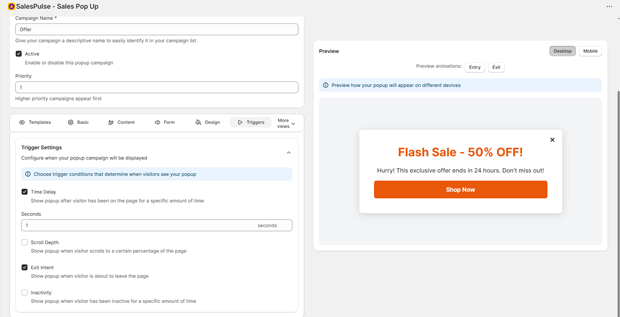
SalesPulse allows you to deploy these campaigns quickly using pre-built templates, ensuring you aren’t spending hours on design. Crucially, you can A/B test different headlines to see if “Wait!” works better than “Don’t go!”
Strategy 2: Building Urgency with Announcement Bars
Sometimes, a popup is too aggressive. If a user is just browsing casually, a full-screen overlay might annoy them. A subtle, psychological nudge often works better.
This is where Sticky Announcement Bars come into play.
Rather than interrupting the experience, a bar sits at the top or bottom of the screen, following the user as they browse. To turn a browser into a buyer, this bar needs to communicate Urgency or Scarcity.
Effective Bar Copy for Browsers:
- Free Shipping Thresholds: “You are $15 away from Free Shipping.” (Encourages them to keep looking).
- Countdown Timers: “Order within 2 hours for same-day dispatch.”
- Limited Offers: “Flash Sale ends at midnight.”
Tools to Help:
You can manage these bars alongside your popups using SalesPulse, which supports multiple announcement bars with priority logic. A powerful feature here is the Countdown Timer.
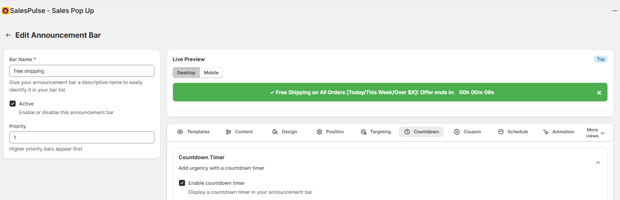
Placing a subtle timer in an announcement bar can psychologically trigger a “Fear Of Missing Out” (FOMO) that pushes a browser to make a decision without needing a discount code.
Strategy 3: The “Browse Abandonment” Email Flow
Strategies 1 and 2 are about keeping the user on the site. Strategy 3 is about what happens if they leave anyway.
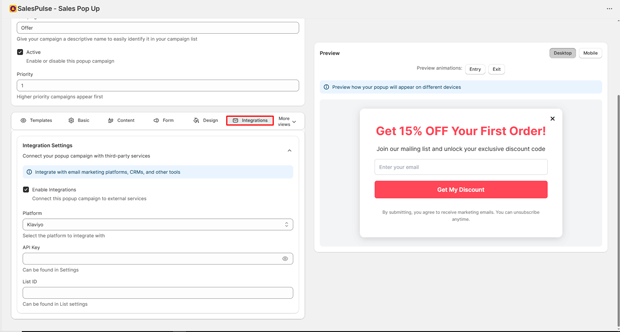
If you successfully captured their email (via that Exit Intent popup mentioned in Strategy 1), you can trigger an automated email flow via your Email Service Provider (ESP) like Klaviyo or Mailchimp.
The Anatomy of a High-Converting Browse Abandonment Email:
- Timing: Send 2 hours after they leave. (Too soon = creepy; too late = forgotten).
- Subject Line: Keep it casual. “Saw you looking…” or “Questions about [Product Name]?”
- Content: Dynamically insert the product they viewed.
- The Pivot: Suggest 2-3 similar alternatives. If they didn’t buy the first item, maybe they just didn’t like the color or style. Show them what else you have.
Integration Note: SalesPulse integrates with Klaviyo and Mailchimp. Email captures can be sent directly into your Browse Abandonment segment, allowing the automation to trigger instantly without any manual steps.
Common Mistakes That Hurt Recovery Rates
Even with the best tools, poor strategy can tank your results. Avoid these common pitfalls:
1. Triggering Too Early
If a visitor has been on your site for 3 seconds, showing an exit popup is premature. They haven’t even seen the product yet.
- The Fix: Use “Page Level” targeting or “Time on Site” rules. Only show recovery offers to people who have dwelt on a product page for at least 15–30 seconds.
2. Ignoring Mobile UX
Google’s indexing is mobile-first, and likely 70%+ of your traffic is mobile. Popups that cover the entire screen and are impossible to close will frustrate users and can actually hurt your SEO rankings (Google penalizes “intrusive interstitials”).
- The Fix: Use “Teaser” popups (small tabs that open when clicked) or bottom-sheet bars that take up less than 30% of the screen height.
3. Generic Messaging
Showing a generic “Join our Newsletter” popup to someone looking at a specific pair of boots is a wasted opportunity.
- The Fix: Context matters. Ensure your copy relates to shopping or saving, not just “joining a list.”
Freequently Asked Questions
What is a good conversion rate for an exit-intent popup?
generally, a conversion rate (email capture) of 3% to 8% is considered healthy for exit-intent offers. Anything above 10% is exceptional.
Can I use browse abandonment emails without a popup?
Only if the user is already logged in or subscribed to your list. For new, anonymous visitors, you must capture their email via a popup or form before you can legally send them recovery emails.
Does browse recovery work for low-ticket items?
It can, but it works best for items where there is a “consideration phase.” If you sell $5 stickers, people usually buy or don’t. If you sell $100 shoes, people browse, compare, and deliberate—making them perfect candidates for recovery strategies.
How do announcement bars help with browse abandonment?
They reduce cognitive load. By constantly reminding the user of a benefit (like “Free Returns” or “Free Shipping”), you lower the perceived risk of buying, which encourages the browser to commit to a cart addition.




