
What are behavioral triggers for popups? Behavioral triggers are automated rules that launch a popup based on a user’s actions, such as time spent on page, scroll depth, exit-intent, or specific products viewed, ensuring the message is relevant to their current intent.
Key Takeaways
- The Goal: Move away from “blind” popups that interrupt and move toward “behavioral” triggers that assist.
- Who it helps: Shopify merchants struggling with high bounce rates or low newsletter opt-ins.
- Key Insight: Timing is everything—using exit-intent, scroll depth, and page-specific triggers can increase conversions by up to 10x compared to immediate popups.
- What you’ll learn: How to map triggers to the customer journey to reduce friction.
The “Interruption” Problem in Shopify UX
We’ve all experienced it: you land on a new Shopify store, and before the images have even finished loading, a giant “10% OFF!” box slams into your screen.
You haven’t even seen the products yet. You don’t know if you like the brand. Your first interaction with the store is a chore—finding the tiny “X” to close the box.
This is the “entry-pop” trap. While merchants think they are being proactive about lead generation, they are often creating immediate friction.
According to research by the Baymard Institute, intrusive interstitials can lead to immediate site abandonment, especially on mobile where they are harder to dismiss.
In today’s competitive DTC landscape, you cannot afford to annoy your traffic. The solution isn’t to remove popups—it’s to make them intelligent.
By using behavioral Popup triggers, you transition from “interrupting” a visitor to “conversing” with them at the exact moment they are ready to engage.
Why Bad Timing Kills Your Shopify Conversion Rate
Conversion Rate Optimization (CRO) isn’t just about the offer; it’s about the context . If a visitor is 2 seconds into a blog post, they are in “consumption mode.”
If they are on a product page for 60 seconds, they are in “evaluation mode.” If their cursor moves toward the browser tab, they are in “exit mode.”
When you fire a trigger at the wrong time:
- You break the “F-Pattern” scanning: Users lose their place in your content.
- You trigger “Popup Blindness”: Users develop a reflex to close boxes without reading them.
- You hurt SEO: Google penalizes sites with intrusive interstitials that block the primary content on mobile.
By aligning your triggers with the user’s psychological state, you shift the perception of the popup from an “ad” to a “helpful nudge.”
Recommended Blogs for You:
👉 A/B Test Popups: The Complete Shopify Merchant Guide
👉 The Ultimate Seasonal Popup Strategy for Shopify Conversion Rate Optimization (CRO)
👉 Popups vs Announcement Bars: When to Use Each on Shopify
👉 What Are Sales Popups? How Real-Time Social Proof Increases Shopify Conversions
The 4 Essential Behavioral Popup Triggers for Shopify Merchants
To master behavioral targeting, you need to understand the four main levers available in most Shopify apps:
1. Exit-Intent: The “Wait, Before You Go” Trigger
This is arguably the most powerful tool in your kit. By detecting mouse movement toward the top of the screen (on desktop) or sudden upward scrolls (on mobile), you can present a “hail mary” offer.
- Best for: Reducing cart abandonment or capturing emails from bouncing traffic.
- How to Implement: To implement exit-intent popups, use SalesPulse ‑ Sales Pop Up that allows you to enable exit detection with just a few clicks.

2. Scroll Depth: The “Engagement” Trigger
Instead of timing, use distance. If a user has scrolled through 60% of your product description, they are clearly interested.
- Best for: High-intent offers like “Free Shipping” info or related product recommendations.
- How to Implement: Use SalesPulse ‑ Sales Pop Up app that supports scroll-based triggers and set it to appear after a visitor scrolls a certain percentage of the page, such as 60%.
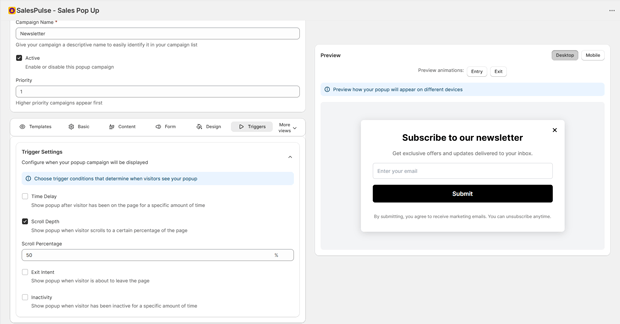
3. Time-on-Page: The “Consideration” Trigger
Wait until the user has had enough time to process your value proposition. A common benchmark for Shopify stores is setting a delay of 20–30 seconds.
- Best for: Newsletter signups and “Welcome” discounts for first-time visitors who have shown stickiness.
- How to Implement: Use SalesPulse ‑ Sales Pop Up app that includes time delay settings and configure it to display the popup after 20–30 seconds.
4. Page-Specific (URL) Triggers
Not all pages are created equal. A popup on a “Returns Policy” page should look very different from one on a “Best Sellers” collection.
- Best for: Hyper-relevant upsells. For example, if they are looking at “Hiking Boots,” trigger a popup for “Wool Socks.”
- How to Implement: Install SalesPulse ‑ Sales Pop Up app that allows page-level targeting. Set conditions so that specific popups appear only on certain pages, collections, or products.
How to Implement Triggers Without Hurting UX
Setting this up doesn’t require a developer. Most modern Shopify apps allow you to build these rules visually.
- Audit Your Current Popups: Disable any “0-second” entry popups immediately.
- Segment Your Audience: Create different rules for “New Visitors” vs. “Returning Customers.”
- Match the Offer to the Trigger:
- Exit-Intent = High Value (e.g., 15% off).
- Scroll Depth = Low Friction (e.g., “Join our VIP list”).
- Leverage Social Proof: Use tools like SalesPulse – Sales Pop-Up Notifications to show recent sales or “limited stock” alerts. These work best when triggered after a short delay, creating a sense of a “busy store” without blocking the user’s view of the product.
- Set Frequency Caps: Ensure a user doesn’t see the same popup more than once per session.
Common Shopify Mistakes That Drive Shoppers Away
- The “Double Up”: Having a chat bubble, a cookie consent bar, and a popup all appear at once. This creates “UI clutter” that makes your store look untrustworthy.
- Mobile Neglect: Triggers that work on desktop (like exit-intent) don’t always translate to mobile. Ensure your mobile popups use “scroll-up” triggers instead.
- No “No” Option: If your popup doesn’t have a clear, easy-to-click “Close” button, users will simply hit the “Back” button on their browser.
- Ignoring the Data: If your popup has a 0.5% conversion rate and a high bounce rate, the trigger is likely poorly timed. Aim for a 2-5% conversion rate for well-timed offers.
Frequently Asked Questions
What is the best time delay for a Shopify popup?
Most CRO experts suggest a delay of at least 15 to 30 seconds. This ensures the visitor has engaged with your content before being asked for an action.
Does Google penalize Shopify stores for using popups?
Only if they are “intrusive.” This means they cover the main content immediately upon landing, especially on mobile. Using behavioral Popup triggers like exit-intent or scroll-depth avoids these penalties.
How do I track if my triggers are working?
Use Shopify Analytics or GA4 to monitor your “Conversion Rate” and “Bounce Rate.” Many apps also provide “Impression vs. Interaction” data to show exactly where users are dropping off.




