
You are running Google Ads, and the results are confusing. You might have a high ROAS (Return on Ad Spend), yet your sales volume is low. Or perhaps your budget is draining fast with zero conversions. An agency would charge you $2,000+ to audit this, often taking weeks to tell you what an AI can tell you in seconds.
In this guide, you will learn how to use AI-powered diagnostic tools to instantly analyze your campaign health. We will cover how to interpret an “Ad Health Score,” identify hidden money leaks like “Lost Impression Share,” and implement data-backed fixes to scale your Shopify sales immediately.
Key Takeaways
- The “Health Score” Metric: Learn how to turn complex data into a single 0-100 performance grade.
- The “Lost Share” Trap: Discover if you are losing sales simply because your budget is capping your visibility (Impression Share).
- Actionable vs. Vanity Metrics: Move beyond “Clicks” and focus on “Budget Lost Share” and “ROAS.”
- Automated Strategy: How to get a prioritized “To-Do List” (Immediate vs. Weekly tasks) generated by AI.
What is an AI Ad Diagnostic?
Unlike manual checking, an AI Ad Diagnostic tool scans your active Google Ads campaigns to evaluate performance metrics (CTR, Impression Share, ROAS, and Spend) instantly.
It generates a Campaign Health Score (e.g., 45/100) and provides prioritized, step-by-step recommendations—like identifying if your budget is too low for a high-performing campaign.
Overview of the Task
Most merchants look at their Google Ads dashboard and feel overwhelmed by columns of data. They guess at what to change.
We are going to replace guessing with diagnosing. We will use the AdTrack AI Diagnostic Tool to perform a deep-dive audit on a specific campaign to answer three questions:
- Is my campaign healthy?
- Where am I losing money or opportunity?
- What exactly do I need to do today to fix it?
Prerequisites
- An active Google Ads Account connected to your Shopify store.
- At least 30 days of campaign data (for the AI to analyze trends).
- The AdTrack App installed on your Shopify store.
How to Optimize Your Google Ads Without Hiring an Expert: Step-by-Step Instructions
Step 1: Select Your Campaign & Run Analysis
Instead of digging through Google Ads menus:
Open AdTrack and navigate to Ad Diagnostic Tool.

Select the specific campaign you want to audit (e.g., “Shopping Campaign 01 Sept”).

Click the “Run AI diagnostic analysis” button.

What happens: The AI consumes your Impressions, Clicks, Spend, and historical performance data instantly.
Step 2: Interpret Your “Campaign Health Score”
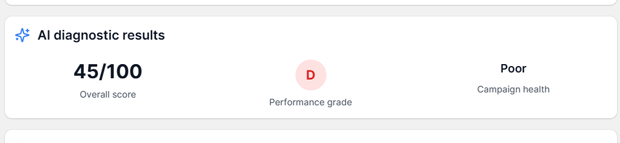
Within seconds, the AI assigns a score.
- Green (80-100): Campaign is optimized. Scale it.
- Yellow (50-79): Functional, but leaking budget. Needs tweaking.
- Red (0-49): Critical. As seen in our test case (Score: 45/100 – Poor), the campaign has fundamental issues limiting its success.
Step 3: Identify “Critical Issues” (The ‘Why’)
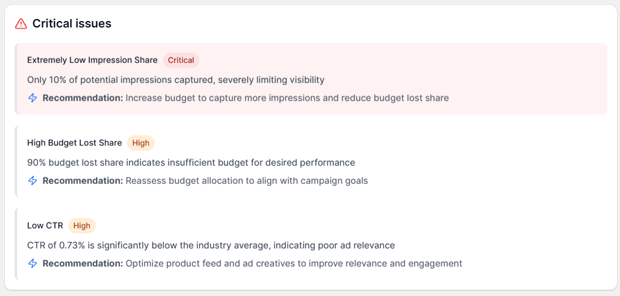
This is the most powerful part of the diagnostic. The AI breaks down why the score is low.
- Example from Analysis:
- Issue: Extremely Low Impression Share (Critical).
- The Data: You only captured 10% of potential customers. 90% of people searching for your product didn’t even see your ad.
- Issue: High Budget Lost Share.
- The Meaning: Your ads stopped showing early in the day because the daily budget ran out.
Step 4: Review Key Insights

The AI looks for the “Silver Lining.” Even a failing campaign might have winning elements.
- Example Insight: “ROAS of 4.4 is above industry average.”
- The Diagnosis: This is a High-Potential Campaign that is being strangled by a low budget. You are making $4.40 for every $1.00 spent, but you aren’t spending enough to capture the volume.
Step 5: Execute the “Next Steps”
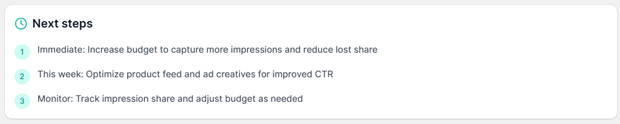
You don’t need to be a marketing genius to fix this. The tool provides a prioritized checklist:
- Immediate: Increase campaign budget to reduce “Lost Share.”
- This Week: Optimize product feed/images to improve CTR (Click-Through Rate).
- Monitor: Track if the impression share goes up after the budget increase.
Advanced Options: Understanding “Lost Share”
One concept the AdTrack AI highlights—which most beginners miss—is Impression Share.
- Search Impression Share: The percentage of times your ad showed vs. the number of times it could have shown.
- Search Lost IS (Budget): The percentage of times your ad didn’t show because you ran out of money.
The AI Strategy: If AdTrack sees you have a High ROAS (profitable) but High Lost IS (Budget), it will flag this as a “Critical Issue.” This is the easiest money you will ever make: simply raising the budget on this specific campaign will directly result in more profitable sales.
Common Errors & Fixes
| Diagnostic Alert | What It Means | The AI Recommendation |
| Low CTR (e.g., < 0.73%) | People see your ad but don’t click. Your image or price is unappealing. | “Optimize product feed and ad creatives to improve relevance.” |
| High Budget Lost Share | Your ads turn off at 10 AM because the budget is too small. | “Reassess budget allocation. Increase budget to capture lost impressions.” |
| High ROAS / Low Impressions | You have a winning product, but nobody sees it. | Do not pause. Scale this campaign immediately. |
Frequently Asked Questions
How does the AI diagnostic differ from Google’s recommendations?
Google’s recommendations are often biased toward getting you to spend more universally. AdTrack’s AI diagnostic focuses on efficiency (ROAS) and specific campaign health, helping you understand where to spend, not just telling you to spend more.
What is a good “Campaign Health Score”?
A score above 75/100 is considered healthy. If your score is below 50, as shown in the example, you likely have critical blocks (like budget caps or poor images) preventing sales.
Can AI fix the issues automatically?
The AI identifies the issues and tells you exactly what to do (e.g., “Increase Budget”). You currently need to approve and make the change to ensure you maintain full control over your spend.
Why is “Impression Share” so important?
Impression Share is the measure of your visibility. If your Impression Share is 10%, it means 9 out of 10 potential customers never saw your brand. Fixing this is the fastest way to scale a profitable store.
Conclusion
Optimization isn’t magic; it’s math. But you shouldn’t have to do the math manually.By using AdTrack’s AI Diagnostic Tool, you can instantly turn a confusing dashboard into a clear, prioritized action plan.
Whether it’s fixing a low CTR or unlocking hidden revenue by fixing “Budget Lost Share,” the AI gives you the insight of a Senior Strategist for a fraction of the cost.




