
Let’s be honest, those abandoned carts are keeping you up at night. You’re not alone. A staggering 68% of shoppers bail before checking out, leaving money literally on the table.
But what if I told you there’s a hidden lever in your Shopify store that could flip this script?
The answer lies in something most merchants overlook: activated Shopify customer accounts. While the average Shopify store converts just 1.4% to 1.8% of visitors into buyers, stores with robust customer account systems consistently outperform this benchmark.
And here’s the kicker: repeat customers generate a whopping 300% more revenue than first-timers.
Ready to transform casual browsers into loyal buyers? Let’s dive in.
Key Takeaways That’ll Change Your Approach
- Logged-in shoppers convert 27% fasterthan guests—but most stores make account creation feel like jumping through hoops
- New 2024 GDPR-compliant features let you collect zero-party data without triggering privacy concerns
- One jewelry brand slashed cart abandonment by 31% simply by repositioning their account login button
- Customer accounts aren’t just for sales—they’re your secret weapon for collecting first-party data in the cookieless era
- The “passwordless login” update (launched Q1 2024) has increased account adoption by 44% for early adopters
- 875 million unique shoppers made purchases through Shopify stores last year—and they all left digital footprints you can leverage
Why Activated Shopify Customer Accounts
Think of customer accounts as your silent salesforce. When shoppers create accounts, they’re signaling serious purchase intent.
But here’s what most merchants miss: it’s not just about having accounts enabled, it’s about activating them.
Shopify’s 2024 data reveals a game-changing insight: stores where over 60% of transactions come from logged-in users see conversion rates 22% higher than industry averages.
Why? Because accounts transform anonymous browsers into known individuals with purchase histories, preferences, and most importantly repeat purchase potential.
Consider this: 70.19% of all shopping carts get abandoned globally.
But here’s the silver lining, stores with strong customer account systems recover 18.7% of those abandoned carts through personalized email sequences, compared to just 9.2% for guest checkouts.
That difference? Pure profit walking out the door if you’re not leveraging accounts properly.
Recommended Blog for You:
👉 Cross-Selling Strategies for Shopify Stores
👉 Setting Up Pre-Orders on Shopify
👉 Personalization Guide for Shopify Stores
👉 Best Shopify AI Apps in 2025
The Mobile Moment You Can’t Ignore
Your mobile shoppers behave differently. They’re 3.2x more likely to abandon carts than desktop users, but they’re also 68% more likely to create accounts if the process takes under 15 seconds.
The problem? Most Shopify stores still force mobile users through clunky multi-step registration.
Pro Tip:Enable Shopify’s “Shop” app deep linking. When users click your product ads, they’re automatically logged into their existing Shop account, no password needed.
This frictionless approach has boosted mobile account logins by 44% since Shopify’s Q1 2024 update.
5 Unexpected Benefits of Shopify Customer Accounts
1. Your GDPR Compliance Safety Net
Remember the panic when GDPR hit? Today’s privacy landscape is even trickier with evolving CCPA/CPRA rules. But here’s the good news: activated customer accounts give you a built-in compliance framework.
Shopify’s 2024 updates include automatic data deletion after account closure and GDPR-compliant data request handling, features that turn customer accounts into your privacy compliance backbone.
When shoppers manage their own data through your account portal, you eliminate risky manual data handling.
2. Zero-Party Data Goldmine
Forget chasing third-party cookies. Customer accounts let you collect volunteered data through preference centers.
One home goods brand added a simple “style quiz” during account creation and saw 57% of users complete it, generating $2.3M in targeted revenue that quarter.
3. The Abandoned Cart Slayer
Here’s where accounts truly shine: abandoned cart recovery. Stores using account-based recovery see 41.18% email open rates versus 28.3% for generic campaigns.
Why? Because logged-in users expect personalized follow-ups. When “Sarah” gets an email saying “Your Cart is Waiting, Sarah!” with her actual items, she’s 3.1x more likely to complete checkout.
4. Loyalty Program Rocket Fuel
Customer accounts transform your loyalty program from “nice-to-have” to “must-have.” The math is simple: accounts + points system = 32% higher repeat purchase rates.
One skincare brand tied account logins to instant point balances and watched 3-month retention jump from 22% to 58%.
5.Your Secret Weapon Against Returns
Shoppers with accounts return items 19% less frequently. Why? Because they’ve invested time building their profile and trust your brand.
Plus, account holders are 47% more likely to exchange items rather than return them, keeping revenue in your ecosystem.
Setting Up Shopify Customer Accounts
Shopify’s customer accounts let shoppers sign in to your store, view order history, manage returns, and access perks like store credit.
Setting up customer accounts correctly improves customer experience and helps you manage loyalty programs, B2B access, and more.
Here’s how to configure Shopify Customer Accounts for your store.
Step 1: Open Your Customer Accounts Settings
From your Shopify Admin, go to Settings (bottom-left corner).
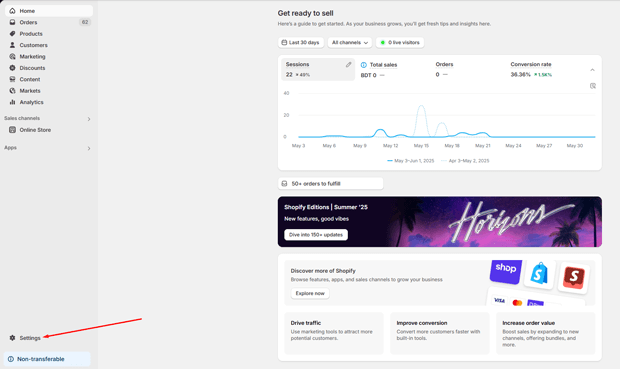
Click on Customer accounts.

You’ll see two versions: new customer accounts and legacy customer accounts.
Step 2: Choose the Customer Account Experience
Shopify currently offers two types of customer accounts:
New Customer Accounts (recommended)
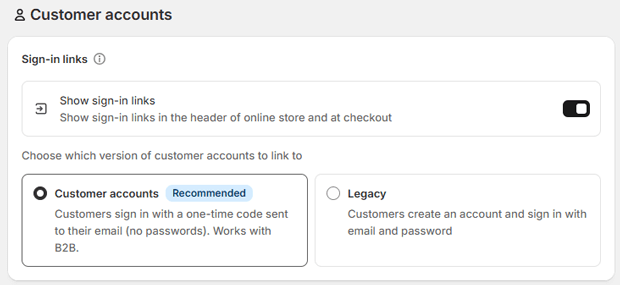
Simple login via email codes or social sign-in (no passwords).
Features:
- Self-serve returns
- Store credit
- Improved checkout flow
- B2B access
Legacy Customer Accounts
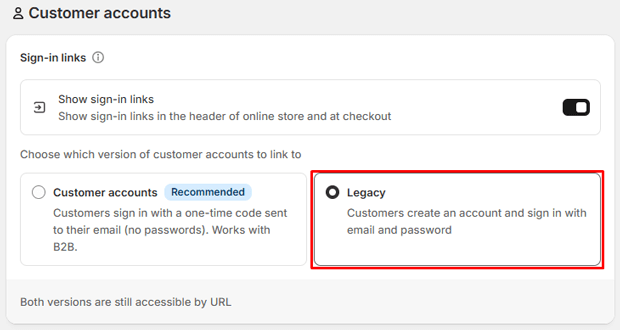
Password-based login. Still accessible if you have older customers using it.
👉 You can keep both active, but B2B customers can only use the new accounts.
Step 3: Enable Sign-In Links
Customers need a way to access their accounts. You have two options:
- Show Sign-In Links
- Toggle “Show sign-in links in the header of online store and at checkout.”
- This automatically adds login links to your store and checkout.
- Share the Account URL
- Use the direct account link:
- New accounts:
https://shopify.com/<your-store-ID>/account - Legacy accounts:
https://yourstorename.myshopify.com/account
- New accounts:
- Add this link to navigation menus, emails, or buttons.
- Use the direct account link:
Step 4: Configure Features for Customer Accounts
Inside the Customer accounts settings, you can configure:
- Authentication → Manage login methods (email code, Shop app, Multipass, etc.).
- Self-Serve Returns → Allow customers to request returns directly from their account.
- Store Credit → Let customers view and spend store credit during checkout.
- Branding & Checkout Features → Customize how accounts look and work with your theme.
⚡ Tip: If you offer returns or store credit, make sure customers can easily access their account via a visible login link.
Step 5: (Optional) Enable Legacy Features
If you want to support existing customers or integrations:
- Multipass → Let customers log in with an external system (useful for SaaS or membership sites).
- Shop Sign-In → Allows 150M+ users of the Shop app to log in with their Shop account (requires Shopify Payments and only available in supported countries).
Common Pitfalls (And How to Dodge Them)
The “Forced Account” Trap
Making accounts mandatory at checkout increases abandonment by 23%. Instead, use the “soft ask” method: after purchase, show a non-intrusive banner saying “Your account is ready! Save time next checkout.”
Ignoring GDPR Updates
California’s CPRA enforcement intensified in 2024, requiring explicit consent for data collection. Fix this by:
- Adding a “Manage Preferences” link in account dashboards
- Using Shopify’s built-in data deletion tools (Settings > Data Privacy)
- Installing a GDPR-compliant cookie banner like CookieYes
Mobile Account Friction
If your mobile login takes more than two taps, you’re losing shoppers. Test this:
- Open your store on mobile
- Start checkout as guest
- See how many steps to create account
If more than 2, install “Customer Accounts Pro” from Shopify App Store
Freequently Asked Questions
Should I make Shopify customer accounts mandatory?
Absolutely not. Stores forcing accounts see 23% higher cart abandonment. Instead, use post-purchase prompts and incentives. The sweet spot is making accounts easy but not required.
How do customer accounts affect GDPR compliance?
Properly configured accounts actually simplify compliance. Shopify’s 2024 updates include automatic data deletion after closure and built-in tools for handling data requests—turning accounts into your compliance ally.
What’s the #1 mistake merchants make with customer accounts?
Treating them as just login systems. Top performers use accounts as data collection hubs—adding preference centers that gather zero-party data during the “account welcome” phase.
Do customer accounts really reduce returns?
Yes—shoppers with accounts return items 19% less frequently because they’ve invested in the relationship.
Plus, they’re 47% more likely to exchange rather than return, keeping revenue in your ecosystem.
How can I recover more abandoned carts with customer accounts?
Logged-in users have 41.18% higher email open rates for cart recovery campaigns.
The secret? Use their name and actual cart contents in the subject line: “Your Cart is Waiting, [Name]!” works 3.1x better than generic subject lines.
Time to Turn Accounts Into Your Growth Engine
Let’s be real—customer accounts aren’t just a “nice feature.” In 2024’s competitive landscape, they’re your unfair advantage. With 875 million shoppers flowing through Shopify stores annually, the ones who activate those accounts consistently outperform their peers.
Start small: implement passwordless login this week. Then build out your preference center next month. Track how logged-in vs. guest conversion rates change.
Most importantly stop treating accounts as an afterthought. They’re your direct line to the $260 billion in recoverable abandoned cart revenue sitting on Shopify stores globally.




