
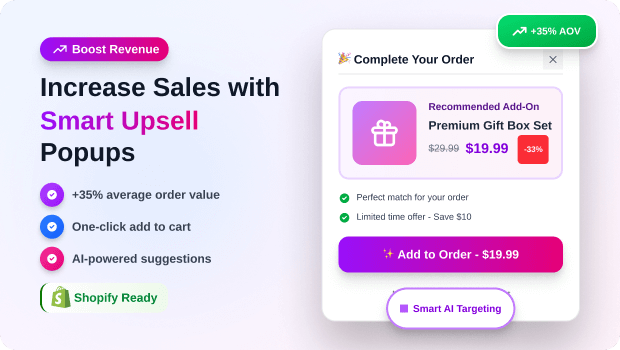
In the world of Shopify ecommerce, there is a massive difference between “interrupting” a customer and “guiding” them.
Most merchants treat popups like a digital megaphone—blasting every visitor with the same 10% discount code. But as customer acquisition costs (CAC) continue to rise, simply getting people to your site isn’t enough. You need to maximize the value of every single session.
According to research from the Baymard Institute, the average cart abandonment rate hovers around 70%. If you aren’t using smart logic to capture that intent before they leave, you’re leaving revenue on the table.
The “smart” in smart upsell popups refers to relevance. It’s the difference between suggesting a random pair of socks to someone buying a high-end camera, versus suggesting the exact battery pack or leather case that fits that specific model.
In this guide, we’ll break down how to move past “annoying” popups and implement a sophisticated upselling framework that increases your Average Order Value (AOV) while actually improving the user experience.
Summary
- The Goal: Increase Average Order Value (AOV) by offering relevant additions at the peak of buying intent.
- Who It’s For: Shopify merchants looking to scale revenue without increasing ad spend.
- Key Insight: Generic popups annoy; “Smart” popups (triggered by behavior and cart content) convert.
- The Result: A seamless customer journey that feels like helpful curation rather than a sales pitch.
What are smart upsell popups?
Smart upsell popups are behavioral-triggered notifications on Shopify that suggest higher-value alternatives or complementary products to customers. Unlike generic popups, they use data—like cart contents or browsing history—to present the right offer at the exact moment of peak interest.
What Problem Are Shopify Merchants Actually Facing with Upselling?
The primary struggle isn’t a lack of tools; it’s a lack of strategy. Many merchants fall into the “Volume Trap”—assuming that if they show more popups to more people, sales will naturally go up.
In reality, this often leads to:
- High Bounce Rates: Intrusive popups on mobile devices that cover the entire screen before a user has even seen the product.
- Decision Paralysis: Offering too many choices (upselling three different products at once), which causes the customer to close the tab entirely.
- Irrelevant Offers: Suggesting a “Frequently Bought Together” item that the customer already has in their cart.
Why Conventional Upselling Often Fails (Root Causes)
The root cause of poor upsell performance is usually static triggering. If your upsells are programmed to show “always” or “on every page,” they aren’t smart.
Modern Shopify consumers expect a personalized experience. If your backend doesn’t talk to your frontend—meaning your popup engine doesn’t know what’s in the Shopify AJAX cart—your offers will feel robotic. High-converting upsells require a marriage of timing (when they see it) and context (why they see it).
Recommended Blogs for You:
👉 Back-in-Stock Popups: Recover Lost Revenue on Shopify
👉 Monitor Shopify Popup Performance in Real-Time
👉 A/B Test Popups: The Complete Shopify Merchant Guide
👉 Popups vs Announcement Bars: When to Use Each on Shopify
👉 What Are Sales Popups? How Real-Time Social Proof Increases Conversions
How Poorly Implemented Popups Hurt Your Shopify Conversion Rate
It’s a delicate balance. A study by NN/g (Nielsen Norman Group) consistently ranks “popups that appear before the content” as one of the most hated web experiences. When a merchant uses “dumb” popups, they aren’t just missing an upsell; they are actively damaging their brand trust.
If a user feels harassed by a popup they can’t easily close on mobile, they won’t just skip the upsell—they’ll skip the entire purchase.
How to Implement Smart Upsells Popups on Shopify
1. Identify Your “Anchor” Products
Start with your top 20% of products that drive 80% of your revenue. These are your anchors. For each anchor, identify a logical “Plus One.”
- Upsell: A more expensive version of the same item (e.g., a 12-month subscription instead of 1 month).
- Cross-sell: A complementary item (e.g., cleaning kit for a pair of boots).
2. Define High-Intent Triggers
To be “smart,” your popup must wait for a signal of intent. The three most effective triggers for Shopify are:
- Add-to-Cart (ATC): The moment they show interest, offer a bundle deal.
- Cart Value Thresholds: “You’re $10 away from Free Shipping! Add this [Product] to qualify.”
- Exit-Intent: If a user moves their cursor to close the tab, offer a “Last Chance” upsell or a discount on the item they were just viewing.
3. Optimize the Creative for Mobile
Shopify traffic is often over 70% mobile. Ensure your upsell popup is “thumb-friendly.” This means large “Add to Order” buttons and a very clear “No Thanks” or “X” button to avoid “fat-finger” frustration.
Tools and Features That Make Upselling Easier
You don’t need to be a developer to build these workflows. The Shopify ecosystem has specialized tools designed to handle the heavy lifting of behavioral triggers.
SalesPulse ‑ Sales Pop Up is a popular choice for merchants who want to combine social proof with promotional intent.
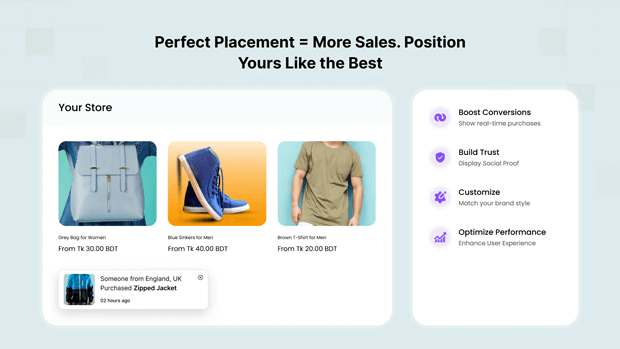
While many think of “sales pops” only as “Someone just bought this” notifications, the underlying technology allows you to create a sense of urgency and momentum that supports your upselling efforts.
By showing that others are buying the “Pro” version of a product, you use social proof to validate the upsell you’re presenting in your popup.
Common Shopify Mistakes That Kill Upsell Revenue
- Upselling After the Sale (Sometimes): While “Post-Purchase” upsells are great, many merchants forget to upsell during the high-heat moment of the cart.
- Ignoring Page Speed: Heavy, unoptimized popup scripts can slow down your Liquid theme. Always look for apps that use “defer” or “async” loading to keep your Shopify Speed Score high.
- No A/B Testing: Merchants often set one offer and leave it for a year. A smart merchant tests “Buy 2 Get 1 Free” against “20% Off Bundles” to see which resonates.
Frequently Asked Questions: Upselling on Shopify
Do upsell popups actually work on mobile?
Yes, but they must be non-intrusive. Use “slide-in” or “bottom-sheet” styles instead of full-screen overlays to comply with Google’s intrusive interstitial guidelines and improve mobile UX.
What is the best time to show an upsell on Shopify?
The most effective time is immediately after a customer clicks “Add to Cart” or on the Cart page itself. This captures them while they are in “buying mode” but before they have entered the focused checkout environment.
Can I upsell without offering a discount?
Absolutely. Many successful Shopify brands upsell based on value (e.g., extended warranties, “Priority Processing,” or exclusive limited-edition versions) rather than just price cuts.
Conclusion: What To Do Next in Your Shopify Optimization Journey
Increasing your sales through smart upsells isn’t about being louder; it’s about being more relevant.
Start small: pick your best-selling product and create a single “Frequently Bought Together” popup trigger. Monitor your AOV over 30 days.
Once you see the lift, begin segmenting your offers based on customer behavior. When you stop treating your visitors like generic “traffic” and start treating them like individuals with specific needs, your conversion rates—and your bottom line—will follow.




