
Shipping costs are the single biggest killer of the Shopify “Add to Cart” button. It is a psychological hurdle that turns a happy shopper into a skeptical researcher. However, for a merchant, “free shipping on everything” is often a fast track to eroded margins and unsustainable growth.
The solution lies in the Free Shipping Threshold strategy. When executed correctly, this doesn’t just “offer a perk”, it acts as a powerful lever to increase your Average Order Value (AOV) and offset the rising costs of customer acquisition.
Summary
- The Goal: Increase Average Order Value (AOV) by incentivizing larger carts.
- The Math: Set your threshold 10–20% above your current median AOV to stretch customers without losing them.
- The Psychology: Use real-time progress bars to reduce cognitive load and cart abandonment.
- The Outcome: Higher margins and a more competitive customer experience.
What is the best free shipping threshold for Shopify?
The ideal free shipping threshold is typically 10% to 20% higher than your current Average Order Value (AOV). This encourages customers to add one more item to their cart to “unlock” the benefit, directly increasing revenue per session.
Why the Free Shipping Threshold is Critical for Shopify Growth
In the age of Amazon Prime, free shipping isn’t a “bonus”, it’s an expectation. According to the Baymard Institute, nearly 48% of shoppers abandon their carts specifically because extra costs (shipping, taxes, fees) were too high.
But you aren’t Amazon. You have COGS, ad spend, and fulfillment fees. A strategic threshold solves two problems at once:
- It gamifies the shopping experience, encouraging a “just one more item” mentality.
- It protects your bottom line by ensuring the order value is high enough to absorb the shipping cost while remaining profitable.
What You Need Before Setting Your Shopify Shipping Strategy
Before you jump into your Shopify admin settings, you need a clear view of your unit economics. You cannot guess your threshold. You need three specific data points:
- Current Average Order Value (AOV): Found in your Shopify Analytics dashboard.
- Median Shipping Cost: What it actually costs you (on average) to ship a package.
- Gross Margin: How much profit you make on the items before shipping is factored in.
Recommended Blogs for You:
👉 How to Schedule Shopify Free Shipping Bars for the Holidays
👉 Tiered Pricing Examples: The Ultimate Guide to How Top Companies Maximize Revenue
👉 How to Request Customer Reviews Automatically After Checkout: Complete Guide
👉 Popups vs Announcement Bars: When to Use Each on Shopify
How to Calculate the Perfect Shipping Threshold
The most common mistake Shopify merchants make is setting a threshold that is too high (frustrating the customer) or too low (giving away shipping on orders that would have happened anyway).
1. The “AOV + 15%” Rule
A standard industry benchmark is to set your threshold roughly 10–20% above your current AOV.
- Example: If your current AOV is $65, setting a threshold at $75 or $80 nudges customers to add a small accessory or a “refill” item to their cart.
2. The Median Order Value Analysis
Sometimes AOV is skewed by a few very large orders. Look at your Median Order Value. If most customers spend $40, but a few spend $500, your AOV might look like $100. Setting a threshold at $110 would be a mistake. In this case, setting it at $50 (just above the median) is the smarter move.
3. Factor in Your Highest-Volume Product
If your “hero” product is $45, setting the threshold at $50 is a masterclass in conversion. It practically forces the customer to find a $5–$10 add-on to avoid a $8 shipping fee.
Expert Tips: How to Visualize Progress to Increase Conversions
Simply stating “Free shipping over $75” on your shipping policy page isn’t enough. Customers need constant, low-friction reminders of how close they are to the goal. This is where visual cues become essential.
Tool Highlight: Many Shopify merchants use the GP Free Shipping Bar to bridge this communication gap. Instead of a static text link, it provides a dynamic progress bar that updates as items are added to the cart.
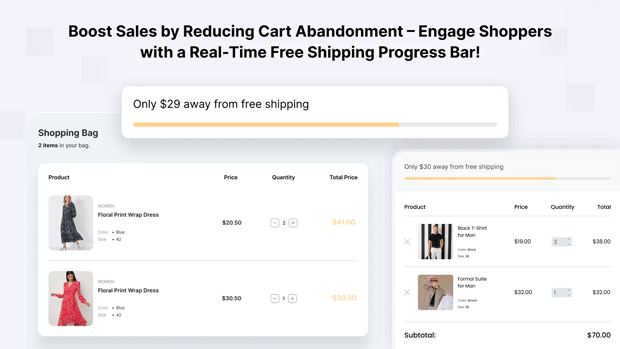
By using a tool like this, you can:
- Display a “You are only $15 away!” message in real-time.
- Auto-detect the user’s currency to ensure the threshold is accurate globally.
- Use “progressive tiers” (e.g., Free Shipping at $50, Free Gift at $100).
How to Setup Your Threshold in the Shopify Admin
Once you have your number, here is how you implement it:
- Go to Settings > Shipping and Delivery.
- Click Manage next to your shipping profile.
- Click Add Rate.
- Select Set as free shipping.
- Click Add Conditions.
- Select Based on order price and enter your “Minimum price” (e.g., $75).
- Save your changes.
Common Shopify Mistakes to Avoid with Shipping Thresholds
- Hiding the Threshold: If the customer only finds out they missed free shipping at the final checkout step, they won’t go back to add more. They will simply close the tab.
- Inconsistent Messaging: Ensure the threshold mentioned in your announcement bar matches your actual Shopify shipping settings.
- Ignoring Mobile UX: Pop-ups can be intrusive on mobile. A sticky bar or an inline cart notification is usually a better way to communicate shipping goals without breaking the user flow.
How to Troubleshoot Low Conversion Rates After Implementation
If you’ve set a threshold but AOV isn’t budging, or if cart abandonment is increasing, consider these fixes:
- Lower the Gap: If your AOV is $40 and your threshold is $100, the “gap” is too wide. Customers won’t double their spend just for free shipping.
- Add “Threshold Fillers”: Do you have $5–$15 items available? If your cheapest item is $30, it’s hard for a customer who is $10 away to reach the goal.
- Test “Free Shipping” as a Limited-Time Offer: Sometimes, a “Free Shipping Weekend” with no threshold can help you clear old inventory and gather data on how much shipping costs impact your specific audience.
Frequently Asked Questions
How does free shipping increase Average Order Value?
It creates a psychological incentive. Shoppers often perceive more value in “buying another product” than in “paying for a service” like shipping. They would rather spend $15 on a tangible item than $10 on a shipping label.
Should I include international orders in my free shipping threshold?
Generally, no. International shipping costs are volatile. Most successful Shopify stores set a higher, separate threshold for international orders or exclude them entirely from free shipping promotions to protect margins.
Can I have multiple free shipping tiers on Shopify?
Yes. You can set multiple conditions. For example: Free Shipping at $75 and a Free Mystery Gift at $150. This “tiered” approach is an advanced way to push AOV even higher for your most loyal customers.
Conclusion
A free shipping threshold isn’t just a shipping setting; it’s a profitability strategy. By aligning your threshold with your actual order data and using dynamic tools like the GP Free Shipping Bar to communicate progress, you turn a logistical cost into a powerful conversion engine.




