
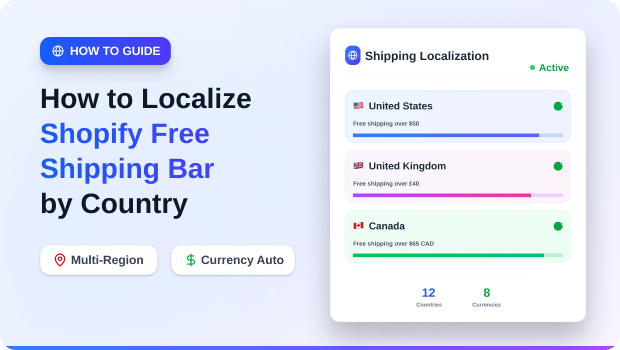
If you are treating a customer in London the same way you treat a customer in Los Angeles, you are likely leaving money on the table. In the world of cross-border ecommerce, “Free Shipping Over $50” is a dangerous oversimplification.
Shipping a 2lb package from a US warehouse to Kentucky costs roughly $8; shipping that same package to the UK can easily exceed $35.
According to the Baymard Institute, 48% of shoppers abandon their carts specifically because of high “extra” costs like shipping and taxes.
When an international visitor sees a shipping threshold that doesn’t account for their local currency or your actual logistics costs, one of two things happens: either they abandon the cart because the cost is too high, or you lose your entire profit margin because the threshold was too low.
Localizing your shipping bar isn’t just about translation; it’s about revenue protection and AOV optimization. This guide will walk you through the precise workflow for setting up a localize Shopify free shipping bar strategy that actually converts.
How to Localize Shopify Free Shipping Bar
To localize your free shipping bar by country, install a geo-targeting app like GP Free Shipping Bar. Create unique “bars” for different regions, set thresholds in local currencies, and enable IP-based detection to show the right offer to the right visitor automatically.
Summary
- The Goal: Increase Average Order Value (AOV) and reduce cart abandonment for international customers.
- The Strategy: Use geo-targeting to show country-specific shipping thresholds and messages.
- The Tool: A localized shipping bar app that handles currency conversion and IP-based detection.
- What You’ll Learn: How to set regional thresholds, sync with Shopify Markets, and track performance.
What You Need Before Localizing Your Shopify Shipping Task
Before you touch a single line of code or install an app, you need a data-backed plan. Localizing a bar without calculating your margins is a recipe for “unprofitable growth.”
1. Define Your Shipping Zones via Shopify Markets
Shopify Markets is the backbone of your international strategy. Ensure you have active markets set up for your target regions (e.g., North America, EU, APAC). You cannot effectively localize a bar for a country you haven’t technically enabled for checkout.
2. Calculate “The Threshold Gap” for Each Region
Expert ecommerce strategists recommend setting your free shipping threshold approximately 30% higher than the local AOV.
- Example: If your average order in Germany is €60, your free shipping bar should target €80.
- Data Point: Research from Contimod shows that 58% of customers will add additional items to their cart specifically to qualify for free shipping. Use this psychology to your advantage.
3. A Multi-Currency and Geo-Targeting Solution
Standard Shopify announcement bars are static. To show different messages to different countries, you need an app capable of IP-detection and dynamic currency conversion.
Recommended Blogs for You:
👉 Shopify Free Shipping Threshold Strategy
👉 How to Schedule Shopify Free Shipping Bars for the Holidays
👉 Best Practices for Designing a Free Shipping Bar That Converts
👉 7 GA4 Mistakes Killing Your Shopify Store’s Profits
Localizing Your Free Shipping Bar by Country : Step-by-Step Instructions
Setting up a localized bar should take less than 15 minutes if you follow this workflow.
Step 1: Install a Geo-Targeting Shipping Bar
To execute this, most merchants use the GP Free Shipping Bar. It is specifically designed to handle the complexity of multi-country targeting without slowing down your site.
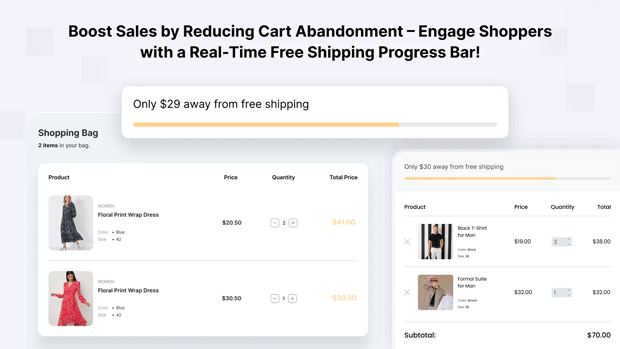
Step 2: Create Targeted Geographic “Bars”
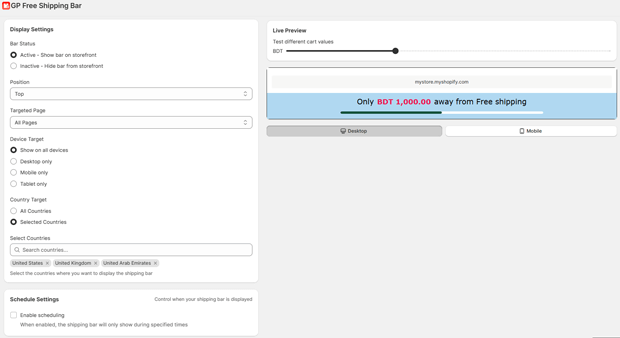
Don’t try to cram every country into one rule. Create separate “campaigns” or bars for your top-tier markets:
- Domestic Bar: Optimized for your home country (e.g., USD).
- Tier 1 International (UK/EU): Higher threshold to account for air freight.
- Rest of World: Often a “Flat Rate” announcement rather than a free shipping goal.
Step 3: Configure Progressive Messaging
A static bar says “Free Shipping Over $100.” A localized progressive bar updates in real-time:
- Initial: “Free shipping to [Country] on orders over [Amount]!”
- Progress: “You are only [Amount] away from free shipping!”
- Goal Achieved: “Congratulations! You’ve earned free shipping!”
Expert Tips for Optimizing Localized Shipping Bars
To move from “functional” to “high-performance,” consider these three advanced tactics:
1. Leverage “Shipping FOMO” on Product Pages
Don’t just put the bar at the top of the site. Use the GP Free Shipping Bar to place localized messages directly under the “Add to Cart” button. Seeing a country-specific shipping cost or threshold at the moment of decision significantly reduces cart abandonment.
2. Match Bar Design to Regional Seasonality
If you are running a “Lunar New Year” sale in Singapore but a “Winter Clearance” in Canada, your shipping bar’s aesthetic and copy should reflect that. Localization isn’t just about numbers; it’s about cultural relevance.
3. Track Your Conversion Lift with GA4
You need to know if your new €80 threshold is actually working. We recommend using Analyzely ‑ Google Analytics 4 to track how “Shipping Threshold Reached” events correlate with your conversion rate. If users are consistently stopping €5 short of the goal, your threshold might be slightly too high for that market.
How to Troubleshoot Common Multi-Country Shipping Bar Issues
“The Bar Is Showing the Wrong Currency”
This usually happens when there is a conflict between your theme’s currency switcher and the app’s IP detection. Ensure your shipping bar app is set to “Auto-Detect” or “Sync with Shopify Markets” to maintain consistency across the entire funnel.
“Visitors Using VPNs See the Wrong Offer”
VPNs can trick IP-based targeting. The best way to handle this is to include a “Country Selector” in your header. Most modern apps will update the shipping bar once the user manually selects their true destination.
“Thresholds Don’t Match My Shipping Rates”
If your bar says “Free Shipping Over $100” but your Shopify Shipping settings require $110, you will face a customer service nightmare. Always double-check your Settings > Shipping and Delivery in Shopify against your bar’s logic.
What To Do Next After You Finish This Setup
Once your localized shipping bar is live, your focus should shift to retargeting those high-intent international visitors.
- Retargeting Tip: If a customer reaches 90% of your shipping threshold but doesn’t convert, they are “whale” leads. Use Pixee – Multi Facebook Pixels to create custom audiences for international cart abandoners. You can serve them a specific ad saying: “Still want that free shipping to Australia? Come back and finish your order!”
Freequently Asked Questions
Can I show different shipping bars for mobile vs. desktop?
Yes. Most advanced apps allow you to hide or simplify the bar on mobile to ensure it doesn’t block the “Add to Cart” button or interfere with UX.
How does Shopify know which country the visitor is from?
It uses Geolocation via IP address. When a visitor hits your site, the app checks their IP against a global database to determine their country and currency.
Do I need to code anything to localize my shipping bar?
No. Apps like GP Free Shipping Bar are “no-code” and integrate directly with your theme’s liquid or JSON files automatically.
Does a free shipping bar slow down my Shopify store?
If the app is “Built for Shopify” and uses a lightweight script, the impact is negligible. Always check the “App Speed” rating in the Shopify App Store.
Conclusion: Global Growth Requires Local Nuance
Scaling a Shopify store internationally is a game of margins. By localizing your free shipping bar, you stop “guessing” what your global customers want and start providing the specific incentives they need to click “Checkout.”




