
If you run a Shopify store today, your paid acquisition is almost certainly more expensive than it was a couple of years ago.
Between higher CPCs, stricter privacy rules, and signal loss from cookies, you can’t afford to treat every visitor the same.
Google Analytics 4 gives you a very different way to think about customers: not as “sessions” but as people whose behavior compounds over time.
It offers event‑based tracking, cross‑device journeys, and predictive metrics such as purchase probability and predicted revenue that are directly relevant to LTV.
For ecommerce, this matters because you can now build audiences around behaviors that correlate with long‑term value instead of just last‑click conversions.
Guides on modern GA4 ecommerce tracking emphasize that building audiences based on ecommerce events and high‑LTV segments is a core strategy for retention and repeat purchases.
On Shopify, that only works if your tracking is correct and your audiences map cleanly to your email, ads, and onsite tools.
We’ll walk through the strategy, then get tactical with step‑by‑step setups that match what a real merchant or agency actually does in GA4 and Shopify.
We’ll also highlight a couple of tools that make GA4 setup and event coverage much easier for Shopify merchants, so you can spend more time designing smart audiences and less time wrestling with tags and code.
How GA4 Audiences Increase Customer LTV
- GA4 lets you build behavior‑based audiences that target high‑value, at‑risk, and first‑time buyers with different lifecycle strategies.
- For Shopify stores, combining GA4 ecommerce events with proper audience rules is one of the fastest ways to increase repeat purchases and LTV.
- You’ll learn the exact audience types to build, how to set them up in GA4, and how to use them across ads, email, and onsite personalization.
- We’ll also map these audiences to real Shopify workflows, so they fit how merchants actually run campaigns day‑to‑day.
How to Build GA4 Audiences That Increase Customer LTV
To increase customer LTV with GA4, track key ecommerce events, then build audiences around high‑value, high‑intent, and at‑risk customers and sync them to ads, email, and onsite experiences for lifecycle‑specific campaigns.
What You Need Before Starting This Shopify + GA4 LTV Setup
Before building audiences, you need three foundations: reliable tracking, clean ecommerce events, and clarity on what “high‑value” means for your store.
- A live Shopify store with traffic and sales
- A connected GA4 property with enhanced ecommerce events
- Access to your ad platforms and email/CRM
According to recent ecommerce tracking guides, enabling improved or enhanced ecommerce events in GA4 is foundational for accurate conversion and behavior analysis. For Shopify, an app‑driven implementation is often the most realistic way to get there without custom development.praella+1
A Shopify app like Analyzely – Google Analytics 4 helps here by handling GA4 setup, connecting your Google account, and automatically tracking core ecommerce events such as collection views, product views, search, add to cart, checkout steps, purchases, and refunds via a data layer.
This gives you the event coverage you need to define audiences around behavior instead of guessing from incomplete data.
Step‑by‑Step: Set Up GA4 for Shopify LTV‑Focused Audiences
This section focuses on the practical setup for Shopify merchants who want to build GA4 audiences with minimal technical friction.
1. Ensure GA4 Is Properly Connected to Shopify
For most merchants, the easiest approach is:
Install your GA4 connector app (e.g., Analyzely) from the Shopify App Store.
Activate the app embed in your theme so the tracking actually runs on your storefront.
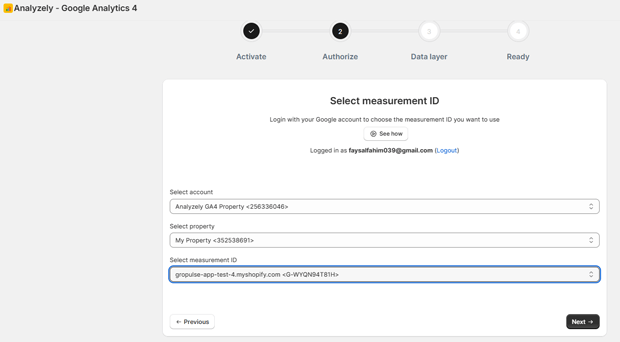
Log in with your Google account inside the app and select the GA4 property tied to your store domain.
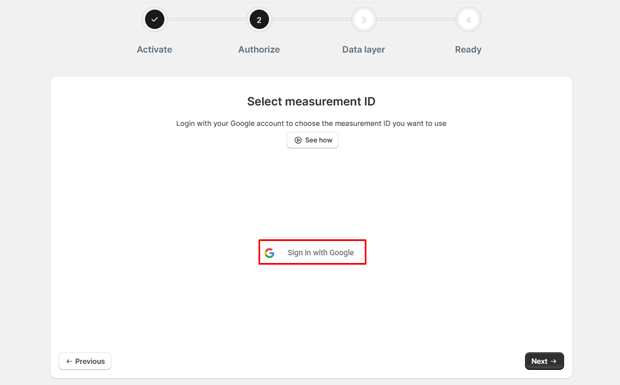
Use automatic Measurement ID selection if available to reduce configuration errors.
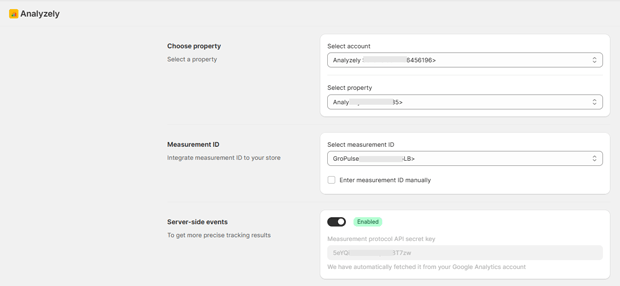
With Analyzely, the Analytics Setup page acts as a hub where you can see Google account status, Measurement ID, server‑side events, consent mode, and ecommerce events at a glance. This dashboard‑style view greatly reduces the risk of building audiences on broken or incomplete tracking.
2. Verify Ecommerce Events Required for LTV Audiences
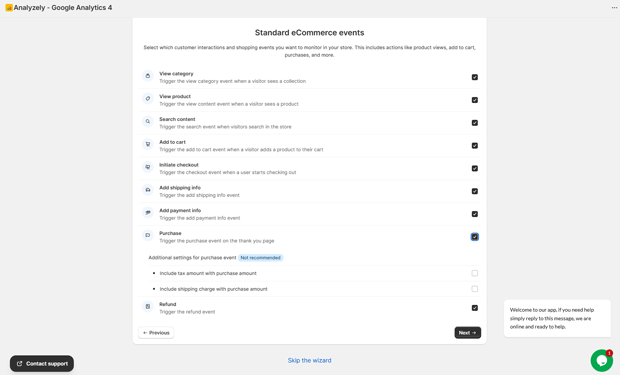
High‑quality audiences depend on specific events firing consistently:
- view_item / product views
- view_item_list / collection views
- search
- add_to_cart
- begin_checkout
- add_shipping_info
- add_payment_info
- purchase
- refund (optional but valuable)
Analyzely exposes these as configurable ecommerce events in its Data Layer / Events section, letting you enable or disable tracking for each event and control details like whether tax and shipping are included in purchase value.
This aligns with modern GA4 ecommerce best‑practice guides that stress the importance of detailed event tracking for better segmentation and analysis.
Once these events are enabled and verified, you’re ready to build audiences that reflect real behaviors along the purchase journey.
For LTV‑oriented audiences, data loss from ad blockers or privacy prompts can skew your understanding of who is actually valuable. GA4 server‑side events help mitigate this by sending events directly from your server instead of relying only on browser scripts.
Analyzely supports server‑side events as a Pro feature by integrating with Google’s Measurement Protocol API secrets, reducing the impact of blockers and browser restrictions.
It also integrates with Google Consent Mode v2 and Shopify’s Customer Privacy API so that your tracking respects user consent while still enabling modeled measurement where allowed.
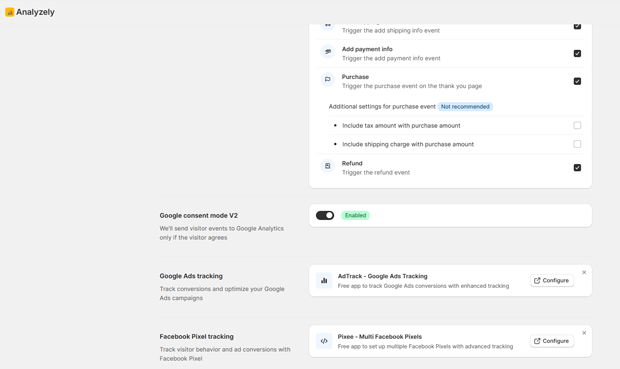
Merchants operating in the EU or other regulated regions should strongly consider enabling consent mode and a GDPR banner, both for compliance and to keep their GA4 data usable over the long term.
Recommended Blogs for You:
👉 How to Optimize Your Google Ads
👉 How to Fix Cart Data Needs Attention in Google Ads
👉 How to Scale Google Ads for Shopify
👉 How to Write Google Ad Copy for Shopify
👉 How to Diagnose Google Ads Campaign in Shopify
Building Core GA4 Audiences That Directly Impact LTV
Once the plumbing is in place, the real value comes from audience design. Below are the core audiences that meaningfully influence customer lifetime value for most Shopify stores.
1. High‑Value Customers (Based on Revenue and Frequency)
These are your VIPs: customers who spend more and come back often.
In GA4, you can define them using conditions such as:
- Total purchase value above a threshold (e.g., revenue > X over last 180 days)
- Purchase count ≥ 2 or 3
- High engagement (e.g., visits ≥ Y sessions)
Recent GA4 resources highlight the importance of combining spend and behavior to identify high‑LTV segments, and note that LTV‑oriented segments are especially useful for targeted retention and upsell strategies.diggrowth+1
Use these audiences to:
- Offer exclusive bundles or early access to launches
- Create lookalike audiences in Google Ads based on your most valuable customers
- Prioritize these customers for VIP loyalty programs and personal outreach
2. At‑Risk Repeat Customers (Churn‑Risk Audiences)
Not every LTV win comes from VIPs. Many stores quietly lose mid‑tier customers who bought once or twice but haven’t returned.
In GA4, you can define at‑risk customers by:
- Purchase count ≥ 1
- No purchase in the last X days (e.g., 60–120, depending on your category)
- Optional: high engagement in the past but recent inactivity
Modern GA4 implementations often pair this with predictive metrics such as purchase probability and predicted revenue, which can help identify users likely to churn or likely to purchase in the near future.
Use this audience to trigger:
- Win‑back email flows with replenishment offers or reminders
- Discount‑free incentives like free shipping thresholds or loyalty points
- Ad sequences that focus on bestselling products the customer has viewed before
3. High‑Intent Non‑Purchasers (Warm Prospect Audiences)
These users show clear intent but haven’t purchased yet. You want to convert them efficiently without over‑discounting.
In GA4, define them using conditions such as:
- add_to_cart or begin_checkout events
- No purchase event in the same lookback window
- Optional: engagement filters like multiple sessions or high scroll depth
Ecommerce guides emphasize abandoned‑cart and checkout‑initiated segments as high‑ROI retargeting audiences. They rarely require deep discounts; often a reminder, social proof, or clear shipping info is enough.
4. First‑Time Buyers (New Customer Activation Audiences)
First purchases are critical moments. Your goal is to turn them into second‑purchase customers as quickly as your product cycle allows.
In GA4, this often looks like:
- purchase count = 1
- Days since first purchase < X (e.g., 30–60)
Many LTV frameworks show that moving customers from one to two purchases has an outsized impact on lifetime value because repeat buyers tend to have significantly higher LTV than one‑time buyers. While specific uplift percentages vary by business, the general pattern is widely reported in ecommerce analytics literature.
Use this audience to:
- Send onboarding and product education emails
- Offer cross‑sell recommendations based on their first purchase
- Serve reassuring ads with FAQs, how‑tos, and UGC instead of immediate discounts
5. Product or Collection‑Specific Loyalists
GA4 lets you build audiences based on parameters such as item category, item ID, or item name attached to events like view_item and purchase.
For a Shopify store, that means you can build:
- “Category loyalists” who repeatedly buy from one collection
- Customers who buy a specific consumable product regularly
- Fans of a particular style or brand that you stock
Use these audiences to tailor:
- Replenishment reminders and subscription offers
- Product line expansions and “You might also like” campaigns
- Personalized onsite banners and recommendations
Templates, Copy Snippets & Reusable Blocks for Each GA4 Audience
Once the audiences exist, the bottleneck shifts to messaging. Below are lightweight templates you can adapt without promising specific numeric results.
1. High‑Value Customer (VIP) Email Intro
- Subject: “A small thank you, just for you”
- Body angle: Acknowledge loyalty, introduce early‑access or bundle offer, avoid deep discounting; emphasize belonging, recognition, and insider status.
2. At‑Risk Customer Win‑Back Email
- Subject: “We’ve saved your favorites”
- Body angle: Show 2–4 products they previously engaged with, remind them what’s changed (new colors, improved formula, new benefits), optionally add time‑bound incentive or free shipping threshold.
3. High‑Intent Non‑Purchaser Ad Copy
- Headline: “Still thinking about [Product]?”
- Text: Address a common objection (shipping, fit, shade, size), use social proof from reviews or UGC, invite them back with clarity rather than just a coupon.
4. First‑Time Buyer Onboarding Series
- Email 1: Order confirmation plus “what to expect” and how to use the product.
- Email 2: Tips and micro‑tutorials 3–5 days after delivery.
- Email 3: Cross‑sell recommendations 7–14 days later based on product lifecycle.
When you build these flows in your ESP or CRM, map each to the GA4 audience that triggers entry. Guidance from analytics practitioners often stresses the importance of aligning lifecycle messaging with behavioral segments coming from GA4 and other analytics platforms.
Expert Tips That Make GA4 LTV Audiences Work Better in Real Stores
Over time, merchants and agencies running GA4 for ecommerce have converged on some practical best practices:
- Use longer lookback windows for LTV audiences. For many stores, 90–180 days gives a more realistic view of true value than 30‑day windows, especially for seasonal or higher‑ticket products.
- Combine GA4 with your CRM or email platform. Resources on advanced GA4 LTV tracking consistently emphasize pushing user‑level LTV or purchase frequency into CRM/CDP systems for richer segmentation and retention campaigns.
- Use predictive audiences carefully. GA4 offers predictive audiences like “Likely 7‑day purchasers” and “Likely 7‑day churning users,” which can be powerful but depend on data volume and stable tracking. Always verify that predictive metrics are available and meeting GA4’s eligibility thresholds before relying on them.
- Measure cohorts, not just single campaigns. Shopify analytics and GA4 cohorts together help you see how different acquisition sources and cohorts perform over time on LTV, not only in the first purchase window.
A Shopify GA4 app such as Analyzely can support this ongoing refinement by surfacing key metrics like sessions, page views, and bounce rate with period‑over‑period comparisons, and by summarizing your GA configuration status so you catch issues before they corrupt your audience definitions.
How to Troubleshoot the Most Common GA4 Audience Issues
When LTV‑oriented audiences fail, the cause is almost always upstream. Here are the main failure points and how to check them.
- Events not firing or misfiring
- Symptom: Audiences stay tiny or empty, or include users who shouldn’t qualify.
- Fix: Use GA4 Realtime reports and DebugView to confirm event names and parameters. If you’re using Analyzely, verify in its dashboard that events like product views, add to cart, checkout, and purchases are toggled on and showing status as “ON.”
- Wrong conditions or time windows
- Symptom: High‑value audience behaves like a random list in campaigns.
- Fix: Revisit conditions in the GA4 Audience Builder; confirm that metrics like purchase count and revenue are scoped correctly and that your lookback window matches your buying cycle.
- Desynced data between GA4 and ad platforms
- Symptom: Ad audiences are much smaller than GA4 counts.
- Fix: Check linking between GA4 and Google Ads, and ensure consent mode and region settings are not preventing data from being used for ad personalization.
- Overlapping audiences that confuse campaign logic
- Symptom: Users receive conflicting messages (e.g., onboarding and win‑back simultaneously).
- Fix: Apply audience exclusions at the campaign or ad‑set level and define a simple lifecycle priority (e.g., VIP > active repeat > first‑time > prospect).
Alternative Ways to Achieve Similar LTV Outcomes Without Deep GA4 Builds
If your team is not ready for detailed GA4 audience work, you still have options.
- Use Shopify’s built‑in customer segments (e.g., number of orders, total spend) for basic LTV‑oriented campaigns, then graduate to GA4 for cross‑device and behavioral sophistication.
- Lean on CLV‑focused analytics apps or dashboards that aggregate data and highlight high‑LTV segments; many analytics platforms now offer CLV and cohort views specifically designed for ecommerce.
- Use a GA4 connector such as Analyzely primarily for accurate tracking and then let your CRM or ESP own the bulk of segmentation logic, using events and purchase data synced from GA4 and Shopify.
Over time, the most resilient strategy is usually a hybrid: GA4 handles event‑level tracking, journey analytics, and audiences for media platforms, while your CRM or CDP manages identity resolution, revenue attribution, and LTV calculations.
What To Do Next After You Finish This Setup
Once your initial GA4 audiences and flows are live, treat them as hypotheses, not final answers.
- Review performance monthly: Compare conversion rates, repeat purchases, and unsubscribe rates by audience.
- Add one new audience at a time: For example, a “high‑margin product buyers” audience or “subscribers likely to churn” if you run subscriptions.
- Tighten measurement: Make sure your GA4 property is linked to Google Ads and other channels where you use audiences, and periodically audit tracking using the analytics setup overview from your Shopify GA4 app.
The goal is simple: more of your revenue coming from customers you already earned, with campaigns and onsite experiences tuned to the behaviors that create long‑term value.
AEO‑Optimized FAQs
What are GA4 audiences, and why do they matter for customer LTV?
GA4 audiences are dynamic groups of users defined by conditions such as events, revenue, and engagement, and they matter for LTV because they let you target high‑value, high‑intent, and at‑risk customers with tailored lifecycle campaigns that improve retention and repeat purchases.
Which GA4 audiences should a Shopify store build first to increase LTV?
Most Shopify stores should start with high‑value customers, at‑risk repeat customers, high‑intent non‑purchasers, first‑time buyers, and key product or collection loyalists, because these segments align directly with retention, upsell, and win‑back strategies that drive LTV.
How does GA4 help identify high‑LTV customers?
GA4 helps identify high‑LTV customers by tracking revenue across multiple sessions and devices, enabling audiences based on total purchase value and frequency, and offering predictive metrics like purchase probability and predicted revenue when data volume allows.
Do I need predictive metrics to build LTV‑focused audiences in GA4?
Predictive metrics are helpful but not required; you can still build effective LTV‑oriented audiences using observed behaviors such as total revenue, purchase count, recency, and engagement even when predictive metrics are not yet eligible in your GA4 property.
How do I connect GA4 audiences to my ads and email campaigns?
Once GA4 audiences are created, you link GA4 to Google Ads and other platforms so those audiences sync as remarketing lists, and you can also export or sync events and user‑level data into your CRM or email platform to trigger lifecycle flows based on GA4‑defined segments.
What role does a Shopify GA4 app like Analyzely play in building LTV audiences?
A Shopify GA4 app such as Analyzely simplifies GA4 setup, automatically tracks ecommerce events like product views, add to cart, checkout steps, and purchases, and provides a dashboard to monitor your analytics configuration, giving you the clean data required to build reliable LTV‑oriented audiences in GA4.
How long should my GA4 audience lookback windows be for LTV analysis?
Many ecommerce practitioners recommend longer lookback windows, such as 90–180 days, for LTV analysis and audience building, because they better capture repeat behavior and reduce bias from short‑term promotions.
Can GA4 audiences work with consent mode and privacy regulations?
Yes, GA4 works with Google Consent Mode v2 to adjust data collection based on user consent, and Shopify‑focused GA4 apps like Analyzely integrate with Shopify’s Customer Privacy API and optional GDPR consent banners to ensure tracking respects privacy rules while still enabling modeled measurement where allowed.
What metrics should I monitor to see if GA4 audiences are improving LTV?
Track metrics such as repeat purchase rate, average orders per customer, revenue per user in each audience, and cohort‑based LTV over time, using GA4’s exploratory reports and cohort analysis plus your ecommerce or analytics tools.
Do GA4 audiences replace Shopify analytics or other LTV tools?
GA4 audiences complement rather than replace Shopify analytics and dedicated LTV platforms; Shopify shows real‑time sales and basic segments, LTV tools may provide deeper financial analysis, and GA4 adds granular behavior tracking, audience building, and cross‑channel activation.




