
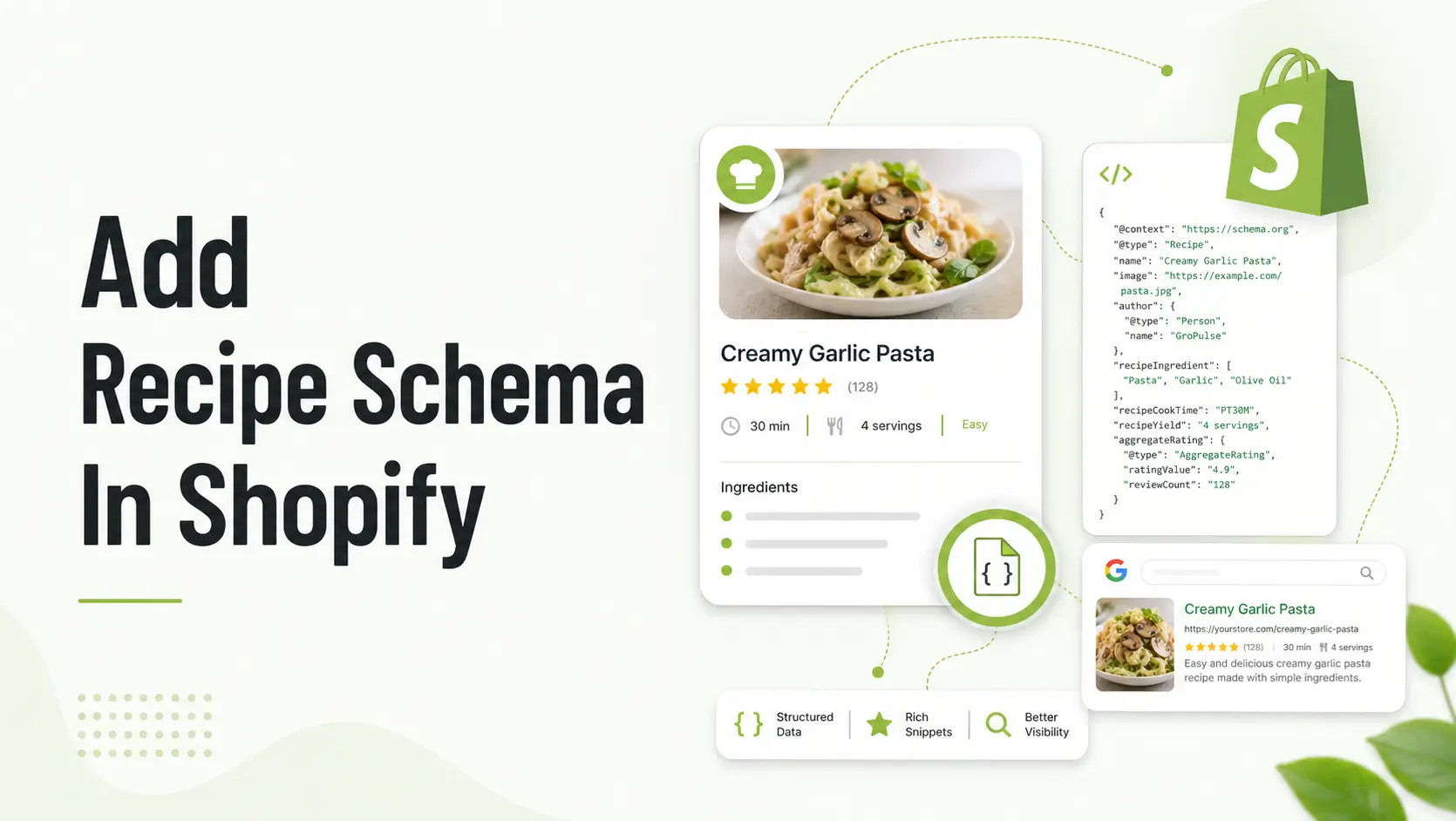
If you publish recipes on Shopify, adding Recipe schema helps search engines understand your content, including ingredients, instructions, total time, and nutrition details.
While rich results are not guaranteed, valid markup improves eligibility when page quality is strong.
Add valid JSON-LD Recipe schema to recipe-specific Shopify pages, include complete required properties, and test with Google Rich Results Test plus Schema Markup Validator before publishing.
Summary
- Use JSON-LD Recipe schema only on real recipe pages.
- Include complete recipe fields and keep schema aligned with visible content.
- Avoid duplicate schema from apps and theme snippets.
- Validate before and after updates.
Why Shopify Recipe Schema Matters for Ecommerce SEO
Recipe pages can attract upper-funnel organic traffic for food and kitchen brands. Structured data helps search engines parse your page type and key fields more reliably.
For structured data foundations, review How structured data helps Google understand Shopify stores.
When to Add Recipe Schema in Shopify
- Use on dedicated recipe blog posts or recipe landing pages.
- Do not use on product-only pages without full recipe content.
- Ensure each recipe URL has unique, complete instructions.
Shopify Recipe Schema Fields to Include
| Field | Purpose | Priority |
| name | Recipe title | High |
| image | Recipe image | High |
| author | Attribution | Medium |
| datePublished | Publish date context | Medium |
| recipeIngredient | Ingredient list | High |
| recipeInstructions | Cooking steps | High |
| totalTime | Preparation expectation | Medium |
Recommended Blogs for you:
👉 How to Add FAQ Schema on Shopify: The Complete Step-by-Step Tutorial
👉 Shopify Local Business Schema: Boosting Your Service Area SEO
👉 Top 10 Schema Types Every Shopify Store Should Use for Better SEO
👉 The Role of Schema Markup in EEAT and Semantic SEO
How to Add Recipe Schema in Shopify Step by Step
Manual Approach
Step 1: Choose your Shopify recipe template approach
Keep recipe content in a consistent template so schema mapping stays predictable.
Step 2: Add JSON-LD Recipe schema to the template
Insert one Recipe schema block per recipe URL and map fields from page content.
<script type="application/ld+json">
{
  "@context":"https://schema.org",
  "@type":"Recipe",
  "name":"Easy Protein Pancakes",
  "recipeIngredient":["1 cup oats","2 eggs","1 banana"],
  "recipeInstructions":[
    {"@type":"HowToStep","text":"Blend ingredients."},
    {"@type":"HowToStep","text":"Cook on medium heat."}
  ],
  "totalTime":"PT20M"
}
</script>
Step 3: Match Shopify page copy with schema values
Keep instructions, ingredient list, and times consistent between visible page content and JSON-LD.
Step 4: Validate Recipe schema before publish
- Run Google Rich Results Test.
- Run Schema Markup Validator.
- Check indexing in Search Console.
- Retest after app/theme updates.
App Approach
Editing theme code can be difficult and may create a risk of breaking your store’s functionality. A safer and easier option is to use a dedicated Shopify app.
The GP JSON-LD Schema & AI SEO app makes this process simple.
Go back to the app dashboard and select Schema Settings from the left-hand sidebar menu.
Scroll down through the available schema types until you locate Recipe Schema.
Click Enable (or toggle the switch to active) next to the Recipe Schema option.
Configure the the recipe. Please steps:
Recipe Configuration Steps
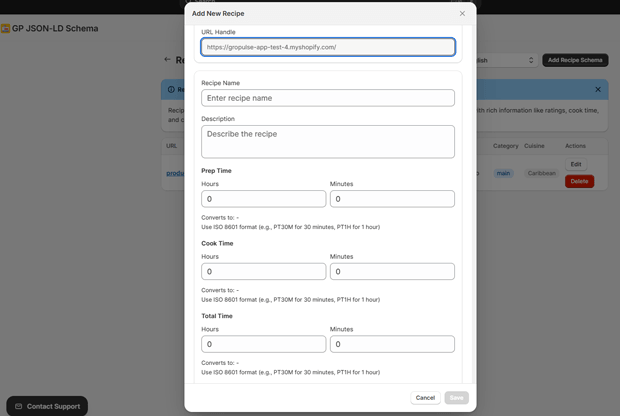
- URL Handle: Enter the last part of the page URL where the recipe appears. Example: if the full URL is:
https://example.com/blog/chocolate-cakeenter only:chocolate-cake - Recipe Name: Enter the full name of the recipe. Example:
Chocolate Cake - Description: Write a short description of the recipe. Example:
A soft and moist homemade chocolate cake recipe. - Prep Time: Add the preparation time in hours and minutes. The system will convert it into ISO 8601 format automatically. Example:
30 minutesbecomesPT30M. - Cook Time: Add the cooking time in hours and minutes. Example:
1 hourbecomesPT1H. - Total Time: Add the full time needed to complete the recipe, including prep and cook time. Example:
1 hour 30 minutesbecomesPT1H30M.
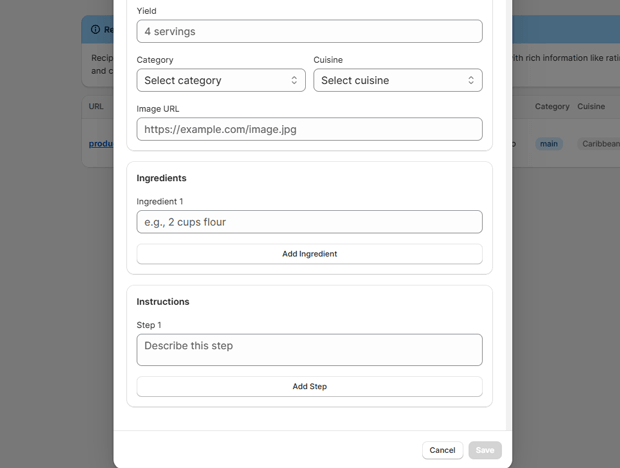
- Yield: Enter how many servings the recipe makes. Example:
4 servings - Category: Select the recipe category from the dropdown. Example:
Dessert,Breakfast, orDinner. - Cuisine: Select the cuisine type from the dropdown. Example:
Italian,Mexican, orAmerican. - Image URL: Enter the direct URL of the recipe image. Example:
https://example.com/image.jpg - Ingredients: Add each ingredient one by one. Example:
2 cups flour - Instructions: Add the cooking steps one by one. Example:
Step 1: Mix all dry ingredients together.
Manual vs App Approach for Shopify Recipe Schema
| Approach | Best For | Pros | Limitations |
| Manual JSON-LD | Technical teams | Full control | Needs maintenance |
| Schema app | Busy merchants | Faster setup | Risk of duplicate markup |
| Hybrid | Growing stores | Balanced workflow | Requires governance |
Shopify Recipe Schema Checklist Before Publish
- Recipe page has full instructions and ingredients.
- Only one Recipe schema block on page.
- Time uses ISO format like PT30M.
- Image URLs are valid and crawlable.
- Page is indexable and canonicalized correctly.
Common Shopify Recipe Schema Mistakes That Hurt Rich Results
- Adding Recipe schema to non-recipe pages.
- Missing or incomplete recipeInstructions.
- Conflicting schema from multiple plugins/snippets.
- Schema content not matching visible page text.
Validate Shopify Recipe Schema Performance
Track impressions, CTR, and recipe query growth for 4-8 weeks, then iterate. For crawl/index support, review Shopify sitemap tuning and technical SEO for Shopify.
Frequently Asked Questions
Can I add Recipe schema to Shopify product pages?
Only when the page contains a complete, genuine recipe.
Does Recipe schema guarantee rich snippets?
No, it improves eligibility but does not guarantee display.
How do I avoid duplicate Recipe schema?
Audit theme snippets and apps so each recipe URL has one schema source.
Which test tools should I use?
Use Google Rich Results Test and Schema Markup Validator.
How often should I revalidate schema?
After theme updates, app installs, or major content changes.
Conclusion
Recipe schema in Shopify works best when your structured data is complete, accurate, and aligned with visible page content. Start with one template, validate every recipe URL, and maintain it as your store evolves.




