
We’ve all been there. You launch a Facebook ad campaign for your store. For the first week, the ROAS (Return on Ad Spend) is healthy. Sales are coming in. You feel like you’ve finally cracked the code.
Then, seemingly overnight, performance falls off a cliff. The Cost Per Acquisition (CPA) spikes, and the sales dry up.
Your instinct is probably to panic, turn everything off, or blindly launch five new ads hoping one sticks. But in the post-iOS14 world, guessing is expensive. The complexity of Meta’s advertising ecosystem means the problem could be anything: creative fatigue, audience saturation, a broken pixel, or a landing page that loads too slowly.
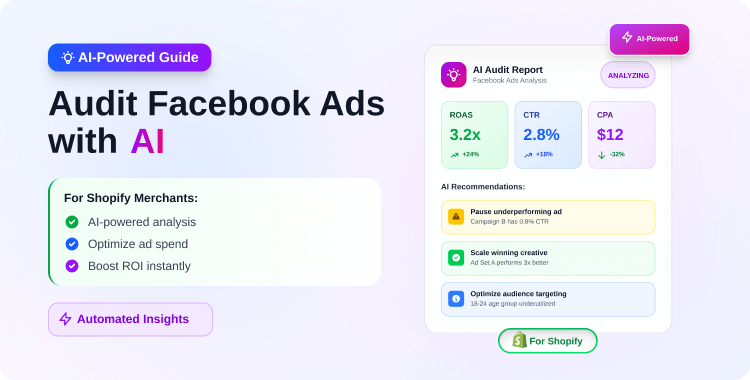
This is where AI Diagnostics change the game. Instead of spending hours drowning in spreadsheets, you can now use AI to perform a “health check” on your ad account, identifying the root cause of the bleed in minutes.
Here is the step-by-step workflow to stop burning cash, starting with the most integrated tools available to Shopify merchants.
How do I use AI to audit my ads?
The fastest way is to use a dedicated Shopify app Pixee ‑ Multi Pixel & Meta Ads, which connects directly to your Meta Ad Account. Its AI diagnostic tool scans your campaigns to identify low-CTR creatives and budget-draining audiences instantly. Alternatively, you can export your ad data and use LLMs like ChatGPT to analyze patterns in your copy and headlines.
Summary
- The Problem: High-performing ads often die suddenly due to creative fatigue or audience saturation, but finding the root cause manually is slow.
- The Solution: AI diagnostic tools can analyze your ad account instantly to flag expensive audiences and tired creatives.
- The Tool: We use Pixee to automate this audit inside Shopify, ensuring your tracking (CAPI) is accurate before you diagnose.
- The Alternative: We also cover how to use ChatGPT for a manual “second opinion” on your ad copy.
How to Audit Facebook Ads with AI
Step 1: The Foundation – Ensure Your Data Isn’t “Lying”
Before you audit performance, you must audit your tracking. An AI audit is only as good as the data it analyzes. If your Facebook Pixel isn’t firing correctly, or if you aren’t using Conversions API (CAPI), your ad manager is essentially flying blind.
Common Shopify Tracking Gaps:
- Browser Blocking: Safari and Firefox often block third-party cookies.
- iOS Restrictions: Many mobile users opt out of tracking.
If your Shopify store relies solely on browser-side pixels, you might be missing 15–20% of your conversion data.
The Fix: This is the first layer of the Pixee app’s value. Before running diagnostics, Pixee ensures you are tracking correctly by enabling Server-Side Tracking (CAPI). This bypasses browser blockers and sends purchase data directly from Shopify’s server to Facebook.
Once Pixee confirms your data is accurate, you can trust the audit results in the next step.
Step 2: Automated Audit with Pixee
For Shopify merchants, the most efficient workflow is to use a tool that lives where you work—inside your store dashboard.
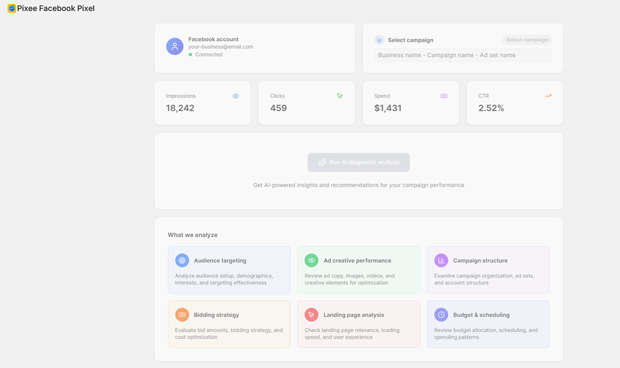
Pixee ‑ Multi Pixel & Meta Ads has introduced an AI-powered Meta Ads diagnostics tool designed specifically to solve the “why is my ad failing?” problem.
How to Execute the Audit:
- Connect Your Ad Account: Inside the Pixee dashboard, link your Meta Ad Account. Because Pixee is already handling your pixel data, it has a holistic view of both traffic (clicks) and truth (server-side conversions).
- Run the AI Diagnostic: With one click, the AI analyzes your active campaigns against historical performance benchmarks.
- Review Actionable Signals: The tool will surface specific red flags, such as:
- Creative Fatigue: Identifying ads that have high frequency and dropping CTR.
- Audience Drain: flagging ad sets that are spending budget but haven’t converted in the last 72 hours.
- High CPC Warnings: Alerting you when competition for a specific audience has made it unprofitable.
The “Fix It” Button: The unique advantage here is the built-in solution. If the diagnostic tells you your ad copy is stale, Pixee includes an AI Ad Copy Generator. You can select a product, and the AI will generate fresh, compliance-friendly ad copy designed to improve CTR, allowing you to refresh the creative without leaving the app.
Step 3: Manual Audit with Generative AI
If you want to dig deeper into qualitative data—specifically the emotional hooks in your copy—you can use general LLMs like ChatGPT or Claude as a “second opinion” to your specialized tools.
The Manual Workflow:
- Export Your Data: Go to Facebook Ads Manager and export your ad performance data (Ad Name, Ad Copy, Headline, CTR, ROAS) to a CSV.
- Anonymize & Clean: Remove sensitive customer data, but keep the performance metrics.
- Prompt the AI: Paste the data into ChatGPT with a prompt like this:
“I am a Shopify merchant selling [Product Category]. Below is a list of my Facebook ads and their CTRs. Please analyze the copy and headlines. Identify common patterns in the high-performing ads versus the low-performing ones. Tell me which emotional hooks are missing from the underperformers.”
What to Look For: The AI will often spot tonal inconsistencies you missed. For example, it might notice that your winning ads use “scarcity” (e.g., “Only 3 left”) while your losing ads focus too much on generic features.
Conclusion: From Guesswork to Precision
The days of “set it and forget it” Facebook advertising are over. In the current ecommerce landscape, the merchants who win are the ones who can detect a dying ad within 24 hours, not 2 weeks.
By combining Server-Side Accuracy with AI Diagnostics, you move from emotional decision-making to data-driven growth.
Ready to audit your ads? If you want to stop guessing and start knowing exactly why your ads are struggling, Pixee ‑ Multi Pixel & Meta Ads offers the most integrated solution for Shopify merchants. It combines the tracking accuracy of CAPI with the intelligence of AI diagnostics, giving you a complete “Command Center” for your paid media.




