
If you’re running a Shopify store in 2026, you can’t treat Meta retargeting as “set and forget” anymore. Rising CPMs, iOS tracking limits, and shorter attention spans mean every retargeting dollar has to pull real weight.
The merchants who win aren’t just “installing a pixel” – they’re combining Meta Pixel, Conversions API, and product catalogs to build a full-funnel system: from first visit to repeat purchase.
This guide is written for Shopify merchants and marketing teams who already run Meta ads, but know their tracking and retargeting structure is leaving money on the table.
Quick Summary
- Meta retargeting on Shopify works best when you combine Meta Pixel, Conversions API (CAPI), and a synced product catalog across the full funnel.
- This setup helps you recover more abandoned carts, scale warm audiences, and improve ad efficiency even with stricter privacy rules.
- You’ll learn how to structure full-funnel audiences, which events matter, and how to technically wire everything inside Shopify.
- We’ll also walk through practical workflows for Meta Advantage+ catalog ads, dynamic retargeting, and post-purchase upsell campaigns.
- Along the way, you’ll see how a tracking app like Pixee (multi-pixel + CAPI + catalog sync) can simplify the whole stack.
Meta retargeting on Shopify works best when you combine Meta Pixel, Conversions API, and a synced product catalog to track key events, build warm audiences, and run dynamic product ads across the entire customer journey.
What You Need Before Starting This Shopify Task
Before you build any Meta retargeting funnel, you need some non‑negotiable foundations in place on Shopify.
- A Meta Business account with Pixel and catalog access in Events Manager and Commerce Manager.
- A correctly installed primary Meta Pixel on your Shopify theme (ideally via an app, not pasted code).
- Server-side tracking via Meta Conversions API to recover events lost to ad blockers and privacy changes.
- A synced Facebook/Meta product catalog that pulls products directly from your Shopify store for dynamic ads.
- Clear funnel goals: e.g., “recover abandoned carts,” “upsell past buyers,” “nurture browsers into buyers.”
From the tracking side, an app like Pixee – Multi Pixel & Meta Ads gives you one hub to add Meta Pixels, enable CAPI, configure event tracking, and keep a Facebook catalog synced with your Shopify products.
According to the Baymard Institute, the average cart abandonment rate is around 70%, which represents hundreds of billions in recoverable ecommerce revenue.
Step-by-Step Instructions To Complete This Setup
1. Install and configure your primary Meta Pixel on Shopify
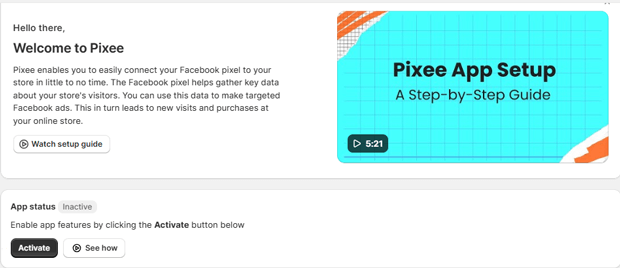
In Shopify, open Pixee ‑ Multi Pixel & Meta Ads app
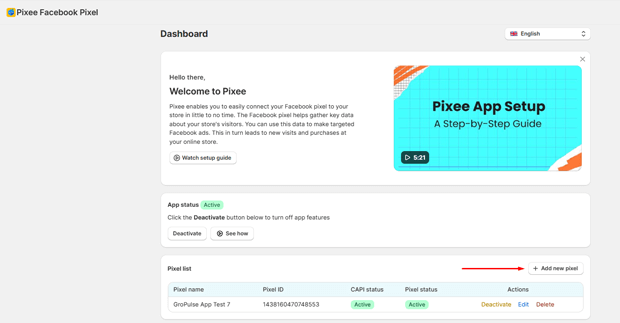
Make sure the pixel is Active in the app dashboard and embedded correctly in your theme.
Add a new Facebook/Meta Pixel, give it a friendly name (e.g., “Main Store Pixel”), and paste the Pixel ID.
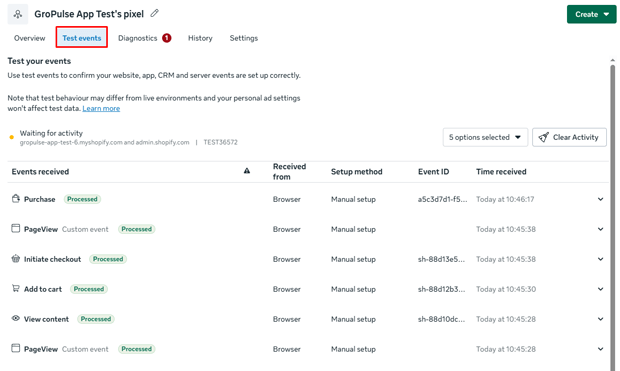
Use Meta Pixel Helper and Events Manager Test Events to confirm that page views and product views are firing.
2. Turn on Meta Conversions API (CAPI) for server-side retargeting
Browser-only pixels miss a growing share of events due to ITP, cookie limits, and ad blockers.
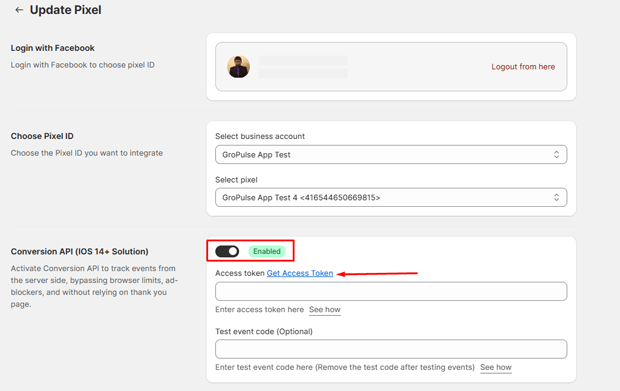
- In Events Manager, go to your Pixel’s Settings, scroll to the Conversions API section, and generate an access token.
- In your tracking app, connect your Facebook account, then edit your Pixel settings.
- Toggle Enable Conversions API, paste the access token, and save.
- Check Events Manager’s Test Events tab and verify that both Browser and Server events appear for key actions like AddToCart and Purchase.
Pixee automatically deduplicates events using event IDs, so you don’t double-count when the same action is sent from both browser and server.
Meta reports that implementing Conversions API can improve Event Match Rate by up to 70% for Shopify stores, giving the algorithm more reliable signals for optimization. (Meta via CustomerLabs)
3. Configure full-funnel events for Meta retargeting
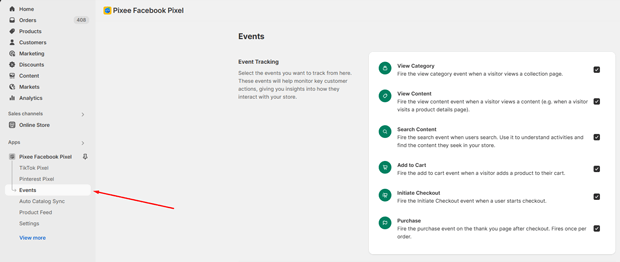
On Shopify, full-funnel Meta retargeting typically uses these core events:
- PageView – everyone who lands on your site
- ViewContent – product page views
- AddToCart – high-intent shoppers
- InitiateCheckout – checkout starters
- Purchase – buyers
In your tracking app’s Events or Event Tracking section:
- Make sure each standard ecommerce event is enabled and correctly mapped to Shopify actions (product view, cart add, checkout step, thank-you page).
- Confirm that the same events are being sent via CAPI where supported (PageView, ViewContent, AddToCart, InitiateCheckout, Purchase).
- Optionally, configure custom events for high-value actions (e.g., “subscribed_newsletter”, “viewed_collection”) to build more granular audiences.
Pixee’s event tracking guide shows exactly which Shopify pages and actions trigger each event so you know where retargeting audiences will come from.
4. Sync your Shopify catalog to Meta for dynamic product ads
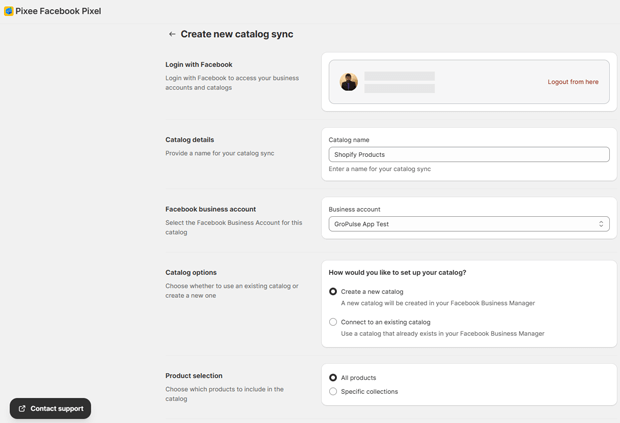
To show people the actual products they viewed or left in cart, you need a product catalog that stays in sync with your Shopify inventory.
Within Pixee’s Catalog Sync feature:
- Connect your Facebook account from the app’s Settings, then open Catalog Sync in the sidebar.
- Select an existing Facebook catalog or create a new one from the app.
- Choose what to sync: all products or specific collections (e.g., only “Best Sellers” or “In-Stock” ranges).
- Set sync frequency (hourly, every 6 hours, daily, or manual) based on how often your prices and stock change.
- Save and run the initial sync, then verify that product titles, images, prices, and URLs appear correctly in Commerce Manager.
Pixee supports automatic, recurring sync for one catalog on the free plan and multiple catalogs on paid plans, which is useful if you split catalogs by market or language.
5. Build full-funnel retargeting audiences in Meta Ads Manager
Once Pixel, CAPI, and catalog are in place, you can construct audiences that map directly to your Shopify funnel.
- Top-of-funnel warm visitors: All website visitors (PageView), product viewers (ViewContent), or specific collection viewers.
- Mid-funnel high-intent: AddToCart and InitiateCheckout audiences, often in a 7–14 day window for highest intent.
- Bottom-of-funnel buyers: Purchasers in the last 30–180 days for cross-sell and upsell sequences.
In Ads Manager:
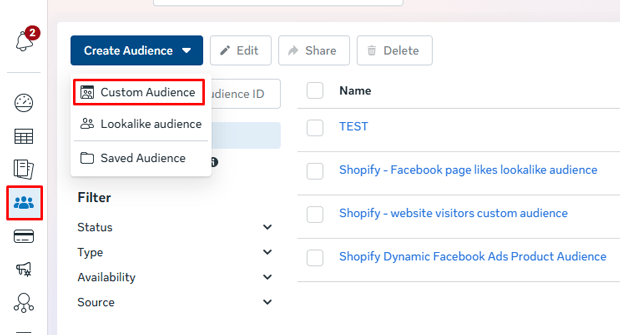
- Create custom audiences based on your Pixel/CAPI events and time windows (e.g., AddToCart in last 7 days, excluding Purchases).
- Save catalog-based audiences for Advantage+ catalog ads that dynamically show products people viewed or carted.
- Layer in value-based audiences if Purchase events send value data, allowing Meta to prioritize higher-LTV customers.
6. Launch dynamic Meta retargeting campaigns tied to your Shopify funnel
With audiences defined, map campaigns to funnel stages:
- Product viewers → cart adders: Dynamic catalog ads that showcase recently viewed products with soft social proof.
- Cart abandoners → purchasers: Stronger urgency and incentives (limited-time discount, free shipping, or bundle).
- Recent buyers → repeat buyers: Post-purchase upsell and cross-sell using catalog recommendations and UGC.
Meta’s Advantage+ catalog ads work particularly well here because they automatically pull product data from your synced Shopify catalog and optimize which items to show each user.
According to Shopify data, conversion APIs help close the loop between ads and purchases by sending server-side conversion data, which improves attribution and optimization.
Templates, Copy Snippets & Reusable Blocks
You don’t need fancy copy to make Meta retargeting work; you need message–audience–funnel alignment.
Here are simple, reusable blocks you can adapt:
1. Product viewer retargeting (ViewContent audiences)
- Headline: “Still thinking it over?”
- Body: “You recently checked out [Product Name]. Customers love it for [primary benefit]. Take another look while it’s still in stock.”
- CTA: “View product”
2. Cart abandonment retargeting (AddToCart / InitiateCheckout)
- Headline: “Your cart is waiting”
- Body: “You were close to completing your order at [Store Name]. Finish checkout now to lock in your price before it sells out.”
- CTA: “Complete your order”
3. Post-purchase upsell retargeting (Purchase)
- Headline: “Complete your set”
- Body: “Because you bought [Product Name], customers often add [Complementary Product]. Finish your set in a few clicks.”
- CTA: “Shop the bundle”
You can generate variations of this copy with tools, but even basic templates like these outperform generic brand awareness ads when tied to accurate events and dynamic catalogs.
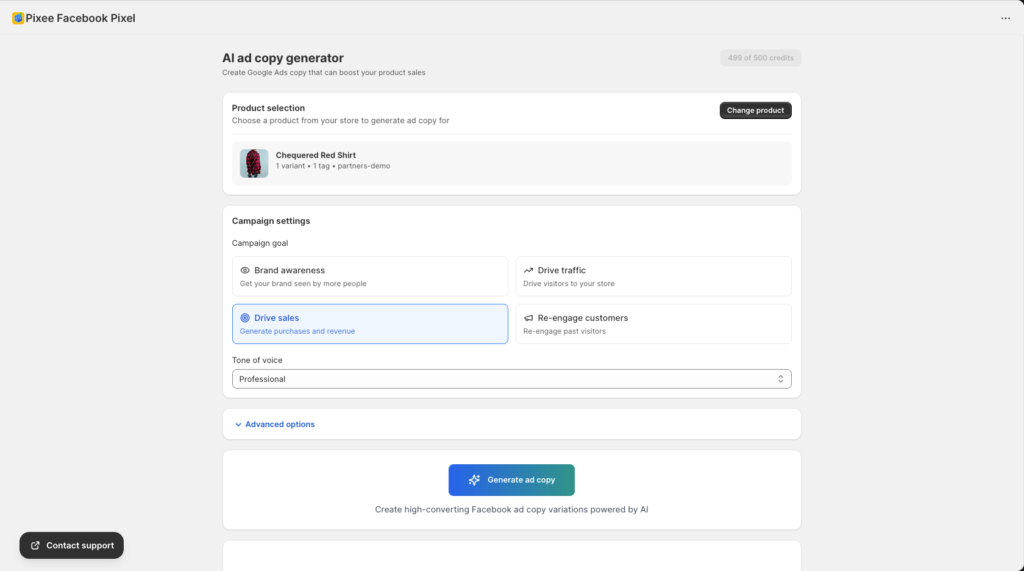
For merchants using Pixee’s Advanced plan, the built‑in AI Ad Copy Generator and AI Ad Consultant can help brainstorm and refine Meta ad hooks, angles, and copy faster once your tracking is set up.
Expert Tips That Make This Work Better in Real Stores
Use one primary optimization pixel, but multiple pixels where it truly helps
Meta generally performs best when you optimize around a single, well-trained pixel per store or brand.
However, Shopify merchants with multiple regions, sub-brands, or agencies may need multiple pixels for reporting and account structure; Pixee’s paid plans support multiple pixels across platforms while still letting you pick a primary optimization pixel.
Keep event counts clean with deduplication and no duplicate scripts
- Let one app (e.g., Pixee) control both browser Pixel and CAPI to avoid overlapping setups.
- Use the app’s deduplication (via event_id) and confirm in Events Manager that each action appears once.
- Remove any hard‑coded pixel scripts from your theme or other apps that may be double‑firing events.
Match retargeting windows to buying cycles
- For fast fashion or impulse buys, 3–7 day retargeting windows often work well.
- For higher ticket or considered purchases, 14–30 day windows make more sense.
- Always exclude recent purchasers from cart-abandonment ads to avoid wasted impressions and bad UX.
Regularly audit your tracking health
At least weekly:
- Check your tracking dashboard for pixel status, event status, and CAPI status.
- Use Events Manager diagnostics to fix any red flags on event quality or EMQ (Event Match Quality).
- Verify catalog syncs are completing and product counts match expectations.
Pixee’s Dashboard provides a quick view of app status, pixel list (including CAPI status), and which events are currently tracked so you can catch issues early.
How To Troubleshoot the Most Common Issues
1. Pixel or events not firing on Shopify
Symptoms: No events in Events Manager, or Pixel Helper shows errors.
- Confirm the app is activated and the theme app embed is enabled.
- Double-check the Pixel ID and that the Pixel status is Active in your app’s Dashboard.
- Test in an incognito window and on another browser to rule out caching.
2. CAPI events missing or erroring
If server-side events don’t show in Events Manager:
- Make sure the access token is valid and pasted correctly, with no extra spaces.
- Regenerate the token if needed and update it in the app settings.
- Allow 15–30 minutes for events to start appearing after changes.
3. Duplicate events in Events Manager
When both browser and server events show as separate actions:
- Confirm that only one app is sending CAPI events.
- Remove any legacy CAPI integration or manual code you used before.
- Ensure your tracking app’s deduplication is enabled and events have event_id set.
4. Catalog products missing, outdated prices, or rejected items
- Check your Catalog Sync page for error status on recent syncs.
- If you see “Error,” open details, reconnect Facebook, and trigger a manual sync.
- Verify that critical fields (title, price, availability, URLs, images) are populated in Shopify as they are sent to Meta.
Alternative Ways To Achieve the Same Outcome
Not every Shopify store wants to use a dedicated multi-pixel app; some prefer channel apps or more custom stacks.
Alternative approaches include:
- Native Shopify–Meta integration: Use the official Facebook & Instagram channel app, which can set up Pixel and CAPI with a simpler UI but less control over advanced multi-pixel setups.
- Server-side tracking tools: Use specialized server-side tracking platforms or tag managers that send events to Meta from a separate data pipeline.
- Manual dev implementation: Have a developer custom-implement Pixel and CAPI via Shopify’s theme and server, though this is harder to maintain for non-technical teams.
For most small to mid-sized Shopify merchants, an app like Pixee that combines pixel management, event tracking, CAPI, and catalog sync in one dashboard offers the best balance of control and ease-of-use.
What To Do Next After You Finish This Setup
Once your Meta retargeting stack is wired correctly, don’t just leave it running; iterate.
- A/B test different retargeting hooks (urgency vs. social proof vs. education) across audiences.
- Gradually adjust budgets toward the highest-ROAS retargeting segments (often cart abandoners and recent buyers).
- Expand into lookalike audiences based on high-quality Purchase or AddToCart events, which become much more powerful with CAPI in place.
If you’re using Pixee’s AI Ad Diagnostic or AI Ad Consultant, feed them your live campaign and event data to get tailored recommendations on budget shifts, creative, and audience structure.
FAQs for Meta Retargeting on Shopify
Do I really need both Meta Pixel and Conversions API on Shopify?
Yes. Pixel alone misses events due to cookies and ad blockers, while CAPI alone lacks some browser context; together, they give Meta the most complete signal for optimization and retargeting.
Which events are most important for Meta retargeting on Shopify?
The most important events are ViewContent, AddToCart, InitiateCheckout, and Purchase, because they reflect clear stages of buying intent and allow you to build targeted audiences at each step.
How often should my Shopify catalog sync to Meta?
For most stores, daily or every 6 hours is enough; fast‑moving inventory or dynamic pricing may require hourly syncs, while very stable catalogs can rely on daily or manual syncs.
Do Meta dynamic ads work without a product catalog?
No. You can run standard retargeting ads without a catalog, but dynamic product ads that show exact products people viewed or carted require a properly configured and synced catalog.
How long should I keep people in my retargeting audiences?
Many merchants keep cart abandoners in a 7–14 day retargeting window and product viewers in a 14–30 day window, but you should test based on your product’s buying cycle.
Can I run Meta retargeting if I have multiple Shopify stores or markets?
Yes. You can set up separate pixels and catalogs per store or region and manage them with a multi-pixel app like Pixee that supports multiple pixels and catalog syncs on paid plans.
How does better tracking actually lower my Meta ad costs?
More complete and accurate event data (especially from CAPI) improves Event Match Rate and attribution, which helps Meta’s algorithm find more likely converters and reduce wasted impressions over time.
Is Meta retargeting still worth it with higher CPMs?
Yes. Retargeting warm visitors and cart abandoners still generally converts better than cold prospecting, so even with higher CPMs, it often delivers stronger ROAS when tracking is accurate.
What’s the fastest way to check if my Meta retargeting is broken?
Open Meta Events Manager and your tracking app dashboard; if Pixel/CAPI events like AddToCart and Purchase have dropped suddenly or show errors, your retargeting audiences and performance will suffer.
Which Shopify app can help set up pixels, CAPI, and catalog sync together?
Pixee – Multi Pixel & Meta Ads is one example that lets you manage multiple Meta Pixels, enable Conversions API, configure event tracking, and automatically sync product catalogs from Shopify to Facebook.




