
In the current landscape of rising acquisition costs, Average Order Value (AOV) has become the primary metric for survival. For Shopify merchants in 2026, bundling is no longer a “nice-to-have” feature; it is a fundamental inventory and marketing strategy.
Shopify’s own Bundles app has matured into a solid entry-level tool, but as brands scale, they often hit a “functionality ceiling.”
Whether you need complex tiered discounts or a “Build Your Own Box” experience, choosing the wrong architecture can lead to broken checkouts or a clunky mobile UX.
This guide breaks down the technical and strategic differences to help you decide which tool fits your growth stage.
Summary
- The Goal: Help Shopify merchants choose between the free native Bundles app and a high-performance alternative like GP Bundle Builder.
- Target Audience: DTC founders, marketing managers, and scaling brands looking to increase Average Order Value (AOV).
- Key Takeaway: While native Shopify Bundles are great for simple “fixed” packs, GP Bundle Builder offers 9 advanced templates, including Build-Your-Own-Box (BYOB) and step-by-step Wizards, powered by Shopify’s latest Functions for a native checkout experience.
- The 2026 Reality: Modern customers expect interactive bundling experiences, not just static “frequently bought together” lists.
Which one should you choose?
Use Shopify Bundles if you only need simple, fixed kits (e.g., a “3-pack of socks”) and have a small catalog. Choose GP Bundle Builder if you want to drive high AOV via interactive Build-Your-Own-Box grids, tiered “Spend More, Save More” perks, or guided “Wizards,” all while maintaining a 100% native Shopify checkout.
How To Choose the Right Shopify Tool for the Job
The “Best” app isn’t always the one with the most features; it’s the one that aligns with your specific product catalog and customer journey. When evaluating these two options, consider three pillars:
- Complexity of Choice: Does the customer pick the items, or do you?
- Checkout Stability: Does the app use Shopify Functions (modern/stable) or “draft orders” (old/unstable)?
- Analytics: Do you need to see exactly which bundle configuration is driving the most revenue?
Comparison Table: Key Features, Pros & Limits
| Feature | Shopify Bundles (Native) | GP Bundle Builder |
| Price | Free | Free (also has a Pro plan) |
| Max Products | 30 per bundle | Unlimited |
| Bundle Types | Fixed kits, multipacks | 9 Types (BYOB, Wizard, Snap, etc.) |
| Checkout Tech | Shopify Functions | Shopify Functions (WASM-based) |
| Mix & Match | No | Yes (Grid & Wizard layouts) |
| Tiered Discounts | No | Yes (“Buy more, save more”) |
| Analytics | Basic (Order-level) | Detailed (Views, Conv. Rate, Revenue) |
| Customization | Very limited | Full (No-code + Custom CSS) |
Recommended Blogs for You:
👉 How to Manage Corporate Gifting on Shopify
👉 How to Set Up Shopify Invoices
👉 Google Ads Retargeting for Shopify
👉 Get Customers to Buy More with Less Effort
App-by-App Breakdown: Pros, Cons & Best Fit
1. Shopify Bundles (The Native Starter)
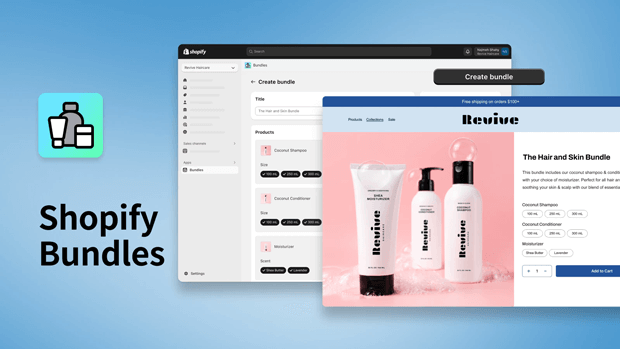
Shopify’s native app is designed for simplicity. It creates a “Bundle” product that maps its inventory to the component SKUs.
- Pros: It’s free and developed by Shopify. Because it’s integrated into the admin, inventory syncing is near-instant. It uses Shopify Functions, meaning it won’t break your Shop Pay or gift card workflows.
- Cons: It is strictly for “Fixed Bundles.” If you want a customer to choose between three different scents of a candle to make a set, the native app cannot handle it. It also lacks any visual “builder” for the storefront.
- Best Fit: New stores or brands with very simple “Kit” offerings.
2. GP Bundle Builder (The High-Growth Engine)
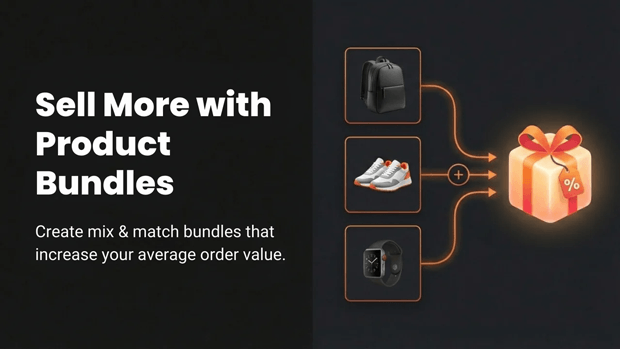
GP Bundle Builder is built for merchants who treat bundling as a core conversion lever. It uses the same native Shopify Functions architecture as the official app but adds a sophisticated presentation layer.
- Pros: The standout feature is the Build-Your-Own-Box (BYOB) experience. It allows merchants to create full-page builders where customers can drag and drop items into slots, unlocking “perks” (discounts) as they add more. It also offers 9 different templates, from “Snap” widgets for quick add-to-carts to guided “Story Wizards” perfect for skincare or supplement stacks.
- Cons: The full feature set requires a Pro subscription ($21/mo), which might be an overhead for brand-new stores with zero traffic.
- Best Fit: Scaling DTC brands (Skincare, F&B, Apparel) that want to gamify the shopping experience to lift AOV.
Which App is Best for Each Merchant Persona?
The “Set it and Forget it” Boutique
If you sell pre-packaged gift boxes where the items never change, Shopify Bundles is your best bet. It stays out of the way and costs nothing.
The AOV-Obsessed DTC Founder
According to recent commerce benchmarks, interactive “Mix & Match” bundles can increase AOV by 15–30% compared to static bundles. If you are tracking AOV daily, GP Bundle Builder provides the granular analytics you need to see which bundles are converting and which are just getting “views” without “adds”.
The Subscription-Ready Brand
If you want customers to “build a box” of 6 coffee bags or 12 protein bars, you need a grid-based builder. GP Bundle Builder’s dedicated BYOB page template is designed specifically for this high-volume use case, offering category filters and inventory-aware slots.
Common Mistakes Merchants Make When Comparing Apps
- Ignoring Checkout Compatibility: Many older bundle apps use “Custom Checkouts” or “Draft Orders.” In 2026, this is a major risk. These apps often break Shop Pay, local pickup, and discount code stacking. Both Shopify Bundles and GP Bundle Builder use Shopify Functions, which is the “gold standard” for stability.
- Overlooking Mobile UX: A bundle builder that looks great on a desktop but requires endless scrolling on a phone will kill your conversion rate. Look for apps like GP Bundle Builder that offer “Sticky Summary” blocks and mobile-optimized wizards.
- Forgetting Analytics: Revenue is a vanity metric if you don’t know the conversion rate of the bundle itself. Ensure your app gives you a per-bundle breakdown so you can A/B test different product combinations.
Frequently Asked Questions
Do these apps work with Shopify 2.0 themes?
Yes. Both use Theme App Extensions, meaning you can drag and drop bundle blocks anywhere in your theme editor without touching a single line of liquid code.
Will bundling slow down my site?
The native Shopify Bundles app has zero impact. GP Bundle Builder uses WASM (WebAssembly) discount functions that run at Shopify’s edge, ensuring that the discount logic doesn’t add any lag to your checkout process.
Can I offer “Buy 2 Save 10%, Buy 3 Save 20%”?
The native Shopify app cannot do this. You would need GP Bundle Builder’s Tiered Discount engine, which applies these discounts natively based on the quantity in the cart.
Final Recap: How To Re-Evaluate Your App Stack as You Grow
Bundling is a journey, not a destination.
- Start with Shopify Bundles to test the waters with 2-3 basic kits.
- Graduate to GP Bundle Builder when you’re ready to offer choice, tiered incentives, and a premium “Build Your Own” experience.
As you scale, keep a close eye on your per-bundle analytics. If a particular “Mix & Match” combo is flying off the shelves, consider making it a permanent “Fixed Bundle” to simplify your fulfillment.




