
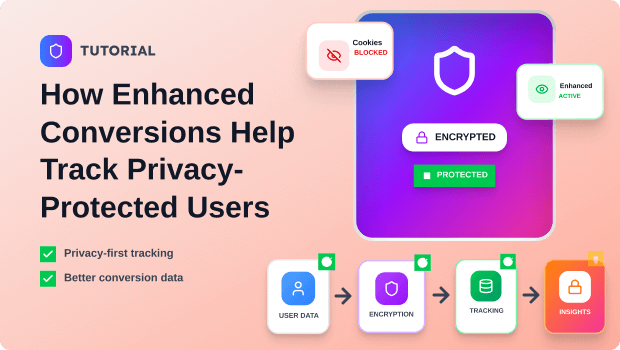
As third-party cookies disappear and privacy regulations tighten, e-commerce merchants face an urgent challenge: how do you measure what works when traditional tracking breaks?
Enhanced Conversions is the answer—a privacy-first tracking method that uses hashed first-party data to match users across devices and attribute conversions accurately, even when cookies are blocked.
Enhanced Conversions match hashed customer data (email, phone, address) from your conversion page with Google’s signed-in user data to track conversions without cookies. This enables accurate cross-device attribution while staying compliant with GDPR, CCPA, and privacy regulations.
Key Takeaways
- Enhanced Conversions use SHA-256 hashing to encrypt first-party customer data before sending it to Google, making tracking privacy-safe and regulation-compliant.
- The feature recovers 5–10% of previously untracked conversions by bridging gaps created by cookie restrictions, ad blockers, and cross-device shopping journeys.
- Unlike standard conversion tags, Enhanced Conversions don’t rely on cookies—instead, they match hashed user identifiers with Google’s logged-in users to attribute conversions.
- Proper data collection, formatting, and consent management are critical to success; low match rates typically indicate data quality issues, not feature limitations.
- Merchants implementing Enhanced Conversions see improved bidding accuracy for smart strategies like Target CPA and Maximize Conversions, directly impacting ROI.
The Privacy Tracking Crisis and Why It Matters Now
For years, third-party cookies were the backbone of digital advertising. Marketers could track users across websites, understand their behavior, and measure ad effectiveness with relative ease. That era is ending. Browser makers like Safari and Firefox already restrict third-party cookies, and Google is phasing them out in Chrome by late 2024 and throughout 2025.
For merchants, this creates a concrete problem: how do you prove your ads work if you can’t track the people who click them?
The impact is immediate and measurable. Approximately 30% of web traffic now comes from browsers with restricted third-party cookies. Ad blockers further reduce the visibility of standard conversion tags. Cross-device shopping—where a customer clicks an ad on mobile but purchases on desktop hours or days later—regularly falls through traditional tracking cracks.
For Shopify merchants and small-to-medium e-commerce businesses, the stakes are highest. These merchants typically run lean marketing teams and rely on data-driven optimization to compete with larger brands. Without accurate conversion tracking, they lose visibility into which campaigns, keywords, and audiences drive real sales. The result is wasted ad spend and broken bidding algorithms.
Enhanced Conversions solves this by shifting from cookie-based to consent-based, first-party data tracking. Instead of following users across the web, you capture data they willingly provide on your conversion page (purchase confirmation, form submission, checkout) and use it to match them with Google’s user database.
Recommended Blogs for You:
👉 How to Set Up Consent Mode v2 for Privacy-Compliant Tracking
👉 Shopify Mobile Advertising: Boost ROAS with Simplified Device Reports
👉 Google Ads Attribution Confusion? Get Clarity with Comprehensive Performance Reports
👉 How to Set Up Google Analytics 4 on Shopify (Without Coding): The 2025 Guide
How Enhanced Conversions Help and Actually Work Behind the Scenes
Understanding the mechanics of Enhanced Conversions helps you implement it correctly and troubleshoot when match rates are low.
The Four-Step Flow:
1. User clicks your ad (while signed into Google): The user sees your Google Ad on YouTube, Gmail, Search, or partner sites. Crucially, they’re signed into their Google account—this is what makes matching possible later.
2. User converts on your website: The user lands on your site and completes a purchase, form submission, or other conversion action. During checkout or form completion, they provide first-party data: email address, phone number, shipping address, or name.
3. Your conversion tag hashes the data: Your Enhanced Conversion tag (installed via Google Tag, Google Tag Manager, or Google Ads API) captures this first-party data and applies SHA-256 hashing—a one-way encryption algorithm that scrambles the data into a unique string. This is the critical privacy step: the email “
john@example.com
” becomes something like “a1b2c3d4e5f6g7h8i9j0…” Crucially, this hash cannot be reversed to retrieve the original email.
4. Google matches and reports the conversion: The hashed data is sent to Google Ads, where it’s matched against Google’s hashed database of signed-in users. If a match is found, Google reports a conversion back to your Google Ads account. The entire process is encrypted and anonymized—Google never stores your raw customer data.
Why This Approach Works When Cookies Don’t:
Cookies are side-channel identifiers; they tag users as they move across websites. When cookies are blocked, the tag is useless. Hashing, by contrast, works on the user’s confirmed identity. By the time someone enters their email at checkout, they’ve already proven who they are. Matching against Google’s signed-in user database—which is not blocked by browsers—creates a direct, first-party match that bypasses cookie limitations entirely.
Cross-Device and Cross-Browser Tracking:
Enhanced Conversions excel at cross-device attribution. A user clicks your ad on mobile, browses, and converts days later on desktop. Standard conversion tags, bound to a single device and cookie, often miss this. Enhanced Conversions capture the purchase email on desktop, hash it, and match it to the same user’s earlier mobile click. The result is accurate multi-device attribution.
Setting Up Enhanced Conversions: The Complete Workflow
Implementation difficulty varies by your technical setup, but Shopify merchants have three straightforward paths.
Phase 1: Enable Enhance Conversion Tracking with AdTrack App
Go to the Shopify App Store and install AdTrack – Google Ads Tracking.

Activate the app in your store
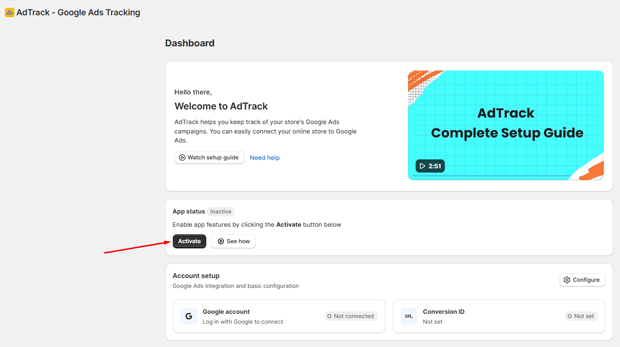
Click the Configure Button

Log in with Your Google Account. Use the Gmail account associated with your Google Ads account.

Enable the Conversion Event and Choose the correct label. Switch the toggle to ON for enhanced conversion tracking.

Click Save to apply your configuration
Phase 2: Enabling Enhanced Conversions in Google Ads
- Go to your Google Ads account and click on the Goals option
- Click on the Conversion action that you enabled in the AdTrack App
- Open the Settings for that conversion action
- Scroll to Enhanced Conversions and check the box that says “Use enhanced conversions for this conversion action.”
Learn more: How to Setup Enhanced Conversions in Google Ads
Common Setup Mistakes to Avoid
1. Turning Off Standard Conversion Tags: Many merchants mistakenly disable standard conversion tags after setting up Enhanced Conversions. This is a critical error. Keep both enabled; Enhanced Conversions supplements, not replaces, standard tracking. The two work together to maximize data quality.
2. Forgetting to Hash Data Correctly: If you’re using the API method, ensure you’re hashing customer data with SHA-256 before transmission. Incomplete or incorrect hashing breaks the matching process.
3. Sending Inconsistent Data Formats: Google’s matching algorithm is strict. Email addresses must be lowercase and trimmed of whitespace. Phone numbers should include country codes. Addresses should be consistently formatted. Even small inconsistencies prevent matches.
4. Skipping Consent Management: In GDPR and CCPA regions, consent is mandatory. Set your pixel permission to “Required” in Shopify so that data is only sent when customers have opted in. This prevents compliance violations and potential penalties.
5. Expecting Instant Results: Enhanced Conversions take time to accumulate data and train Google’s matching algorithm. It typically takes 3–7 days to see meaningful match rates. Don’t panic if match rates look low on day one.
Monitoring Match Rates and Data Quality
Match Rate Diagnostics: Once Enhanced Conversions are live, monitor your match rate—the percentage of conversions where Google successfully matched hashed data with a signed-in user. A healthy match rate typically ranges from 20–60%, depending on your audience (higher for logged-in users, lower for new customers).
Check your match rate in Google Ads > Goals > Conversions > Settings > Enhanced Conversions > Diagnostics Report.
Low match rates indicate:
- Data quality issues: Incomplete or incorrectly formatted customer information.
- Audience mismatch: Your customers aren’t logged into Google when they see ads or make purchases.
- Insufficient data: You’re not capturing email, phone, or address at checkout.
Solution: Verify that checkout data is being collected correctly, that hashing is working, and that Google Tag Assistant shows the data being transmitted.
Building a First-Party Data Strategy
Enhanced Conversions only work if you have high-quality first-party data. To maximize match rates and compliance:
1. Optimize Checkout for Data Collection: Simplify your checkout process to ask for key fields: email (required), phone (optional but valuable), address (from shipping data). Optional data often means better conversions and lower cart abandonment than mandatory fields.
2. Use Consent Management Platforms: Implement a Consent Management Platform (CMP) like OneTrust, TrustArc, or Termly. This centralizes consent preferences and ensures data is only sent to Google when customers have agreed. In Shopify, this integrates with your pixel permissions.
3. Segment Your Customer Data: Track which customer segments have the highest match rates. New customers may have lower match rates than repeat customers (who are more likely to be logged into Google). Use this insight to adjust your bidding and audience targeting.
4. Unify Data Sources: If you’re using a CDP or data warehouse, ensure customer data is consistent across sources before hashing and sending to Google. Misaligned data between your e-commerce platform, email list, and ad platform creates matches and wasted spend.
Pairing Enhanced Conversions with Google Analytics 4 and Smart Bidding
Enhanced Conversions in GA4: You can also implement Enhanced Conversions in Google Analytics 4 for deeper cross-platform insights. This creates a unified data pipeline where your conversion data feeds both Google Ads (for bidding optimization) and GA4 (for analysis). The setup is similar; you’ll enable Enhanced Conversions in GA4 and ensure the same hashed data flows to both platforms.
Smart Bidding Optimization: Once you’ve recovered lost conversions through Enhanced Conversions, your bidding algorithms (Target CPA, Target ROAS, Maximize Conversions) perform better because they’re optimizing on more complete data. This typically leads to:
- Lower cost per conversion (5–15% improvement is common).
- Higher campaign volume because the system has more training data.
- Better audience targeting because Google can now attribute conversions that were previously hidden.
Real-World Impact: E-commerce merchants report that after implementing Enhanced Conversions, their smart bidding strategies become more stable and efficient, especially during the first 3–4 weeks as Google’s algorithm trains on the new, higher-quality data.
Common Mistakes and Troubleshooting
My Match Rate Is Stuck at 5%
Likely causes and fixes:
- Insufficient checkout data: Users aren’t providing email or phone. Check your checkout form; email should always be captured. Phone is valuable but optional.
- Data formatting issues: Emails aren’t being lowercased, phone numbers lack country codes, or addresses are truncated. Validate your data pipeline before hashing.
- Hashing errors: If using the API, confirm SHA-256 is being applied correctly. Test with a known input to verify the hash output.
- Audience mismatch: Your customers may not be signed into Google. This is especially common for new customers or mobile-only browsers. Over time, as customers make repeat purchases, match rates improve.
Fix: Audit your data collection and transmission using Google Tag Assistant. Enable debug mode in Google Tag Manager and watch the raw data being sent. Compare format against Google’s specifications.
My Tag Isn’t Firing
Troubleshooting steps:
- Verify tag installation: Use Google Tag Assistant to confirm your Enhanced Conversion tag is loaded on your thank-you page.
- Check trigger timing: The tag must fire on the confirmation page after the purchase is complete, not before. Inspect your GTM or custom pixel to confirm timing.
- Confirm data layer: If using GTM, ensure your data layer contains the required fields (email, phone, address) as purchase happens. Inspect the GTM preview.
- Test on a real transaction: Don’t rely on simulated events; create a test purchase and watch it flow through your Tag Assistant in real-time.
We’re Not Seeing ROI Improvement Yet
This is common in the first 2–3 weeks. Enhanced Conversions need time to accumulate data and train Google’s matching algorithm. Additionally:
- Volume matters: If your monthly conversion volume is very low (e.g., fewer than 50 conversions), it takes longer for the system to detect a pattern.
- Verify accuracy first: Confirm that your Enhanced Conversion data matches standard conversions in volume and quality. If Enhanced Conversions report significantly higher or lower volume, there’s a setup issue.
- Adjust bidding strategies: After 2 weeks of data, review your Target CPA or Target ROAS. You may need to adjust bids to capitalize on the new data accuracy.
Real Shopify and E-Commerce Scenarios
Scenario 1: Multi-Device E-Commerce Store (Fashion Retailer)
The Challenge: A Shopify store selling clothing sees 40% of customers click ads on mobile but convert on desktop the next day. Standard conversion tags, tied to a single device and cookie, miss half these conversions. The store thinks its Target ROAS strategy is underperforming when, in reality, many conversions are going unattributed.
The Implementation: After enabling Enhanced Conversions on their Shopify checkout, the store captures email, phone, and shipping address for all purchases. Within 7 days, match rates reach 35% (expected for a new customer-heavy audience). Within 30 days, they hit 50%.
The Result: Attributed conversions increase by 8%. Google’s Target ROAS algorithm, now training on complete data, improves efficiency by 12%. Cost per acquisition drops from $45 to $39. Annual savings: ~$18,000 on a $200k ad budget.
Lead-Gen SaaS on Shopify (Course Platform)
The Challenge: A SaaS company selling online courses through a Shopify store uses lead forms to capture emails before purchase. Their standard conversion tag captures purchase events, but doesn’t connect leads to buyers. They can’t optimize for high-quality customers who download resources but don’t buy.
The Implementation: Using the Google Tag Manager method, they implement Enhanced Conversions to hash both lead emails and purchase emails. They also upload historical CRM data (via offline conversions) to cross-reference leads who later became customers.
The Result: They discover that leads from specific traffic sources (e.g., webinar attendees) have a 40% conversion rate, while cold traffic has 8%. They reallocate budget to high-converting channels, reducing CPA by 25% and improving lifetime customer value.
Scenario 3: Subscription Box Shopify Store (High Privacy Concerns)
The Challenge: A subscription box company in Germany faces strict GDPR rules. They want accurate conversion tracking but are cautious about data collection. Their current setup only captures email at checkout, limiting match potential.
The Implementation: They set up a CMP (consent banner) that asks customers to opt-in to “marketing and analytics.” For customers who opt-in, Enhanced Conversions are enabled in Google Ads. For those who opt-out, standard conversions continue to work. They pair this with clear privacy language explaining how data is hashed and anonymized.
The Result: 75% of customers opt-in (higher than expected, due to transparent language). Enhanced Conversions match rate reaches 45%. They improve compliance with GDPR while improving conversion accuracy. Additionally, they’re able to export a clean, opt-in customer list for email remarketing, which drives ROI on their email channel.
Freequently Asked Questions
What is Enhanced Conversions, and why do I need it?
Enhanced Conversions match hashed customer data (email, phone, address) from your website with Google’s database of signed-in users to track conversions without relying on cookies. You need it because third-party cookies are being phased out, and Enhanced Conversions preserve conversion tracking accuracy in a cookieless world.
Is Enhanced Conversions privacy-compliant?
Yes. Enhanced Conversions use SHA-256 hashing to encrypt customer data before sending it to Google, making it GDPR and CCPA compliant. However, you must have a clear privacy policy, obtain user consent where required, and ensure your consent management platform integrates with your tracking setup.
How long does it take to see results?
Match rates typically stabilize within 7–30 days, depending on conversion volume and audience. You may see improved campaign performance within 3–4 weeks as Google’s bidding algorithm trains on the new data. Very low-volume campaigns may take longer.
What’s the difference between Enhanced Conversions and standard conversion tags?
Standard tags rely on cookies to track users across devices and browsers. Enhanced Conversions use hashed first-party data, making them resistant to cookie blocking and more accurate on cross-device journeys. Both should be enabled simultaneously for best results.
Can I use Enhanced Conversions if I don’t collect phone numbers at checkout?
Yes, but match rates may be lower. Enhanced Conversions work with email alone, though email + phone + address dramatically improve matching. If you only capture email, expect match rates around 15–30%.
What if my match rate is very low?
Low match rates usually indicate data quality issues (formatting, incomplete fields) or an audience mismatch (customers not signed into Google). Audit your data pipeline, verify formatting in Google Tag Assistant, and wait 14 days for the system to accumulate more data.
Can I implement Enhanced Conversions without a developer?
Yes. For Shopify, the Custom Pixel method requires no coding—just copy and paste. For more complex setups (GTM, API), you may need technical help, but many Shopify apps (e.g., Analyzify, TrackBee) automate this.
Does Enhanced Conversions work with GA4?
Yes. You can implement Enhanced Conversions in both Google Ads and GA4 simultaneously. This provides unified cross-platform attribution. The setup is nearly identical; you enable it in both platforms and ensure the same hashed data flows to both.
What data can I send to Enhanced Conversions?
Email address, phone number, first name, last name, city, state, postal code, and country. On Shopify, these are captured automatically at checkout. For API implementations, you can send any of these fields; email is the most reliable for matching.
What’s the difference between Enhanced Conversions via tag and via API?
The tag method (Google Tag, GTM) is client-side; it captures and hashes data in the browser before sending to Google. The API method is server-side; you hash data on your backend and send it directly to Google. The API offers more flexibility and better compliance but requires technical implementation.
How do I know if Enhanced Conversions are actually working?
Check your Enhanced Conversions diagnostics report in Google Ads (Goals > Conversions > Settings > Enhanced Conversions > Diagnostics). Look for match rates above 15%, zero errors, and data flow. Also verify that Enhanced Conversion volume roughly matches standard conversion volume.
Can I use Enhanced Conversions to build audiences?
Yes. Once Enhanced Conversions are enabled, you can build custom audiences of users who converted, then create lookalike audiences to find similar customers. This is especially powerful for e-commerce stores looking to scale.
Do I need to update my privacy policy?
If you’re already collecting and disclosing customer data at checkout, no major updates are needed. However, if you’re implementing Enhanced Conversions in a new region or for the first time, ensure your privacy policy mentions hashing, data sharing with Google, and the customer’s right to opt-out.
What’s the cost of Enhanced Conversions?
Enhanced Conversions are free. They’re included as a standard feature in Google Ads and GA4. You only pay for Google Ads campaigns themselves.
Conclusion
Enhanced Conversions represent a fundamental shift in how digital marketers measure success. By moving from cookie-based to consent-based, first-party data tracking, you preserve conversion accuracy even as the web becomes more privacy-conscious.
For Shopify merchants and e-commerce businesses, the stakes are especially high. Third-party cookies are disappearing—not gradually, but definitively, by late 2025. Merchants who implement Enhanced Conversions today gain a 6–12 month head start in a cookieless world. They recover 5–10% of previously hidden conversions, improve their bidding efficiency, and build a data infrastructure that complies with every major privacy regulation.
Your next step: Enable Enhanced Conversions in Google Ads today. If you’re on Shopify, the Custom Pixel setup takes under 10 minutes. Test it on a portion of your traffic, monitor your match rate for 2 weeks, then roll it out fully. Within 30 days, you’ll see the impact on your conversion accuracy, bidding performance, and ROI.
The merchants who act now will own the third-party-cookie-free future. Those who delay will scramble to make up lost ground.




