
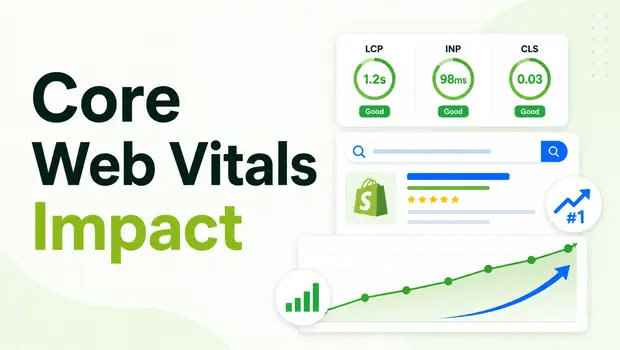
The e-commerce search landscape in 2026 is unforgiving. If your Shopify store takes more than 2.5 seconds to load its main product image, or if your page layout shifts right as a customer tries to tap “Add to Cart,” you aren’t just frustrating users,you’re actively hemorrhaging organic traffic.
Historically, merchants treated site speed and technical SEO (like schema markup) as two separate silos. But today, they are deeply intertwined.
With Google prioritizing AI Overviews and demanding flawless user experiences, your Core Web Vitals (CWV) and your eligibility for Rich Results dictate whether you win the click or lose to a competitor.
Many scaling brands mistakenly believe that simply installing a fast theme is enough. But the reality is that bloated apps, unoptimized product images, and broken structured data create a toxic combination that destroys both rankings and conversion rates.
This guide breaks down exactly how Core Web Vitals and rich results impact your Shopify revenue in 2026, and how to permanently fix the friction.
Key Takeaways
- Passing the Interaction to Next Paint (INP) threshold (under 200ms) is now critical for maintaining Shopify rankings.
- Schema markup (JSON-LD) directly fuels Google’s AI search features, making structured data a non-negotiable asset.
- Image optimization solves dual problems: it lowers Largest Contentful Paint (LCP) and provides the necessary alt text for robust product schema.
Summary
Core Web Vitals measure user experience (speed, visual stability, interactivity), while rich results use structured data to display enhanced search listings. In 2026, passing Core Web Vitals while maintaining error-free schema is a mandatory baseline for ranking in Google’s AI-driven search.
- The Shift: In 2026, Google’s AI Overviews and ranking systems require both lightning-fast Core Web Vitals and flawless JSON-LD structured data.
- The Impact: A Deloitte/Google study found a 0.1-second speed improvement boosts retail conversions by 8.4%, while rich results can lift CTR by up to 58%.
- The Fix: Shopify merchants must optimize LCP, INP, and CLS while simultaneously deploying error-free schema markup to protect and grow search visibility.
What Core Web Vitals and Rich Results Problem Are Shopify Merchants Facing in 2026?
The core problem Shopify merchants face right now is a lack of alignment between what Google’s AI systems want and what their storefronts deliver.
Search engines require structured, easily digestible data (Schema) delivered at lightning speed (Core Web Vitals).
When a shopper searches for your product, Google wants to show a Rich Result,a listing featuring price, availability, and star ratings.
However, Milestone Research indicates that while rich results achieve a 58% CTR compared to 41% for standard results, Google will hesitate to rank a page,even one with perfect schema,if it fails basic Core Web Vitals.
If your Largest Contentful Paint (LCP) is over 2.5 seconds, or your Interaction to Next Paint (INP) is sluggish, your visibility plummets.
Recommended Blogs for You:
👉 How to Add FAQ Schema on Shopify: The Complete Step-by-Step Tutorial
👉 Shopify Local Business Schema: Boosting Your Service Area SEO
👉 The Role of Schema Markup in EEAT and Semantic SEO
👉 Top 10 Schema Types Every Shopify Store Should Use for Better SEO
Why Do Core Web Vitals and Rich Results Fail Simultaneously on Shopify?
These failures rarely happen in isolation. The root causes of slow Shopify speeds and broken schema often stem from the same technical debt:
- Heavy App Bloat: Installing dozens of third-party apps injects render-blocking JavaScript that ruins your INP and LCP metrics. Often, these apps also inject conflicting schema markups, leading to duplicate or broken structured data.
- Unoptimized Media Assets: Uploading massive 5MB hero images or product videos dramatically slows down LCP. At the same time, failing to add descriptive alt text to these images means your Product Schema is incomplete, costing you rich results.
- Theme Incompatibilities: Older Shopify themes or heavily customized Liquid files often lack the native JSON-LD architecture required for 2026 search standards, while simultaneously suffering from Cumulative Layout Shift (CLS) because image dimensions aren’t explicitly defined.
How Do Poor Core Web Vitals and Missing Schema Hurt Shopify Conversion Rates?
The financial impact of ignoring technical SEO in 2026 is staggering. According to a massive Deloitte and Google study analyzing over 30 million sessions, just a 0.1-second improvement in site speed delivered an 8.4% increase in retail conversion rates and a 9.2% increase in average order value.
When you combine poor speed with a lack of rich results, the damage multiplies:
- Lost Impressions: Without valid Product Schema, you lose eligibility for visually dominant product cards and AI Overview inclusions.
- Lost Clicks: If your snippet is standard text instead of a rich result, your CTR drops by nearly 20%.
- Lost Sales: Even if the user clicks, a high INP (laggy buttons) or a high CLS (shifting layout) causes cart abandonment. A site that feels broken breeds mistrust, and mistrust kills e-commerce sales.
Step-by-Step Solution: How To Fix Core Web Vitals and Secure Rich Results in Your Store
To dominate Shopify SEO in 2026, you need a unified workflow that tackles both performance and structured data.
- Audit Your Current Baseline: Connect your store to Google Search Console to view your Core Web Vitals report and your Enhancements (Schema) report. Identify which URLs are failing LCP, INP, or CLS, and check for unparsable structured data errors.
- Optimize Largest Contentful Paint (LCP): Compress all product and banner images. Keep images under 200KB when possible and utilize modern formats like WebP.
- Stabilize Cumulative Layout Shift (CLS): Ensure every image and video on your Shopify store has explicit width and height attributes defined in the CSS. This prevents the page from aggressively shifting as elements load.
- Deploy Clean JSON-LD Schema: Remove outdated microdata from your theme files. Implement centralized, error-free JSON-LD markup for Product, FAQ, and Organization schema.
- Validate and Request Indexing: Run your updated URLs through the Rich Results Test and request re-indexing in Search Console.
Tools & Frameworks That Make Schema and Core Web Vitals Easier for Shopify
You don’t need to be a developer to align your store with 2026 SEO standards. Tools specifically built for Shopify can automate the heavy lifting.
One highly effective solution is the GP JSON-LD Schema for SEO app.

Instead of manually editing Liquid files, this app allows you to configure JSON-LD schema types (like Product, FAQ, Recipe, and Local Business) through a simple interface to improve your store’s visibility in search results.
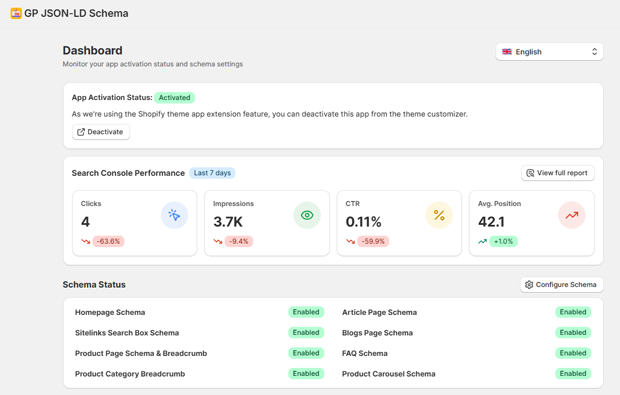
Crucially, it bridges the gap between Core Web Vitals and structured data through its built-in Image Optimization tool.
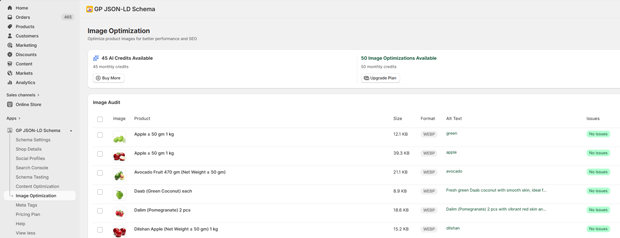
The app automatically scans your product images to identify issues with file size and format, helping you optimize them for faster page speed and better LCP.
Furthermore, optimized images directly enhance your schema markup, as the app uses product image alt text to feed the Product Schema.
Additionally, the app features direct Search Console Integration, allowing you to monitor schema performance, track clicks and impressions, and identify schema errors without ever leaving your Shopify dashboard.
Where Visuals Help Clarify the Fix: Checking Your LCP and Schema Errors
When diagnosing these issues, visuals are critical. If you are struggling to find where your schema is breaking, a dedicated testing interface can save hours of debugging.
Using a Schema Testing dashboard helps you validate markup, check if your structured data is correct, and identify errors before Google even crawls the page. You can input any URL from your store and inspect the error details directly. Seeing a clear “Valid” or “Error” badge next to your Product or FAQ schema makes it instantly obvious whether your rich results are safe.
Common Shopify Mistakes That Sabotage INP and Rich Results
Even experienced merchants make critical errors that destroy their technical SEO baseline.
- Stacking Multiple Schema Apps: Installing two different SEO apps often results in duplicate schema blocks of the same type on one page. This confuses search engines and can result in losing rich results entirely. You must disable conflicting schema in your theme to avoid duplicates.
- Ignoring Interaction to Next Paint (INP): Relying on heavy, JavaScript-based features like complex mega-menus or animated pop-ups delays browser responsiveness, destroying your INP score.
- Missing Basic Alt Text: Forgetting to add alt text doesn’t just hurt accessibility; it causes warnings in your Product Schema, degrading your rich result quality.
Smarter Alternatives When Standard Shopify Speed Fixes Don’t Work
If compressing images and removing old apps doesn’t fix your Core Web Vitals or restore your rich results, you need advanced tactics:
- Headless Commerce: If your INP is unfixable due to Shopify’s monolithic theme architecture, migrating to a headless setup (like Hydrogen/Oxygen) separates the frontend from the backend, allowing for sub-second load times.
- AI-Powered Content Optimization: Instead of guessing what Google wants, use data-driven insights. Advanced tools now offer AI-powered SEO recommendations based on your Google Search Console data, identifying high-priority content opportunities and actionable improvement tasks.
- Dynamic Rendering: Serve a pre-rendered, fully structured HTML snapshot to Googlebot to ensure it reads your schema instantly, while serving the interactive React/Vue frontend to actual users.
What To Do Next in Your Shopify Core Web Vitals Optimization Journey
Your immediate next step should be a technical triage. Open Google Search Console today. Look at the “Core Web Vitals” tab and the “Shopping” tab. If you see red “Poor” URLs or yellow “Needs Improvement” warnings, prioritize the pages with the highest traffic volume.
Fix your heaviest images first to secure quick LCP wins, then ensure your JSON-LD schema is active, deduplicated, and deeply integrated with your optimized assets.
FAQs: Core Web Vitals Rich Results Ranking Impact
Are Core Web Vitals a ranking factor in 2026?
Yes. Google explicitly uses Core Web Vitals (LCP, INP, CLS) as a ranking signal. Sites that fail these metrics struggle to rank, especially in highly competitive e-commerce search results and AI Overviews.
How does schema markup affect Core Web Vitals?
While JSON-LD schema itself is lightweight and doesn’t significantly slow down a site, the assets it references (like unoptimized high-res images) can ruin your LCP. Proper image optimization benefits both your Core Web Vitals and your schema quality.
What happens if I have duplicate schema on my Shopify store?
Multiple schema blocks of the same type on one page can confuse search engines, leading to errors and the loss of rich results. You must disable conflicting schema in your theme or other apps.
What is a good LCP score for Shopify?
Your Largest Contentful Paint (LCP) should occur within 2.5 seconds of the page starting to load. Keeping hero images under 200KB when possible is highly recommended to hit this metric.
Future-Proofing Your Shopify Store for 2026
The days of getting away with slow, unstructured Shopify sites are over. In 2026, search engine visibility is reserved for brands that treat technical SEO,specifically Core Web Vitals and Rich Results,as a unified strategy.
By aggressively optimizing your page speed and deploying pristine JSON-LD schema, you not only appease Google’s evolving AI algorithms but provide the frictionless, high-trust experience that modern shoppers demand.




