
If you run a Shopify store, you probably feel the pain of traffic that looks good in Google Analytics but doesn’t show up as sales.
You pay for clicks, get add‑to‑carts and checkout views, then watch buyers disappear.
Google Ads retargeting (also called remarketing) is how you get a second chance with those visitors, but the results depend heavily on how well you track and structure your data.
For many merchants, the real blocker is not “how do I run retargeting ads?” but “how do I trust the numbers and scale them?”
In this guide, we’ll walk through how Google Ads retargeting works for Shopify from a beginner-friendly setup to more advanced ROAS optimization, with a strong focus on getting your tracking and feedback loop right.
Summary:
- Google Ads retargeting lets you re-engage warm visitors instead of paying to reach cold traffic again.
- For Shopify, the real leverage comes from clean conversion tracking, clear audiences, and strong ad creative.
- Even a basic retargeting setup can recover a meaningful share of abandoned carts when combined with proper tracking.
- As you mature, you can layer advanced tactics like funnel-based audiences, smart bidding, and ROAS-focused reporting.
- Tools that automate Google Ads tracking and diagnostics, like AdTrack, make it easier to go from “is this working?” to structured optimization.
Google Ads retargeting for Shopify means showing ads to people who already visited your store or started checkout but didn’t buy, then optimizing those campaigns with accurate conversion tracking, segmented audiences, and ROAS-focused reporting to scale profitable spend.
Why Google Ads retargeting matters so much for Shopify merchants
Most Shopify merchants don’t struggle to get some traffic; they struggle to convert the traffic they already have. Industry research consistently shows that cart abandonment is the norm, not the exception. Baymard’s long-running checkout studies place global cart abandonment around 70%.
If you think about that in store terms, seven out of ten people who put something in their cart never finish. Email flows and on-site UX work can help, but a huge part of the puzzle is reaching those shoppers after they’ve left your site. Retargeting ads on Google’s properties (Search, Display, YouTube, Discover) are one of the most direct ways to do that.
When done well, retargeting narrows your spend to people who’ve already demonstrated intent—product viewers, cart starters, checkout abandoners—so you waste less budget “re-explaining” who you are to completely new users. Shopify itself frames Google Ads retargeting as a way to “save money on ad spend” by focusing on visitors more likely to buy.
At the same time, retargeting can quietly become a money sink if your tracking is off. If your Google Ads conversion data is incomplete or double-counted, Google’s bidding algorithms will optimize toward the wrong signals, and your ROAS will suffer. That’s why this article pairs audience strategy with a heavy emphasis on tracking infrastructure for Shopify stores.
What is Google Ads retargeting for Shopify?
Google Ads retargeting is the practice of showing ads specifically to people who have already interacted with your store—visited, viewed products, added to cart, or started checkout—but did not convert yet.
On Shopify, that looks like:
- A visitor lands from any source (SEO, Meta, email, Google Ads).
- Your Google tag or conversion pixel records their behavior: page views, product views, add‑to‑cart, checkout steps, purchase.
- Google builds remarketing lists (audiences) based on those actions—for example, “all visitors in last 30 days” or “cart abandoners.”
- You create campaigns or ad groups that target these specific audiences with tailored ads.
- Conversions are tracked back into Google Ads, so you can measure ROAS and let Smart Bidding optimize toward profitable users.
Google and Shopify both emphasize that the power of retargeting comes from this audience specificity: you’re not just paying to show an ad, you’re paying to show an ad to someone whose previous behavior suggests they’re closer to buying.
Recommended Blogs for You:
👉 Build GA4 Audiences That Actually Increase LTV
👉 Fix Cart Data Needs Attention in Google Ads for Shopify
👉 The Ultimate Shopify Tech Stack: From Tracking to AI Chat
👉 How to Diagnose Google Ads Campaign in Shopify
👉 How to Write Google Ad Copy for Shopify
What you need before starting Google Ads retargeting on Shopify
Before you even build a retargeting campaign, you’ll save yourself a lot of frustration by putting a few fundamentals in place.
1. A functioning Shopify store and product feed
- Your store should be live with real products, pricing, and shipping set up.
- For dynamic remarketing (showing specific products in ads), you’ll want a Google Merchant Center feed set up, often via Shopify’s Google & YouTube app or similar tools.
2. A Google Ads account with billing set up
- You need a Google Ads account with an active payment method and at least one campaign historically, even if it was testing.
- If you’re brand new, expect a short learning period while Google’s systems gather data on your store and audiences.
3. Clean Google Ads conversion tracking on Shopify
This is the step most merchants underestimate,and it’s the one that will determine whether your retargeting data is usable.
In broad strokes, you have two ways to handle Google Ads conversion tracking on Shopify:
- Manually: install tags or scripts yourself (or via Google Tag Manager), set up conversion actions, and pass the correct purchase values and customer data.
- With a dedicated tracking app: use a Shopify app that connects your store to Google Ads, automates conversion IDs and labels, and adds the necessary events for you.
Shopify’s own guidance on conversion tracking stresses the need to record user actions after the click to understand which ads lead to valuable events like purchases. If that tracking is wrong, every calculation that follows—CPA, ROAS, LTV by campaign—will be unreliable.
4. Enough traffic and conversions to feed retargeting
Google needs a minimum audience size to activate remarketing lists (typically 100 active users for Display and more for Search). You don’t need massive volume, but if you’re only getting a handful of visitors per day, retargeting will be slow to ramp up.
At a practical level, retargeting tends to work best once you’re consistently driving at least a few hundred visitors per month and seeing purchases every week, so Smart Bidding can learn.
Step-by-step: how to set up basic Google Ads retargeting for Shopify
This section assumes you’re starting from zero or near-zero. The goal is a solid, beginner-friendly setup that you can later refine.
Step 1: Install and configure AdTrack ‑ Google Ads Tracking
AdTrack, for example, is a Shopify app built specifically for Google Ads tracking and optimization. It connects directly to your Google Ads account, auto-syncs your conversion ID and labels in “Auto” mode, and supports both automatic and manual conversion setup.
With AdTrack, the typical flow is:
Install AdTrack from the Shopify App Store and open it inside your Shopify admin.
Activate the app embed and custom tracking pixel so it can record events like page views, add‑to‑cart, checkout steps, and purchases.
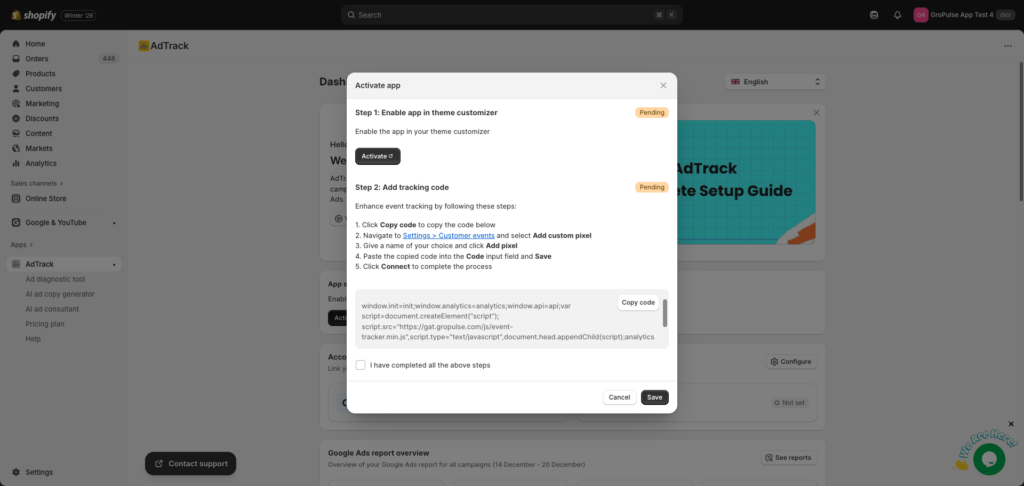
Connect your Google Ads account in Auto mode to automatically populate your conversion ID and link existing conversion actions, or use Manual mode to paste in IDs and labels yourself.

Enable purchase conversion tracking and, optionally, funnel events like Add to Cart, Begin Checkout, and Add Payment Info.
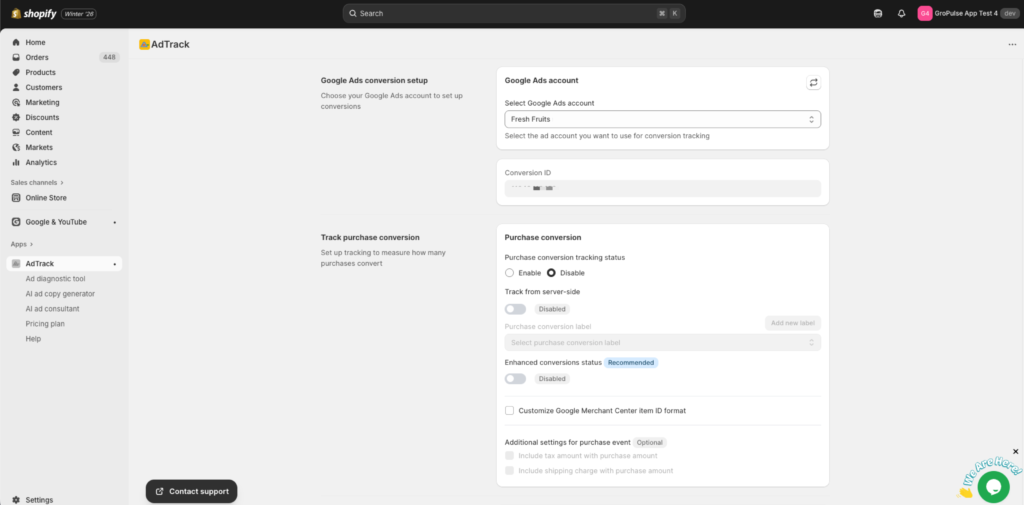
Verify on the AdTrack dashboard that your app status is Active, your Google account is connected, and your conversion ID shows as Complete.
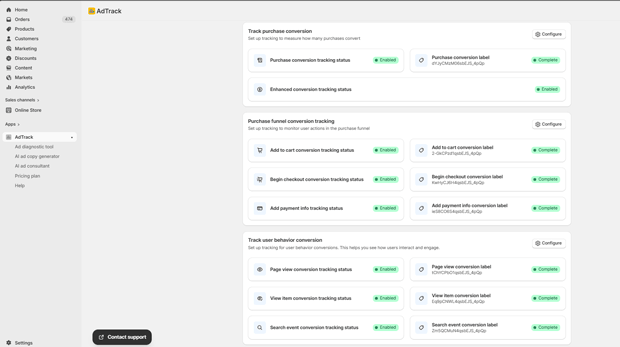
The app also supports Google’s Enhanced Conversions and Consent Mode v2, which can improve accuracy and privacy compliance in regions with stricter regulations.
Step 2: Confirm conversions are firing correctly
Before launching retargeting:
- Place a small test order on your store.
- Check Google Ads “Conversions” to confirm the purchase event is being recorded with a realistic value.
- In a tracking app like AdTrack, confirm that events are flowing through and that your dashboard shows conversions mapped to your Google Ads account.
This step is tedious but crucial. If you skip it, you risk optimizing and scaling based on broken data.
Step 3: Build your first remarketing audiences in Google Ads
Once your base tag and conversions are working, you can define your remarketing lists. Common Shopify-focused audiences include:
- All visitors in last 30 days
- Product viewers (visited product pages but didn’t add to cart)
- Add‑to‑cart but no purchase
- Checkout starters but no purchase
- Past purchasers (for upsell/cross-sell)
You can create these inside Google Ads under Audiences > Your data > Website visitors, using URL rules or event-based rules coming from your tag.
If you’re using a tracking app that sends structured events (page_view, view_item, add_to_cart, begin_checkout, purchase), you can build more precise lists based on those actions. AdTrack, for instance, specifically tracks purchase and funnel events, which you can reference when designing audiences.
Step 4: Create a simple retargeting campaign structure
For a first pass, keep things clean:
- Campaign 1 – “All visitors” (Display or Performance Max)
- Campaign 2 – “Cart & checkout abandoners” (Search + Display or Performance Max)
Within each campaign:
- Use more forgiving frequency caps for higher-intent segments (cart/checkout abandoners) and tighter caps for broad site visitors so you don’t annoy users.
- Start with a modest budget and automatic bidding like Maximize Conversions, then consider switching to Target CPA or Target ROAS once you have sufficient conversion volume.
Step 5: Write Shopify-specific retargeting ad copy
Retargeting ad copy can be more direct because you’re talking to people who know you. Good Shopify-specific angles include:
- Cart recovery: “Still thinking it over? Your cart is waiting.”
- Social proof: “Over X customers love [product type] like yours.”
- Objection handling: “Free returns, fast shipping, secure checkout.”
If you’re using a tool like AdTrack on a Pro plan, you can also lean on its AI Ad Copy Generator and AI Ad Consultant to brainstorm and refine variants faster based on your campaign performance data.
Step 6: Let it run and read the early signals
Give your campaigns at least 7–14 days of data before making big decisions, especially if you’re on Smart Bidding. Monitor:
- Conversion rate vs your standard campaigns
- CPA/ROAS for each audience segment
- Any clear mismatch between paid conversions and Shopify orders (which could indicate tracking issues)
This first phase is about proving that retargeting can drive incremental sales at a reasonable cost before you add complexity.
How clean Google Ads tracking improves Shopify ROAS for retargeting
It’s tempting to think of retargeting purely in creative and audience terms, but your tracking quality sits underneath everything.
Why accurate conversion tracking changes your economics
If your Google Ads account is missing conversions or double-counting them, Smart Bidding will incorrectly estimate user value. For example:
- Underreported conversions → Google thinks your traffic is less valuable, bids too low, and you lose impression share to competitors.
- Overreported conversions → Google thinks some audiences are more profitable than they are, bids aggressively, and your actual ROAS drops.
Accurate tracking, including enhanced conversions where appropriate, gives the algorithm cleaner feedback to optimize search terms, placements, and bids—especially important for retargeting where small audiences and higher bids magnify any data issues.
How AdTrack helps Shopify merchants close the tracking gap
Based strictly on its public listing and documentation, AdTrack is positioned as a Google Ads tracking and optimization tool for Shopify merchants. It focuses on:
- Automatic and manual conversion tracking for Google Ads, including purchase and funnel events, without requiring merchants to edit theme files.
- Enhanced conversions support to improve accuracy by sending hashed customer data where applicable.
- Google Consent Mode v2 support to align tracking with user consent preferences.
- Performance analytics like spend, conversions, ROAS, top search terms, and breakdowns by geo and device on the Pro plan.
- AI diagnostics that analyze campaign performance and suggest ways to boost results and reduce wasted spend.
In practice, that means a Shopify merchant can install the app, connect Google Ads, and have a structured tracking setup for retargeting without needing deep technical knowledge of tags, data layers, or GTM.
Because AdTrack surfaces Google Ads reports directly inside Shopify, it also reduces the “tool hopping” friction that often stops merchants from looking at performance beyond surface-level metrics.
For retargeting in particular, being able to see ROAS by campaign, device, and geography makes it easier to spot where remarketing is genuinely profitable versus where you’re just re-paying for cheap impressions.
Beginner-friendly Google Ads retargeting tactics for Shopify
If you’re just getting started, focus on a small set of proven, manageable tactics instead of trying to implement every advanced strategy immediately.
1. All visitors remarketing on Display or Performance Max
- Audience: “All website visitors in last 30 days” or 60 days.
- Channels: Google Display Network or Performance Max with a conservative budget.
- Goal: Stay top-of-mind, especially for consideration-stage visitors who browsed multiple products.
This is a broad net that can work well for new stores if your creative is strong and you keep your bid strategy and frequency sensible.
2. Cart and checkout abandoner campaigns
Cart abandonment is where a large chunk of potential revenue leaks out of a Shopify store. Research compiled by various ecommerce analysts places average abandonment rates around 70%, and some breakdowns show extra costs, forced account creation, and a complicated checkout as key drivers.
For retargeting, you can:
- Build an audience of users who added to cart or started checkout but did not complete purchase.
- Serve ads that address common hesitations—shipping clarity, returns policy, guarantees, or limited-time incentives.
A study summarized by VWO reported that, in one dataset, 26% of shoppers returned to complete purchases when retargeted, compared with only 8% without retargeting, underscoring how much impact well-timed ads can have on recovery.
3. Past purchasers for upsell and cross-sell
- Audience: Customers who purchased within the last 90–180 days.
- Strategy: Promote complementary products, bundles, or replenishment reminders.
- Benefit: Higher lifetime value and more efficient ROAS because you’re marketing to known buyers.
When your tracking sends purchase events correctly from Shopify into Google Ads, it’s easier to exclude recent purchasers from “new customer” campaigns and build dedicated upsell remarketing.
Advanced ROAS optimization strategies for Shopify Google Ads retargeting
Once you’ve proven that basic retargeting pays for itself, you can start layering more advanced tactics. These tend to matter most for stores with consistent volume and a serious commitment to paid acquisition.
1. Segment by funnel stage and time since visit
Instead of treating all retargeting traffic the same, you can segment:
- Product viewers (low-to-medium intent) vs cart/checkout starters (high intent).
- Recent visitors (last 7 days) vs older visitors (8–30+ days).
That allows you to:
- Bid more aggressively on high-intent segments.
- Increase incentives (discounts, bundles, free shipping) as time passes and the likelihood of conversion drops.
Google Ads allows you to set different bid adjustments or create dedicated campaigns per audience segment; having clean add_to_cart and begin_checkout events coming from Shopify through your tracking solution makes this viable.
2. Use Target ROAS with reliable conversion value tracking
For stores with a clear average order value and stable margins, Target ROAS can be powerful for retargeting. The catch: you must send accurate conversion values for each purchase.
With a setup that passes purchase values from Shopify to Google Ads (through native apps or a tracking tool like AdTrack), you can:
- Let Google bid higher where it expects high-value orders (based on past patterns).
- Keep control by specifying a minimum acceptable ROAS (for example, 400%, depending on your margins).
Without proper value tracking, Target ROAS becomes guesswork and can lead to either overbidding or excessive conservatism.
3. Analyze search terms and geography from retargeting traffic
Many merchants look only at surface metrics like overall ROAS, but you can often improve performance by pruning wasteful search terms and overrepresented low-value geos.
On the reporting side, AdTrack’s Pro plan offers Google Ads performance reports, including:
- Spend, revenue, conversions, and ROAS.
- Top search terms, showing which queries lead to conversions or wasted clicks.
- Geo and device breakdowns to highlight where your ads perform best.
By aligning those insights with your retargeting audiences, you can:
- Negative match irrelevant search terms that are frequently triggering retargeting ads.
- Adjust bids or even exclude regions where conversions are low-value or returns are high.
4. Use AI diagnostics to identify underperforming campaigns
Manually combing through campaign data is time-consuming, which is why many merchants neglect it. AdTrack’s AI-powered diagnostic tool is designed to scan your Google Ads account and surface:
- Underperforming campaigns and ad groups.
- Imbalanced spend vs conversions.
- Opportunities to adjust bids, budgets, or targeting.
For retargeting specifically, this can help you detect when:
- A broad visitor remarketing campaign is hogging budget but generating poor ROAS.
- High-intent audiences are limited by budget.
- Certain devices or networks (e.g., mobile placements on Display) are dragging down performance.
Combined with human judgment, those diagnostics can accelerate your test-and-iterate cycle.
Common Google Ads retargeting mistakes Shopify merchants should avoid
Even experienced merchants fall into a few predictable traps when they roll out retargeting.
1. Launching retargeting without fixing tracking
Running retargeting on broken or incomplete tracking is one of the fastest ways to lose money because you’re rearranging budget based on faulty data.
If your Shopify store is still using outdated tags, has multiple overlapping scripts, or doesn’t send purchase values, make tracking cleanup your first priority. A focused tracking app can help centralize this.
2. Overlapping audiences and double counting
If your “All visitors” and “Cart abandoners” audiences overlap and both campaigns target them without exclusions, you can:
- Auction against yourself, driving up CPC.
- Make it harder to attribute which campaign truly drove the conversion.
Solve this by building clean exclusions (for example, exclude purchasers from prospecting; exclude product viewers from specific campaigns if they’re targeted elsewhere).
3. Over-frequency and ad fatigue
Retargeting works because it reminds, not because it stalks. If your audience sees your ad ten times a day across Google properties, you risk:
- Increased annoyance and negative brand perception.
- More spend on impressions that will never convert.
Use frequency caps judiciously and watch performance over time. Higher-intent audiences can tolerate more impressions than broad ones, but still have limits.
4. Ignoring mobile UX issues
If your Shopify checkout is clunky on mobile, a retargeting campaign that succeeds in driving users back to that same friction might not move the numbers. Baymard’s UX research consistently highlights checkout usability and extra costs as primary drivers of abandonment; simply sending more traffic back without resolving these issues caps your upside.
Pair retargeting with ongoing UX improvements—simpler forms, clearer shipping, guest checkout, and trustworthy microcopy.
What to do after you’ve implemented Shopify Google Ads retargeting
Once your retargeting is stable and profitable, think about the broader growth system you’re building.
- Tighten your measurement stack: cross-check Google Ads, Shopify, and any tracking apps regularly to ensure they tell a coherent story.
- Expand your audience strategies: test lookalike-style expansion via Google’s audience signals, using your best-performing remarketing lists as a seed.
- Align with other channels: coordinate offers and messaging across email, SMS, and paid social so retargeting feels like part of a connected experience, not random ads.
- Leverage AI tools thoughtfully: use AI-based diagnostics and copy generation, like those in AdTrack’s Pro plan, to move faster, but always validate recommendations against your real numbers and brand.
Over time, your goal is to treat retargeting not as a separate “hack” but as a core part of how you monetize your traffic—backed by trustworthy data and a disciplined testing process.
Frequently Asked Questions
What is Google Ads retargeting for Shopify?
Google Ads retargeting for Shopify is showing ads to people who have already visited your store or taken actions like viewing products or adding to cart, with the goal of bringing them back to complete a purchase.
How do I set up Google Ads retargeting on my Shopify store?
You need to install Google’s tracking (via native apps, Tag Manager, or a tracking solution), set up conversion actions, create remarketing audiences based on user behavior, and then build campaigns targeting those audiences.
Do I need a special app to track Google Ads conversions on Shopify?
You can configure tags manually, but many merchants use tracking apps that integrate directly with Google Ads, sync conversion IDs and labels, and handle events like purchases and checkout steps automatically to reduce errors.
How does AdTrack help with Google Ads retargeting on Shopify?
AdTrack connects your Shopify store to Google Ads, automates conversion tracking (including enhanced conversions and funnel events), supports Consent Mode v2, and provides Google Ads performance reports and AI diagnostics that help optimize retargeting campaigns.
What audiences should I use for Google Ads retargeting on Shopify?
Start with all visitors, product viewers, cart abandoners, checkout starters, and past purchasers. As you grow, segment by time since visit and purchase value to refine bids and messaging.
How much budget should I allocate to Google Ads retargeting?
It depends on your traffic, but many stores start by allocating a smaller share of Google Ads spend to retargeting and then scale budgets in segments with strong ROAS and enough volume for Smart Bidding.
Does retargeting really reduce cart abandonment?
Retargeting can help recover a portion of abandoned carts by reminding visitors and addressing objections after they leave. One analysis cited by VWO reported 26% of shoppers returned with retargeting versus 8% without it.
What is Enhanced Conversions in Google Ads, and should I enable it?
Enhanced Conversions sends hashed customer data alongside conversion events to improve measurement when cookies are limited. It can increase tracking accuracy and support better bidding decisions, and some Shopify tracking apps support enabling it.
How do I measure ROAS for my Shopify retargeting campaigns?
Make sure purchase values from Shopify are passed to Google Ads as conversion values, then monitor revenue, cost, and ROAS at campaign and audience levels via Google Ads reports or integrated reporting within your tracking tool.
What should I do if my Google Ads retargeting isn’t converting?
Check conversion tracking first, then review audience definitions, frequency caps, and ad relevance. Use reports and, where available, AI diagnostics to identify underperforming segments, search terms, or placements and adjust bids, budgets, or creatives accordingly.




