
For most Shopify merchants, the goal is global reach. But for a growing segment of “Service Area Businesses” (SABs)—think local boutique furniture makers who offer delivery or specialized consultants—the most valuable customers are right in their backyard.
According to Google, 46% of all searches have a “local intent.” If you aren’t communicating your service area clearly to search engines, you are essentially invisible to nearly half of your potential traffic.
The problem? Standard Shopify themes are built for global e-commerce, not local relevance. They lack the structured data (JSON-LD) required to tell Google, “I don’t just sell this product; I serve customers in these specific zip codes.” This article will walk you through the exact process of bridging that gap using Local Business Schema.
To add Local Business Schema to Shopify, install GP JSON-LD Schema, navigate to Schema Settings, and enable Local Business Schema. Ensure your “Shop Details” are accurate to help Google identify your service area and display rich local results.
Summary
- What it is: A guide to implementing Local Business Schema specifically for Shopify stores that serve specific geographic areas.
- Who it helps: Shopify merchants providing local services (e.g., home decor installation, local delivery, or consulting) rather than just shipping nationwide.
- The Benefit: Improved visibility in Google’s “Local Pack” and higher trust through rich snippets.
- Key Tool: We’ll use the GP JSON-LD Schema app to automate the technical setup.
What You Need Before Configuring Local Business Schema on Shopify
Before you touch your code or open an app, you need to gather your NAP+S data. In the world of Local SEO, consistency is the ultimate ranking factor.
- Name: Your official business name (must match your Google Business Profile).
- Address: Your physical headquarters (even if you don’t allow walk-ins, Google needs a point of origin).
- Phone: A local area code number is preferred over a 1-800 number for local trust.
- Service Area (The ‘S’): A list of the cities, counties, or the radius (in miles/km) you serve.
Expert Insight: Many Shopify merchants make the mistake of using a different business name on their website than they do on their Google Business Profile. BrightLocal research indicates that NAP consistency is a top-five local ranking factor. Ensure every character matches perfectly.
How to Enable Local Business Schema in GP JSON-LD Schema
The most efficient way to handle structured data without breaking your Shopify theme is through a dedicated app. Here is how to set up your local presence using the GP JSON-LD Schema app.
1. Activate the App Extension
Before the schema can appear, the app must be live in your theme.
- Open the GP JSON-LD Schema dashboard.
- Click Activate (this redirects you to the Shopify Theme Editor).
- Toggle the app block to On and click Save.
2. Navigate to Local Business Settings
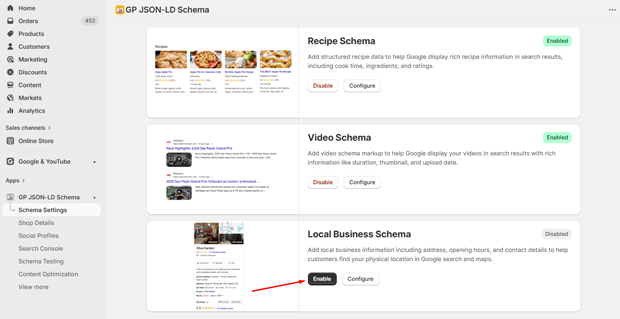
- In the app sidebar, go to Schema Settings.
- Locate the Local Business Schema section (available on the Free plan).
- Click Enable.
3. Configure Your Business Identity
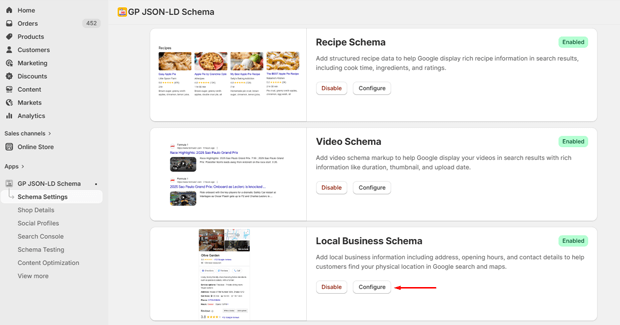
The app pulls data from your store settings to build the code. As noted in the app’s documentation, you must ensure your Shop Details and Social Profiles are fully configured within the app to populate the schema correctly. This includes your brand logo, founding information, and social links which help Google verify your business’s legitimacy.
4. Defining Your Service Area
While the app automates the core LocalBusiness entity, you should ensure your store’s “About” or “Contact” pages explicitly list your service regions. This helps Google’s AI correlate the structured data with your on-page content.
Recommended Blogs for You:
👉 AI Meta Tags Generator for Shopify Products Automatically
👉 Top 10 Schema Types Every Shopify Store Should Use
👉 Schema Markup for Shopify: Complete Implementation
👉 Shopify Product Page SEO: The Ultimate Optimization Guide
Why Service Area Schema is a Game Changer for Local SEO
When you implement Local Business Schema, you aren’t just “doing SEO”—you are providing a map for Google’s crawlers. For service-based Shopify stores, the areaServed property is the most critical piece of the puzzle.
When Google understands your service area, you become eligible for:
- The Local Pack: The “Map” results at the top of Google Search.
- Knowledge Panels: The detailed info box on the right side of search results.
- Voice Search: “Find [product] near me” queries on Siri or Google Assistant.
AEO Note: For those looking to rank in Google’s AI Overviews, structured data is the primary source of truth. If a user asks Gemini, “Who delivers organic dog food in Austin?”, the AI looks for the LocalBusiness schema and areaServed data to provide an accurate answer.
Expert Tips for Optimizing Local Schema in Real Shopify Stores
- Don’t Overcomplicate the Radius: If you serve a 50-mile radius, it’s often better to list the top 5-10 major cities or counties you serve in your description and Shop Details. Specificity beats a generic radius in search relevance.
- Sync with Google Business Profile: Your schema should be a mirror image of your Google Business Profile (GBP). If your GBP says you close at 5 PM, but your schema says 6 PM, Google may lower your trust score.
- Use Content Optimization: Once your schema is live, use the AI Content Optimization feature in GP JSON-LD Schema. This tool analyzes your Search Console data to suggest content tweaks that can further boost your local rankings.
How to Test Your Shopify Local Schema for Errors
Never assume your schema is working just because you toggled a switch. You must validate the code.
- In-App Testing: Use the Schema Testing menu in the GP JSON-LD Schema app. Enter your homepage URL and click Inspect URL.
- Google Rich Results Test: This is the gold standard. Paste your URL into the Google Rich Results Test tool. Look for a green checkmark next to “Local Business.”
- Search Console Monitoring: Once the app is integrated with your Google Search Console, monitor the “Enhancements” tab. Google will alert you if there are any missing fields (like a missing phone number or price range) in your Local Business markup.
Common Shopify Local SEO Mistakes to Avoid
- Enabling Multiple Schema Apps: This creates “Schema Drift,” where Google sees two different sets of instructions. Pick one tool—like GP JSON-LD Schema—and disable any theme-built schema to avoid duplicates.
- Ignoring Password Protection: If your store is still under a password during development, Google cannot crawl your schema. As mentioned in the GP JSON-LD troubleshooting docs, you must disable password protection for Google to index your local data.
- Fake Information: Never add a physical address that doesn’t exist just to try and rank in a different city. Google’s verification algorithms are highly sophisticated; “hallucinating” a location can lead to a manual penalty.
Frequently Asked Questions
Does Shopify have Local Business Schema built-in?
Most standard Shopify themes include very basic “Organization” schema but rarely include the detailed “Local Business” or “Service Area” properties required for local rankings. A dedicated app like GP JSON-LD Schema is usually required.
How long does it take for Local Schema to show in Google?
According to the GP JSON-LD documentation, it typically takes 1 to 2 weeks for Google to re-crawl your site and update its index, though it can take up to 4 weeks in some cases.
Is Local Business Schema free?
Yes, in the GP JSON-LD Schema app, Local Business Schema is included in the Free Plan, making it an essential starting point for new merchants.
Can I use Local Business Schema if I don’t have a physical storefront?
Yes. This is called a “Service Area Business.” You should use your registered business address in the schema but specify your service areas to tell Google you travel to customers.
Conclusion: Your Next Steps in Shopify Local Optimization
Implementing Local Business Schema is the single most effective “set it and forget it” task for local Shopify SEO. By clearly defining your service area in a language search engines understand, you move your store from the “global void” into the local spotlight.




