
For many Shopify B2B merchants, the “one order, one invoice” model is a logistical nightmare. If a wholesale customer places four orders a week on Net-30 terms, your accounting team ends up chasing 16 separate payments a month. It’s inefficient, prone to error, and creates unnecessary friction for your best customers.
In 2026, B2B commerce is moving toward “frictionless reconciliation.” Modern buyers don’t want a pile of PDFs; they want one clear statement that matches their accounts payable workflow.
This guide walks through exactly how to consolidate these orders without losing your mind, or your data integrity, in a sea of spreadsheets.
Summary
- The Goal: Streamline wholesale accounting by merging multiple orders into a single, tax-compliant monthly statement.
- Who it’s for: Shopify Plus and B2B merchants managing net-term payments and high-frequency wholesale buyers.
- Key Takeaway: Shopify treats every checkout as a unique transaction. Use Company Profiles and a dedicated app like GP PDF Invoice Generator to automate consolidation.
- 2026 Context: Future-proof your billing with AI-parseable e-invoicing (ZUGFeRD/Factur-X) and automated Shopify Flow triggers.
How do you consolidate orders on Shopify?
- Group Customers: Assign all buyers to a single Shopify Company profile.
- Select Orders: Identify fulfilled or partially fulfilled orders within a specific billing cycle.
- Use a Billing App: Use a tool like GP PDF Invoice Generator to aggregate these orders into a single, tax-compliant PDF.
- Sync Terms: Ensure the final invoice reflects the Net Terms (e.g., Net-30) set at the Company level.
Why “One Order, One Invoice” is Killing Your B2B Growth
If you’re scaling a wholesale operation, you’ve realized that B2B buyers don’t behave like DTC shoppers. According to 2025 B2B commerce benchmarks, over 70% of professional buyers prefer consolidated monthly billing to reduce administrative overhead.
When you force a buyer to pay 12 separate invoices for 12 weekly deliveries, you’re adding “payment friction.” In high-volume wholesale, friction is a conversion killer.
Furthermore, consolidating invoices drastically improves your Days Sales Outstanding (DSO) by aligning with the buyer’s single monthly “approval and release” cycle.
Statement of Account vs. Consolidated Invoice
| Feature | Statement of Account | Consolidated Invoice |
| Primary Purpose | Overview of all outstanding balances. | Legal tax document for payment. |
| Legal Status | Non-tax document (informational). | Tax-compliant (for VAT/GST). |
| Action Required | Review total debt. | Remit payment for specific line items. |
| AI Parsing | Difficult for accounting bots. | Easy for AI-driven ERPs (ZUGFeRD). |
Recommended Blogs for You:
👉 5 Must-Have Elements in a Professional Shopify Packing Slip
👉 How to Offer Personalized Gift Messages on Shopify
👉 Shopify Checkout Page Optimization for Upsells & Post-Purchase Offers
The Prerequisite: Setting Up Shopify Company Profiles for Billing
Before you can merge orders, your Shopify admin must recognize that these separate purchases belong to the same entity.
- Shopify B2B (Company Profiles): You must have the customer assigned to a “Company.” This links various individual buyers (staff) to a single billing address and tax ID.
- B2B Roles & Permissions: Note that only a user with “Company Admin” permissions will be able to view the consolidated history in their B2B customer portal.
- Net Terms Configuration: Most consolidated billing happens on Net-15 or Net-30 terms. Ensure these are set at the Company level to allow orders to remain “Unpaid” until the end-of-month merge.
How to Merge Shopify B2B Orders (Manual vs. Automated)
Method 1: The Draft Order Workaround (Low Volume)
If you only have one or two B2B customers, you can do this manually, though it is labor-intensive:
- Tag the Orders: Mark all monthly orders with a tag (e.g., June-Consolidation).
- Create a New Draft Order: Manually add the line items from all previous orders into one large Draft Order.
- Apply a 100% Discount to Originals: Cancel or zero-out the original orders to avoid double-counting revenue.
WARNING: This method is high-risk. Applying 100% discounts to original orders breaks Shopify’s Native Analytics, artificially tanking your Average Order Value (AOV) and Conversion Rate reports.
Method 2: Automating Aggregated Billing (The Professional Workflow)
For merchants using the 2026 Shopify API, the most reliable way to handle this is via an app designed for B2B.
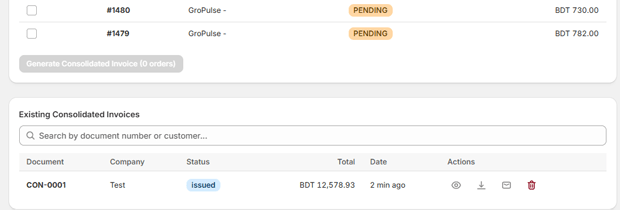
Install a Dedicated App: Tools like GP PDF Invoice Generator pull data directly from Shopify’s Company and Order GraphQL objects.
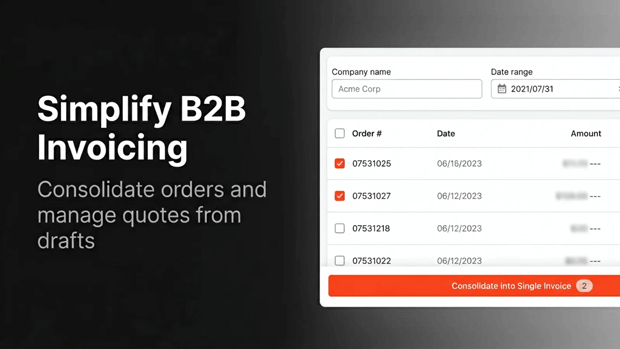
Select Your Range: Filter by Company Name and the Date Range (e.g., April 1st to April 30th).
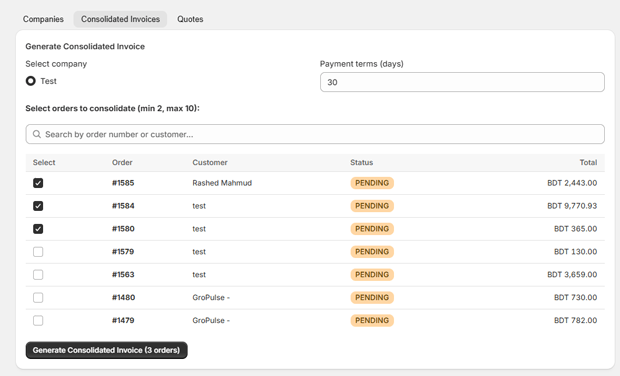
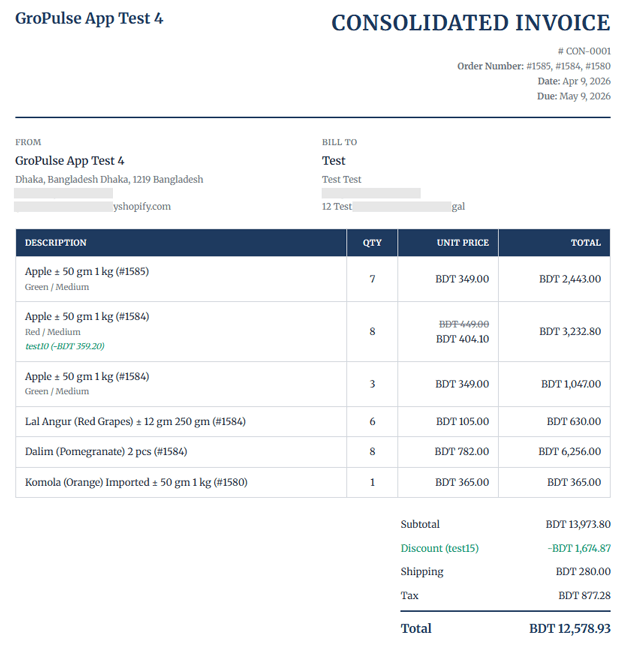
Generate & Sync: The app fetches individual orders, aggregates line items, taxes, and shipping fees, and generates a single PDF.
Automatic Delivery: Set a Shopify Flow trigger to email the consolidated PDF to the company’s primary billing contact once the “Statement Date” is reached.
2026 Compliance: E-Invoicing (ZUGFeRD) and Consolidated VAT
As of 2026, many regions (especially the EU) require Structured E-Invoicing.
- AI Readability: Tools like GP PDF Invoice Generator now embed XML metadata (ZUGFeRD/Factur-X) into the PDF. This allows your buyer’s AI-driven accounting software (like Xero or QuickBooks AI) to parse the data instantly without manual entry.
- Tax Breakdown: To remain compliant, your consolidated invoice must include a table breaking down the VAT/GST per individual order number and supply date.
Frequently Asked Questions About Shopify B2B Billing
Can Shopify Flow automate the consolidation process?
Yes. You can use Shopify Flow to tag orders as they come in and trigger your invoicing app to generate a “Draft Statement” whenever a new order is linked to a specific Company ID.
How do I handle shipping costs for 5 orders on one invoice?
When using an automated tool, shipping costs are pulled as individual line items. You can choose to list them per order or aggregate them into a single “Total Shipping” line to simplify the buyer’s view.
Does consolidated billing affect Shopify Markets?
Currency mismatches are a blocker. You cannot consolidate orders placed in different currencies. Ensure your B2B Company is locked to a single functional currency (e.g., USD only) to maintain accounting integrity.
How is this presented in the Shopify B2B Customer Portal?
While Shopify’s native portal shows individual orders, you can use Checkout Extensibility or app blocks to display a “Download Monthly Statement” button directly on the customer’s account page.
Final Recap: Scaling Your B2B Operations
Consolidating invoices is a strategic move to reduce payment cycles and lower administrative costs.
It signals to wholesale partners that you have the enterprise-grade infrastructure to handle high-volume accounts.
If you’re ready to move beyond manual spreadsheets, leveraging the Shopify GraphQL API through a specialized tool like GP PDF Invoice Generator will automate your compliance and keep your B2B customers coming back.




