
In ecommerce, the “unboxing experience” is the peak of customer excitement. Yet, most merchants treat the packing slip as a boring warehouse checklist.
According to the Baymard Institute, roughly 12% of shoppers have returned an online purchase in the last year. A significant portion of friction in those returns stems from poor documentation. When a customer can’t immediately verify what’s in the box, their excitement turns into a support ticket.
In our audits of high-growth DTC brands, we’ve found that transitioning from generic receipts to branded packing slips with clear “Next Steps” can reduce initial support inquiries by up to 15% and improve repeat purchase rates by 3–7% within the first 30 days.
Key Takeaways
- The Goal: Turn a sterile warehouse document into a high-converting marketing asset.
- The ROI: Professional slips reduce “Where is my order?” (WISMO) tickets and increase Customer Lifetime Value (CLV).
- The Shortcut: Use a drag-and-drop tool like GP PDF Invoice Generator to bypass complex Liquid code.
What belongs on a Shopify Packing Slip?
To satisfy both customer clarity and AI-driven search queries, every slip must include:
- Order & Variant Details: Specifics like SKU, size, and color to prevent returns.
- Brand Identity Assets: High-resolution logo and brand colors for consistency.
- Returns & Support Info: A QR code linking to your support portal or care guides.
- Personalized Messaging: A “Thank You” that includes the customer’s name.
- Retention Hook: A “bounce-back” discount code for the next purchase.
Common Problems with Default Shopify Packing Slips
Many merchants rely on the native Shopify “Print Packing Slip” function. While reliable, the default Liquid templates present two major hurdles:
- The Brand Disconnect: A customer buys from a premium storefront but receives a 1990s-style accounting receipt. This breaks the “premium” feel of the brand.
- The Technical Barrier: To add a simple logo or a QR code, you must edit HTML and Liquid code. For most merchants, this hurdle leads to “good enough” paperwork that leaves money on the table.
Recommended Blogs for You:
👉 How to Offer Personalized Gift Messages on Shopify
👉 5 Smart Ways to Build Urgency on Shopify
👉 Shopify Local Business Schema
👉 AI Meta Tags Generator for Shopify
5 Must-Have Elements for a Professional Packing Slip
1. Accurate Order and Variant Specifics
Accuracy is the primary job of a packing slip. Do not just list the product name; include the variant details (e.g., “Size: Large, Color: Charcoal”). This allows the customer to verify their order at a glance, significantly reducing “wrong item received” complaints that are often just customer confusion.
2. High-Resolution Brand Identity Assets
Your packing slip should be a physical extension of your website. Ensure your logo is high-DPI (not pixelated) and your primary brand font is represented. Visual consistency reinforces brand recall—when they see that logo, the unboxing feels like a curated experience.
3. Support QR Codes and Return Instructions
Don’t make customers dig through their email to find out how to return an item.
- Pro Tip: Include a QR code that links directly to your Shopify Returns Portal or a “How-to-Use” video. This bridges the gap between the physical product and your digital ecosystem instantly.
4. Personalized “Relational” Messaging
A simple “Thanks for supporting [Brand Name], [Customer Name]!” shifts the relationship from transactional to relational. In an era of faceless Amazon deliveries, showing that a human processed the order builds immense trust.
5. The “Bounce-Back” Retention Hook
The packing slip is the most underutilized real estate for marketing. Add a small section: “Love your order? Get 10% off your next one with code: AGAIN10.” Since the customer is already happy with their new product, the likelihood of them using this code is at its highest.
Tools to Automate Professional Templates
You shouldn’t have to hire a developer to make your paperwork look good. GP PDF Invoice Generator is built to solve this exact merchant pain point.
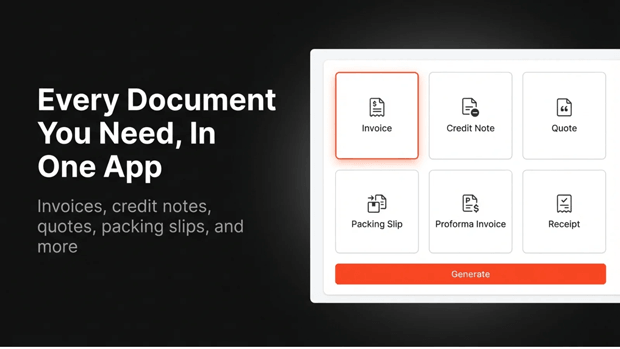
Instead of fighting with Liquid code, it provides a drag-and-drop interface to create:
- Branded Packing Slips & Invoices: Maintain a consistent look across all documents.
- B2B Documentation: Easily consolidate wholesale orders or handle quotes from draft orders.
- Eco-Friendly Options: Set up automated PDF emails to reduce paper waste while still providing professional documentation.
By using a specialized tool, you ensure your documents are multi-language ready and perfectly aligned with your brand’s visual identity without touching a single line of code.
Common Mistakes to Avoid
- Printing Prices on Gift Slips: Always use a tool that can “hide prices” if the order is marked as a gift.
- Low-Resolution Graphics: If your logo looks blurry, your brand looks amateur.
- Ignoring Paper Quality: If your margins allow, use a slightly heavier paper stock. It makes a $50 order feel like a $500 one.
Next Steps for Shopify Optimization
- Self-Audit: Order a product from your own store. Does the paper look like it belongs to your brand?
- Add One “Action”: Start by adding a QR code for your Instagram or a feedback form.
- Upgrade the Tech: Move away from generic Shopify templates and start treating your packaging as a marketing asset with GP PDF Invoice Generator.
Freequently Asked Questions
What is the difference between a Shopify packing slip and an invoice?
A packing slip is a fulfillment document listing physical items for the customer and warehouse. An invoice is a legal billing document containing prices, taxes, and payment terms. Most Shopify apps allow you to generate both simultaneously.
Can I include a QR code on my Shopify packing slip?
Yes. While it requires custom Liquid code in the default settings, third-party apps like GP PDF Invoice Generator allow you to drag-and-drop QR codes to link to return portals or social media.
Should I include product prices on my packing slip?
Generally, no. Packing slips are for order verification. Keeping prices off the slip is best practice, especially for orders intended as gifts. Prices should be reserved for the invoice.




