
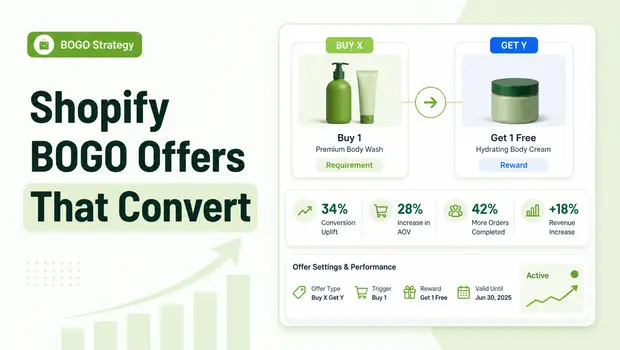
Running a Buy X Get Y (BOGO) offer is one of the fastest ways to move aging inventory and instantly boost your Average Order Value (AOV). For Shopify merchants, it is a tried-and-true merchandising lever.
However, poorly executed BOGO offers often lead to frustrated customers, margin erosion, and abandoned carts.
Today’s Shopify ecosystem demands more than just a basic discount code buried in an email. Customers expect seamless, visual, in-cart experiences where their free or discounted items are applied automatically.
Furthermore, with the rollout of advanced Shopify Discount Functions and Theme App Extensions, there is no longer a valid excuse for relying on outdated apps that hijack your native checkout.
This guide breaks down exactly how to structure, set up, and scale your Shopify BOGO strategy so you can lift AOV without breaking your store’s native functionality.
Summary
- Outcome: Learn how to configure, launch, and optimize profitable “Buy X Get Y” (BOGO) offers on Shopify.
- Audience: Shopify DTC founders, store managers, and CRO specialists looking to increase Average Order Value (AOV).
- Takeaways: A step-by-step setup framework, placement strategies for maximum visibility, and a guide to using native Shopify discount functions to prevent checkout conflicts.
- Nuance: Basic BOGO codes are often clunky; modern Shopify stores are shifting toward seamless, tiered “mix and match” bundles using native functions.
To set up a Buy X Get Y offer on Shopify, navigate to your admin dashboard, click “Discounts,” and select “Create discount.” Choose “Buy X Get Y,” define your customer purchasing requirements (quantity or amount), and set the corresponding free or discounted reward item.
Why Basic Shopify BOGO Offers Matter Today
According to Baymard Institute’s historical checkout usability studies, extra costs like unexpected shipping fees are a leading cause of cart abandonment. BOGO offers elegantly counter this friction by adding undeniable, immediate value to the cart before the customer ever reaches the shipping calculation step.
However, many merchants struggle with execution. Common mistakes include forcing users to manually add the “free” item to the cart, creating conflicting discount codes, or relying on third-party apps that replace the native Shopify checkout with a custom one. When custom checkouts are introduced, vital features like Shop Pay, native gift cards, and advanced fraud rules often break.
Mastering Shopify BOGO means understanding how to use Shopify’s native discount logic to create a frictionless shopping experience that nudges customers to spend just a little bit more.
What You Need Before Starting a Shopify Buy X Get Y Campaign
Before you touch the Shopify admin, you need to map out the financial and strategic parameters of your offer. Launching a BOGO without clear guardrails is the easiest way to accidentally drain your profit margins.
- Calculate Your Margins on Target SKUs: Understand the exact landed cost of your “Y” (get) item to ensure the combined sale remains profitable.
- Determine Your Primary Goal: Are you trying to clear out dead stock, or are you trying to increase AOV on high-performing flagship products? Your goal dictates which products you pair.
- Choose the Offer Type: Decide between “Buy One Get One Free” (maximum conversion) or “Buy One Get One 50% Off” (better margin protection).
- Define Exclusions: Identify products, collections, or customer segments (like wholesale accounts) that should be excluded from the promotion.
Step-by-Step Instructions To Complete a Buy X Get Y Setup on Shopify
Setting up a basic BOGO offer natively in Shopify is straightforward. Follow these steps to ensure your discount applies correctly.
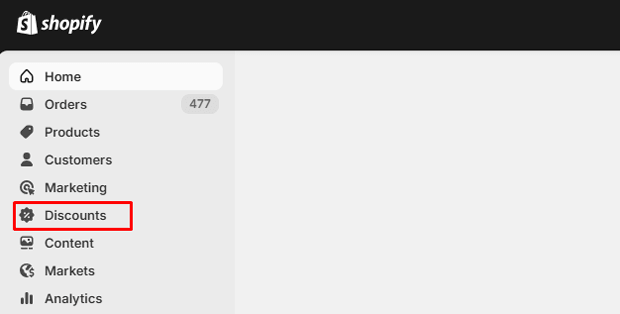
Navigate to the Discounts Menu: Open your Shopify admin, and click on Discounts in the left-hand sidebar.
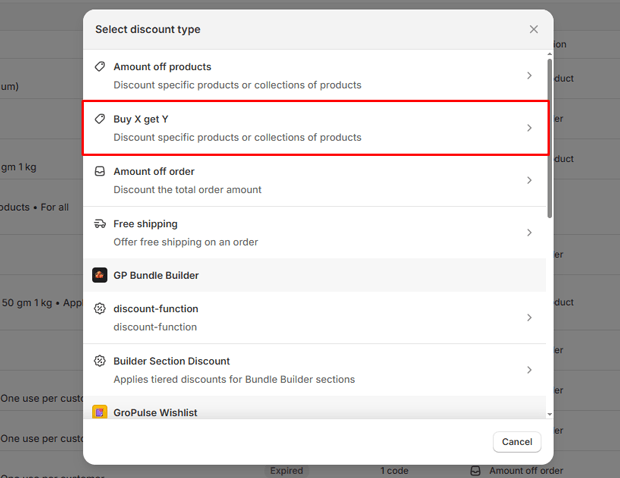
Create a New Discount: Click the Create discount button and select the Buy X get Y option from the menu.
Choose Code or Automatic: Select Automatic discount if you want the offer applied instantly in the cart (highly recommended for conversion rates), or Discount code if this is an exclusive offer for email/SMS subscribers.
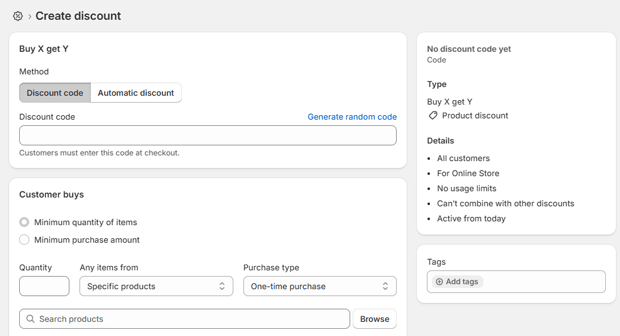
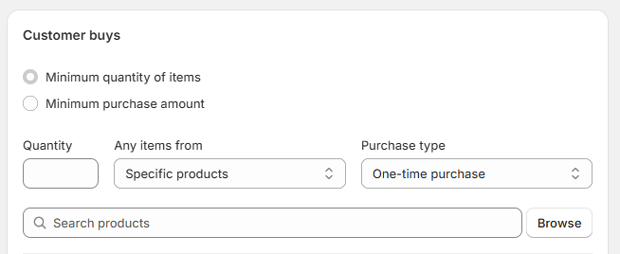
Define Customer Buys (X): Set the minimum quantity or purchase amount required. Select the specific products or collections the customer must add to their cart.
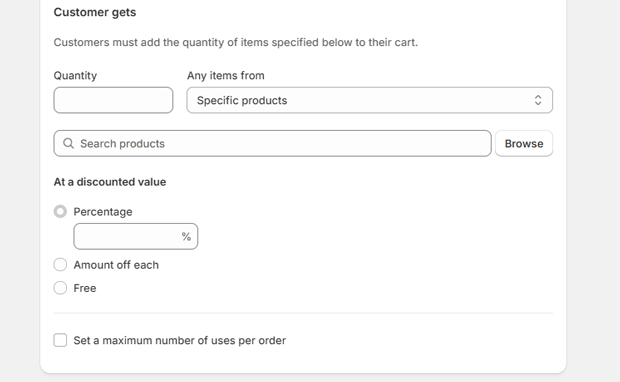
Define Customer Gets (Y): Specify the quantity and the exact products/collections the customer will receive. Set the discount value to either “Free” or a specific “Percentage” off.
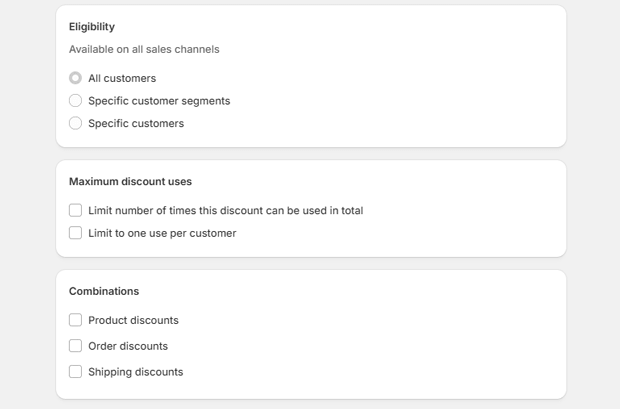
Configure Maximum Uses: Set a limit on the number of times the BOGO can be applied per order to protect your inventory.
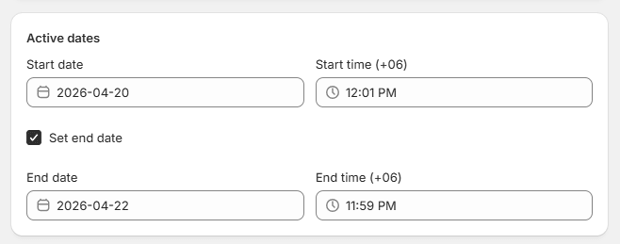
Set Active Dates: Schedule your start and end times to automate the campaign launch and conclusion.
Where to Display BOGO Offers for Maximum Shopify Conversion Rates
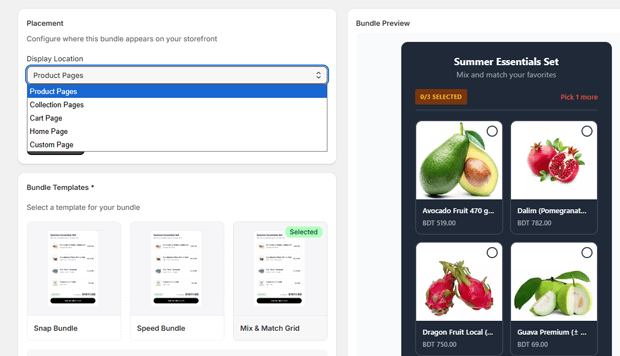
An active discount is useless if customers don’t know it exists. To maximize your BOGO conversion rate, you need to display the offer at key friction points throughout the buying journey.
- Sitewide Announcement Bars: Use a sticky header to promote the BOGO offer across all pages.
- Product Page Hero Text: Place the offer prominently near the “Add to Cart” button on qualifying product pages.
- Slide-Out Cart / Cart Drawer: Display a dynamic progress bar in the cart drawer (e.g., “Add one more serum to get a free moisturizer!”).
- Dedicated Landing Pages: If running a major Q4 or holiday campaign, route paid traffic to a specific page detailing the BOGO terms.
Smarter Alternatives to Basic BOGO: Mix & Match and Tiered Bundles
For merchants who want to upgrade from simple BOGO to sophisticated bundling, many turn to apps built specifically for this purpose. GP Bundle Builder is a no-code bundle builder for Shopify.
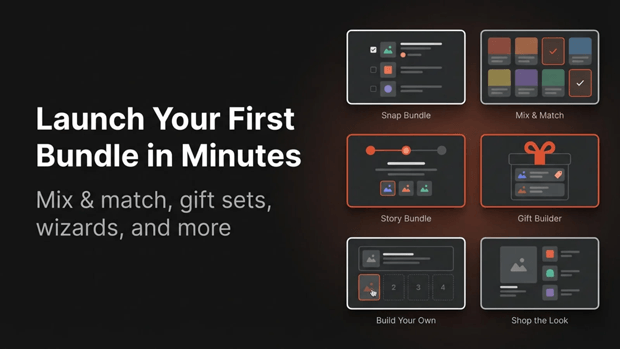
It allows merchants to launch mix-and-match, build-your-own, snap, and tiered bundles in minutes.
Using an app like this opens up advanced strategies:
- Tiered Discount Bundles: Offer progressive savings, such as “Buy 2 save 10%, buy 3 save 20%”.
- Mix & Match Grids: Allow customers to “choose any X items” from a specific collection for a fixed price.
- Build-Your-Own Box (BYOB): Provide a full-page experience where customers can filter categories, drag products into slots, and unlock tiered perks.
Because GP Bundle Builder relies on Shopify’s native discount functions, these complex offers work flawlessly with the native checkout.
You May Also Read:
👉 How to Create Bundles on Shopify: A Step-by-Step Guide
👉 How to Build a Custom Mix and Match Gift Box on Shopify
👉 5 Data Driven Ways to Optimize Shopify Bundles Using Analytics
Expert Tips That Make Buy X Get Y Work Better in Real Shopify Stores
Basic setup is only half the battle. Experienced Shopify strategists use specific tactics to ensure their BOGO offers drive real revenue growth.
- Auto-Add the Free Item: Friction kills conversions. If a customer qualifies for a free item, use a cart script or an app to automatically inject the item into their cart.
- Use BOGO to Cross-Sell: Instead of offering two of the exact same item, use BOGO to introduce customers to a new product category. For example, imagine a Shopify store selling skincare products offering a free travel-size cleanser when a customer buys a full-size moisturizer.
- Create Urgency with Limited Stock: Combine your BOGO offer with an inventory countdown (e.g., “BOGO valid while our 500 units last”) to accelerate purchasing decisions.
How To Troubleshoot Common Shopify BOGO Checkout Issues
When BOGO offers fail to apply, it usually comes down to conflicting rules or outdated technology.
Checkout Hijacking
The most severe issue occurs when third-party apps use custom checkouts. These custom carts break native Shopify features like Shop Pay installments, native gift cards, and fraud rules. Always ensure any merchandising app you use, such as GP Bundle Builder, utilizes Shopify Discount Functions to apply discounts directly in the native checkout.
Discount Stacking Conflicts
Shopify allows you to control whether discounts can combine. If a customer is trying to use a 10% off welcome code alongside an automatic BOGO, the cart may reject one. Navigate to your discount settings and ensure you have explicitly allowed or disallowed discount combinations based on your margin tolerance.
What To Do Next After You Finish Your BOGO Setup
Once your Buy X Get Y offer is live, your focus must shift immediately to tracking and optimization.
- Monitor Average Order Value (AOV): Track your AOV daily to ensure the BOGO is actually lifting the total cart size, rather than just cannibalizing full-price sales.
- Analyze Product Pairings: Look at which “Get” items are driving the highest conversion rates.
- Utilize Bundle Analytics: If you are using advanced merchandising tools, review the per-bundle analytics for views, conversions, AOV impact, and revenue. GP Bundle Builder provides a built-in analytics dashboard that shows views, conversions, and bundle revenue in real time.
Frequently Asked Questions
Can you do Buy One Get One Free on Shopify without an app?
Yes, Shopify’s native discount engine allows you to create basic Buy X Get Y discounts (both automatic and via code) directly in the admin dashboard without requiring a third-party app.
Why is my Shopify BOGO discount not applying at checkout?
This usually happens due to discount stacking restrictions. Check your Shopify admin settings to ensure the BOGO discount is allowed to combine with other active automatic discounts or order-level codes.
What is the difference between an automatic BOGO and a BOGO discount code?
Automatic BOGOs apply instantly when qualifying items hit the cart, creating a frictionless experience. Discount codes require the user to manually type the code at checkout, which is better for exclusive VIP or email-only promotions.
Do Shopify bundle apps ruin Shop Pay integration?
Apps that use custom cart replacements will break Shop Pay. However, modern apps that use Shopify Discount Functions apply the logic seamlessly within the native checkout, preserving Shop Pay and native gift cards.
Final Recap: How To Maintain and Iterate on Shopify BOGO Offers
A successful BOGO campaign isn’t a “set it and forget it” task. To truly master Buy X Get Y on Shopify, you must continuously analyze your margins and customer behavior. Start with native Shopify discounts to test the waters.
Once you see traction, consider upgrading to more advanced, high-converting setups like tiered discounts or mix-and-match bundles using reliable, native-checkout tools. By keeping the UX frictionless and the backend data clean, you turn simple discounts into a sustainable growth engine.




