
In the fast-paced ecommerce landscape of 2026, customer acquisition costs remain stubbornly high. For Shopify merchants, profitability hinges on extracting maximum value from every single transaction—especially during Q4 and peak seasonal spikes.
Yet, an alarming number of brands still treat gift wrapping as an afterthought. They rely on the default “add a note to your order” text box, hoping fulfillment teams can decipher complex customer requests. This disjointed experience frustrates buyers who want premium presentation and overwhelms warehouse staff trying to sort standard orders from delicate gifts.
Adding a structured, paid gift wrap option to your Shopify store isn’t just about making packages look nice; it is a vital Average Order Value (AOV) lever and an operational necessity.
Summary:
- The benefit: Capture missed revenue by offering premium, paid gift wrapping options directly on your product pages, carts, and checkouts.
- Who this is for: Shopify merchants, especially DTC brands, jewelry stores, and seasonal sellers looking to maximize AOV during the holidays.
- What you’ll walk away with: A clear workflow for implementing gift messages, hiding prices on receipts, and automating fulfillment tagging so your warehouse team doesn’t slow down.
- The 2026 reality: Relying on the native “cart notes” field for gift instructions causes massive fulfillment bottlenecks and ruins the unboxing experience. Modern Shopify checkout extensibility makes native gifting seamless.
How do you add gift wrap options to Shopify?
To add a gift wrap option to Shopify without custom coding, install GP ‑ Gift Wrap & Message app that utilizes Shopify’s Theme App Extensions. This allows you to embed a gift wrap and message block directly into your product page, cart drawer, mapping the wrap options to real product variants so the extra revenue tracks accurately in your analytics.
What Gift Wrapping Problems Are Shopify Merchants Actually Facing?
Most DTC brands see gifting account for a significant portion of their revenue, particularly around Black Friday, Cyber Monday, and late December. If you run a boutique gift-forward brand—selling jewelry, candles, stationery, or home goods—gifting can make up 20% to 60% of your revenue in Q4.
But managing this influx comes with three distinct hurdles:
- Lost Upsell Opportunities: Shoppers are willing to pay for convenience. When stores only offer a generic “free gift message,” they leave thousands of dollars in potential premium wrapping fees on the table.
- Ruined Surprises: Buyers are terrified the recipient will see the invoice. Failing to hide prices leads to immediate customer support tickets asking, “Can you remove the packing slip?”
- Warehouse Chaos: Pick-and-pack teams waste valuable time reading order notes to figure out which items need special boxes, ribbons, or handwritten cards.
Why Native Shopify Doesn’t Handle Gift Orders Well
Out of the box, Shopify is incredibly powerful, but its native data architecture treats every order uniformly. When a customer uses the standard cart note to say, “Please wrap this in blue paper and tell Mom I love her,” that data is trapped in an unstructured text field.
Because there is no native “gift intent” data layer, Shopify doesn’t automatically filter these orders. Your 3PL (third-party logistics) provider or in-house fulfillment software just sees a standard order with a note. Furthermore, because no line item was added to the cart for the wrapping material, your inventory for gift boxes isn’t deducted, and the revenue isn’t cleanly tracked.
Recommended Blogs for You:
👉 How to Build a Custom Mix and Match Gift Box
👉 Shopify Bundles vs GP Bundle Builder
👉 How to Manage Corporate Gifting on Shopify
👉 How to Set Up Shopify Invoices
How Missing Gift Options Hurt Shopify Conversion Rates and Revenue
Shoppers buying gifts have very specific, unmet needs during the checkout flow: they want it wrapped nicely (and will pay for it), they want to include a personal message, and they do not want the recipient to see the price.
When a store fails to meet these needs, three things happen:
- Cart Abandonment: The buyer leaves to purchase from a competitor or a massive marketplace that guarantees a gift receipt.
- Increased Return Rates: If a recipient receives a gift with an invoice showing a massive Black Friday discount, it diminishes the perceived value of the gift, sometimes prompting returns.
- Wasted Margin: Offering free gift wrap manually eats into your profit margins, whereas a structured upsell turns an operational cost into a profit center.
Step-by-Step Solution: How To Add Paid Gift Wrap to Your Shopify Store
To fix this, you need an architecture that links the customer’s front-end choices to your back-end fulfillment workflows.
Step 1: Install a Dedicated Gifting App Designed for Shopify
Use GP – Gift Wrap & Message, which lets shoppers add paid gift wrap, a personal message, and a price-free gift receipt to any Shopify order.
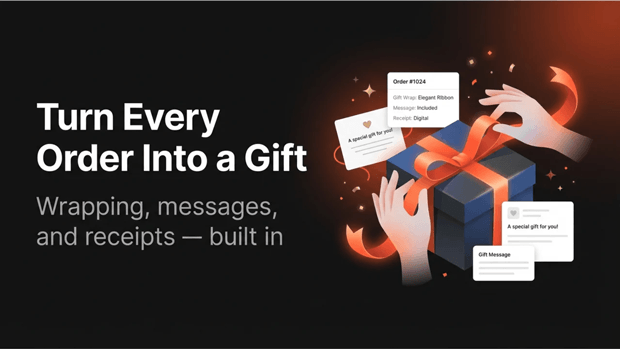
You’ll want to configure your catalog of wrapping options. With GP Gift Wrap & Message, you can create unlimited gift wrap options, mapping them to four option types: paper, box, bag, and ribbon. Because each option maps to a real Shopify product variant, the wrap revenue flows seamlessly through your native Shopify reporting.
Step 2: Configure Personalized Messages and Gift Receipts
Next, address the buyer’s anxiety around presentation. Give them a dedicated text field for their message. You should set custom character limits (e.g., 250 characters) to ensure the text actually fits on your printed cards.
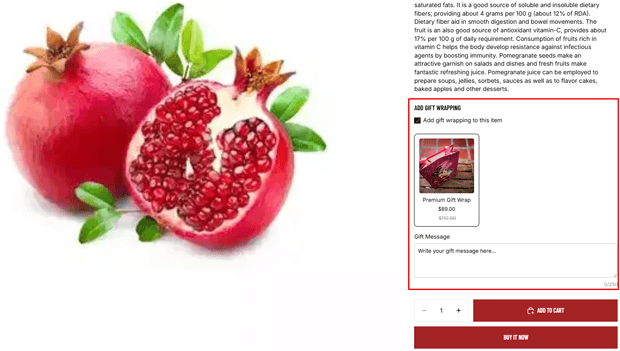
Simultaneously, toggle on a “gift receipt” feature. Apps like GP — Gift Wrap & Message automatically hide prices on the packing slip and generate a printable, price-free gift receipt on demand, protecting the surprise.
Step 3: Implement Order Tagging for Fulfillment Routing
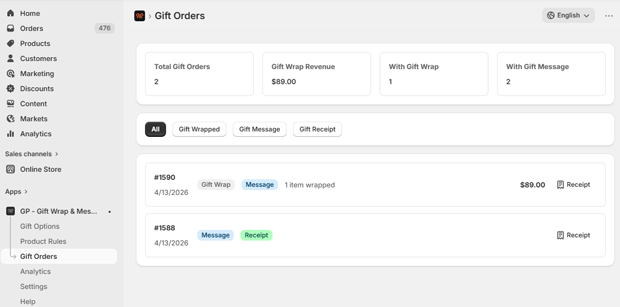
Your warehouse team shouldn’t have to guess. Set up automation that triggers the moment a gift order is placed. The GP — Gift Wrap & Message app auto-tags gift orders for your fulfillment team, utilizing three independent tags: gift-order, gift-wrapped, and has-gift-message.
By pushing these tags into Shopify, you can use Shopify Flow to route orders straight to a specialized “gifting station” in your warehouse, bypassing the standard pick-path.
Checkout UI Extensions: Smarter Alternatives for Shopify Plus Merchants
If you are on Shopify Plus, you have an additional advantage. While standard Shopify plans must place the gift wrap block on the product page or cart drawer, Plus merchants can inject this upsell directly into the checkout flow itself.
Integrating a gift block via a Checkout UI extension catches buyers at the point of highest intent. By the time they enter their shipping information, the realization that they need this sent directly to the recipient hits them. Offering the wrap option right alongside the shipping method drastically improves the attach rate. GP — Gift Wrap & Message supports this by offering a checkout block built specifically for Shopify Plus.
What To Do Next in Your Shopify Optimization Journey
Once your gift wrapping options are live, you must monitor performance. Look at your daily attach rate (total orders vs. gift-wrap orders) and per-option breakdown. If your $9 velvet box isn’t selling but your $3 kraft paper is flying off the shelves, you can adjust your merchandising strategy. GP — Gift Wrap & Message features a built-in analytics dashboard that tracks exactly how much extra revenue gifting is bringing in.
Frequently Asked Questions About Shopify Gift Options
Where is the best place to show the gift wrap option on Shopify?
The most effective placements are the cart drawer (to catch buyers before they begin checkout) and the product page (for stores where items are highly giftable). If you are on Shopify Plus, displaying it natively inside the checkout yields the highest conversion.
Does offering paid gift wrap mess up my Shopify analytics?
Not if it is configured correctly. If your app creates a real Shopify product variant for the wrap, the revenue will show up as standard product sales in your native Shopify Analytics, giving you clean data.
How do I hide the price of an item for a gift order?
You need an app that modifies the packing slip template or generates a distinct gift receipt. This ensures that the recipient only sees the items and the gift message, not the discounts applied or the final price paid.




