
You spend countless hours optimizing your Shopify store for human eyes. High-resolution product images, interactive size guides, and dynamic sliding carts are essential for converting real shoppers and building brand trust.
But the search landscape is shifting rapidly, and the “visitors” analyzing your site aren’t always human.
Today, AI agents, large language models (LLMs), and chat-based search engines are scraping the web to answer complex consumer queries in real-time.
The problem? They don’t process information the way traditional search algorithms do. To an AI bot, your highly visual, beautifully coded storefront might look like a chaotic, unreadable mess.
Summary
- AI assistants like ChatGPT and Perplexity struggle to crawl complex, visual Shopify themes.
- An llms.txt file gives these AI models a clean, text-only map of your core products and policies.
- Implementing this file is a foundational step in Answer Engine Optimization (AEO).
- Setting up llms.txt correctly prevents AI from hallucinating your pricing or inventory.
An llms.txt file is a machine-readable Markdown document placed in a website’s root directory. For Shopify stores, it provides AI crawlers with a clean, code-free map of your most important products and policies, significantly improving your visibility in AI-generated search responses.
Why This Shift to AI Search Matters (And How You Keep Up)
According to industry projections shared by development communities like DEV, LLM-driven referral traffic is expected to jump from roughly 0.25% of total search volume in 2024 to nearly 10% by the end of 2025.
Furthermore, recent analysis by ecommerce marketing platform Yotpo highlighted that for some leading tech platforms, up to 10% of new user signups are already coming directly from AI referrals.
Shoppers are no longer just Googling “best hydrating face serum” and clicking the first blue link. They are asking Perplexity to compare ingredients across three different brands, or asking ChatGPT to find a serum under $40 that offers free shipping.
If your Shopify store relies entirely on heavy JavaScript to display pricing, product specs, and shipping rules, the AI crawler will hit a wall, abandon the crawl, and recommend your competitor instead.
This is exactly where the llms.txt standard comes into play. It is a low-effort, high-impact technical optimization that ensures your brand controls the narrative when artificial intelligence talks about your products.
We’ll also highlight a few tools that make this technical setup much easier for Shopify merchants to automate.
Key Takeaways
- Generative Engine Optimization (GEO) requires plain text: AI models need clean, machine-readable content to confidently recommend your brand.
- An llms.txtfile acts as a dedicated AI pathway: pointing bots directly to your most critical data and bypassing visual clutter.
- You can automate this process: without needing to manually write or format Markdown code every time your catalog updates.
Why Are AI Search Engines Ignoring Your Shopify Store?
If you are heavily invested in traditional SEO, you might assume that ranking well on Google means you will automatically be cited by AI chatbots. Unfortunately, that isn’t the case.
AI search engines retrieve information differently. They attempt to crawl broadly but often hit rate limits or encounter navigation-heavy pages. If they can’t quickly parse your product attributes, they will either stop early or piece together incomplete information from third-party coupon sites or outdated blog mentions.
Why Heavy Shopify Themes Confuse LLMs and Crawlers
Modern Shopify themes are built on Liquid, heavy JavaScript, and complex HTML layouts. While this creates a stunning user experience, AI bots process data with strict token limits and computational costs.
When an AI crawler lands on a product page loaded with interactive 3D models, visual review sliders, and pop-up announcement bars, it struggles to extract the actual price, the core description, and the return policy. The “visual noise” that sells to humans creates friction for machines. The llms.txt file bypasses this completely by feeding the bot a stripped-down, text-only Markdown version of your site’s hierarchy.
Recommended Blogs for You:
👉 The Ultimate Guide to Artificial Engine Optimization (AEO) for Shopify
👉 Multi Language Shopify Invoices: The Cross-Border Selling Guide
👉 Mastering Shopify BOGO: How to Run ‘Buy X Get Y’ Offers
👉 Shopify Bundles vs GP Bundle Builder: The 2026 Comparison
How Poor AI Visibility Quietly Kills Shopify Revenue and Conversions
If an LLM cannot confidently read your shipping policy or product specs, it won’t cite your brand in its answers. Worse, it might “hallucinate” (invent) a lower price based on outdated cached data.
Imagine a customer asking an AI assistant for a recommendation on a premium espresso machine. The AI recommends your store but lists the price at $200 less than reality because it couldn’t read your dynamic pricing script. The shopper clicks through, sees the actual higher price, and immediately bounces. This friction destroys your conversion rates and tells search engines your site wasn’t a good match for the user’s intent.
How to Implement an llms.txt File on Shopify to Fix AI Visibility
Setting up this file manually involves a few straightforward steps:
- Audit Your Canonical Content: Decide which pages AI systems should prioritize. For ecommerce, this means your best-selling products, core collections, FAQ pages, and shipping/return policies.
- Draft the Markdown: Create a plain text file. Start with an H1 heading of your store name, add a brief blockquote summarizing your brand, and use H2s to group your most important links.
- Add Context: Include short, one-sentence descriptions next to your links explaining what the page covers.
- Host at the Root: Upload the file so it lives at yourstore.com/llms.txt.
Shopify Tools That Automate Your llms.txt and AEO Strategy
Managing a static text file manually is incredibly tedious, especially when your Shopify inventory, pricing, and product descriptions change weekly.
Many merchants use the GP ‑ llms.txt AEO Optimizer app to automate this entire workflow. Instead of manually coding Markdown, GroPulse dynamically generates and manages the llms.txt file for your store, structuring your products, collections, and blogs into the exact format that models like Gemini, Claude, and ChatGPT prefer.
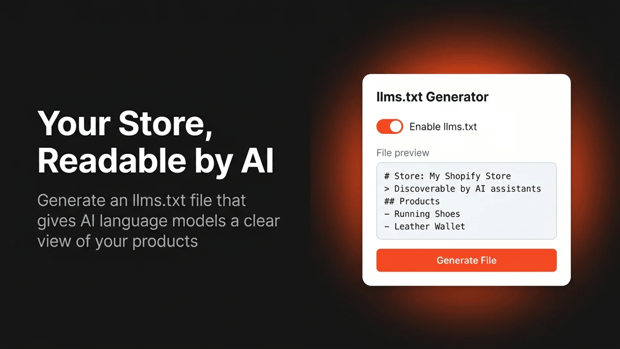
Beyond just generating the file, the app allows you to inject “Custom Brand Instructions.” This ensures that when an AI crawls your store, it reads your specific brand narrative and positioning.
It also includes an IndexNow integration to instantly notify search engines of content changes, and a live analytics dashboard so you can actually track which AI bots are visiting your store.
What a Clean, Machine-Readable llms.txt File Looks Like
A highly optimized file isn’t just a list of URLs; it’s a curated menu. Here is a conceptual structure of how a Shopify store should map it out:
- [Your Brand Name]
- > [A 2-sentence summary of what your store sells and your unique value proposition]
- Best-Selling Collections
- [Link to Collection] – [Brief description of the product type]
- Customer Policies & Support
- [Link to Shipping Policy] – [Clear outline of free shipping thresholds]
- [Link to Returns] – [30-day return policy details]
Common llms.txt Formatting Mistakes That Hurt Your Shopify Store
- Dumping the Entire Sitemap: Context limits matter to AI. Do not include thin pages, draft products, or archived collections. Prioritize the 20% of your pages that answer 80% of customer questions.
- Using Standard HTML: The power of llms.txt lies in Markdown. AI parses Markdown efficiently; HTML visual tags slow it down.
- Letting the File Go Stale: If you update a product’s price or discontinue a line but leave it in your static llms.txt file, you are feeding the AI bad data. (This is why automating the process with an app is highly recommended).
What to Rely on If AI Bots Ignore Your llms.txt File
Because llms.txt is an emerging standard, not every single crawler mandates it yet. To build a bulletproof AEO strategy, you must combine it with traditional technical SEO. Ensure your JSON-LD schema markup (especially Product and Review schema) is flawless. Maintain a clean robots.txt file, and ensure your actual product page descriptions use logical, question-based H2 and H3 headings that mirror how real people ask questions.
How to Track AI Bot Traffic and AEO Growth
You need to know if your Answer Engine Optimization efforts are actually moving the needle. You can monitor your server logs to watch for user-agents like GPTBot or ClaudeBot. Alternatively, set up specific referral tracking in Google Analytics 4 (GA4) to monitor traffic coming from chatgpt.com or perplexity.ai.
Frequently Asked Questions About llms.txt and Shopify AEO
Is an llms.txt file different from a robots.txt file?
Yes. A robots.txt file provides rules on what search engines are allowed or not allowed to crawl. An llms.txt file is a curated, highly specific map that highlights the best structured content specifically for AI ingestion.
Will optimizing for AEO hurt my standard Google SEO?
No. In fact, providing clearer data structures, better schema markup, and concise answers directly aligns with Google’s Helpful Content guidelines and generally improves traditional ranking.
Do I have to know how to code to implement this?
Not necessarily. While you can write it manually in a text editor, Shopify apps handle the Markdown formatting and automated updating for you
Final Thoughts on Future-Proofing Shopify for AI Search
The shift toward conversational, AI-driven search is not a fad—it is a fundamental change in how consumers discover products.
By taking the time to implement an llms.txt file and optimizing your store’s data for machines, you remove the friction that prevents LLMs from recommending your brand.
The Shopify merchants who structure their data for AI today will be the ones dominating the recommendation engines of tomorrow.




