
Automatically request reviews from customers after purchase.
Configure SMTP Settings
Go to Request reviews from the sidebar and click on the “Turn on” Button
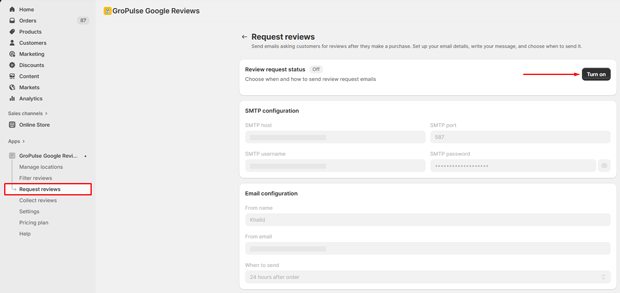
Enter your email server details:
| Field | Example Value |
|---|---|
| SMTP host | smtp.gmail.com |
| SMTP port | 587 |
| SMTP username | your-email@gmail.com |
| SMTP password | Your app password |
Configure Email Settings
| Field | Description |
|---|---|
| From name | Your store or brand name |
| From email | Your email address |
| When to send | Time delay after order (1 hour to 1 week) |
Customize Email Template
Use these variables to personalize your emails:
| Variable | Description |
|---|---|
{customerName} | Customer’s name |
{storeName} | Your store name |
{orderNumber} | Order number |
{googleReviewLink} | Link to leave a Google review |
{orderDate} | Date of the order |
Test and Enable
- Click Send test email to verify your configuration
- Toggle Review request status to On
Last updated on December 23, 2025
Was this article helpful?
Powered by Support Genix