
Optimize meta titles and descriptions for better search engine rankings. This tool analyzes your content and provides AI-powered recommendations.
Overview
Meta tags are crucial for SEO:
- Meta Title — The clickable headline in search results
- Meta Description — The summary text below the title
Well-optimized meta tags can:
- Improve click-through rates
- Better communicate page content
- Increase search visibility
Accessing Meta Tags
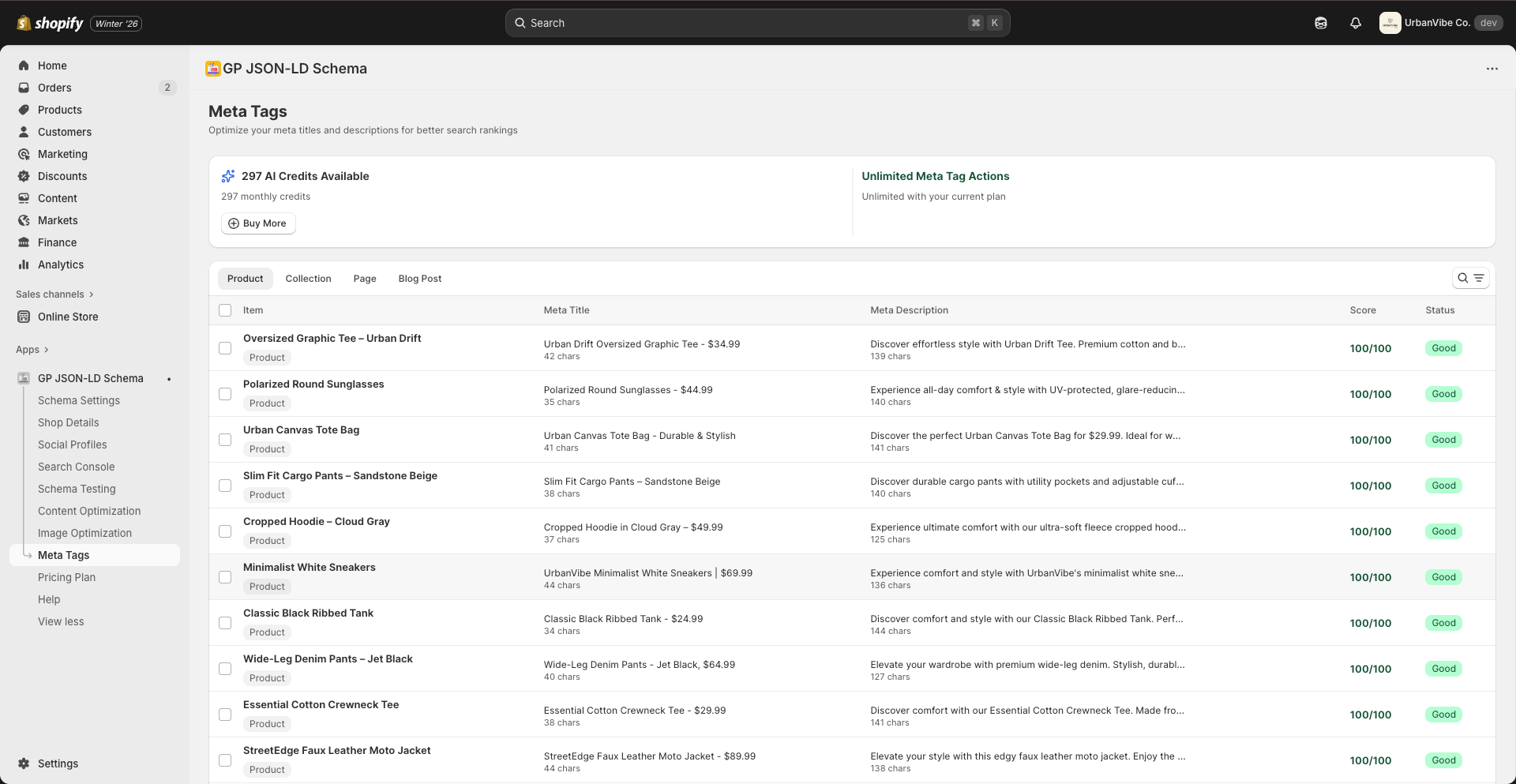
- Navigate to Meta Tags from the sidebar
- View your content organized by type
- Click on items to optimize
Content Types
Products
Optimize meta tags for your product pages:
- Product titles
- Product descriptions
- SEO visibility
Collections
Optimize collection/category pages:
- Collection names
- Category descriptions
Pages
Optimize static pages:
- About page
- Contact page
- Custom pages
Blog Posts
Optimize blog content:
- Article titles
- Post descriptions
Understanding the Dashboard
Credits Display
At the top, you’ll see:
- AI Credits Available — For AI-powered suggestions
- Meta Tag Actions Available — Monthly optimization limit
| Plan | AI Credits | Meta Tag Actions |
|---|---|---|
| Free | — | 10/month |
| Pro | 50/month | 50/month |
| Advanced | 300/month | Unlimited |
Content Table
Each row shows:
| Column | Description |
|---|---|
| Item | Product/page name |
| Meta Title | Current title and character count |
| Meta Description | Current description and character count |
| Score | SEO score out of 100 |
| Status | Warning, Good, or Missing |
SEO Scores
Score Ranges
| Score | Status | Meaning |
|---|---|---|
| 90-100 | Excellent | Fully optimized |
| 70-89 | Good | Minor improvements possible |
| 50-69 | Warning | Needs attention |
| 0-49 | Poor | Requires optimization |
Score Factors
- Title character length (50-60 chars optimal)
- Description character length (150-160 chars optimal)
- Keyword presence
- Uniqueness
- Readability
Optimization Guidelines
Meta Title Best Practices
Optimal length: 50-60 characters
Do:
- Include primary keyword
- Make it compelling and clickable
- Use your brand name at the end
- Be specific and descriptive
Don’t:
- Exceed 60 characters (gets truncated)
- Stuff keywords
- Use all caps
- Duplicate across pages
Example:
Bad:  "Product" (7 chars - too short)
Good: "Organic Cotton T-Shirt - Sustainable Fashion | YourBrand" (56 chars)
Meta Description Best Practices
Optimal length: 150-160 characters
Do:
- Summarize page content accurately
- Include a call-to-action
- Use relevant keywords naturally
- Make it unique for each page
Don’t:
- Exceed 160 characters
- Copy product descriptions
- Leave it empty (Google will auto-generate)
- Use the same description everywhere
Example:
Bad:  Missing (0 chars)
Good: "Shop our organic cotton t-shirts made from sustainable materials.
       Free shipping on orders over $50. Eco-friendly fashion that looks great."
       (154 chars)
Using AI Optimization
Generate AI Suggestions
- Select items to optimize (use checkboxes)
- Click Generate with AI
- Review the suggestions
- Apply or modify as needed
- Save changes
AI Credit Usage
Each AI generation uses credits:
- Single item optimization: 1 credit
- Bulk optimization: 1 credit per item
Bulk Actions
Select Multiple Items
- Use the “Select all” checkbox for the current page
- Or check individual items
- Apply bulk actions
Available Bulk Actions
- Generate AI suggestions — Create optimized meta tags
- Export — Download meta tag data
- Apply changes — Save modifications
Filtering and Search
Search
Use the search box to find specific products or pages.
Filter by Status
Filter items by their optimization status:
- All items
- Needs optimization
- Warning
- Good
Troubleshooting
“Missing” status for descriptions
Cause: No meta description set
Solution:
- Click on the item
- Add a description manually or use AI
- Save changes
Low SEO score despite content
Possible causes:
- Title too short or long
- Description too short or long
- Missing keywords
- Duplicate content
Solution:
- Check character counts
- Ensure unique content
- Include relevant keywords
- Use AI suggestions for improvements
Changes not appearing in Google
- Meta tag updates need to be re-crawled
- Use Google Search Console to request indexing
- Wait 1-4 weeks for updates to appear
Monthly Limits
| Plan | Meta Tag Actions |
|---|---|
| Free | 10/month |
| Pro | 50/month |
| Advanced | Unlimited |
Actions reset on your billing cycle date.
Need more? Click Upgrade Plan to increase your limits.
Related Guides
Need Help?
- Contact Support: gropulse.com/contact
- Live Chat: Available in the bottom-right corner of the app