
This guide explains how to use the AI-powered Ad Consultant to get personalized Facebook advertising advice.
What is the AI Ad Consultant?
The AI Ad Consultant is an interactive chatbot that provides expert advice on:
- Campaign strategy: How to structure and plan your campaigns
- Audience targeting: Finding and reaching your ideal customers
- Ad creative: Creating compelling ads that convert
- Performance optimization: Improving your ad results
- Troubleshooting: Solving common advertising problems
Plan Requirements
The AI Ad Consultant is available exclusively on the Advanced Plan.
| Feature | Free | Basic | Advanced |
|---|---|---|---|
| AI Ad Consultant | – | – | Yes |
| AI Credits | – | – | 500/month |
Accessing the Consultant
- Open the Pixee app in your Shopify admin
- Click on AI Consultant in the sidebar
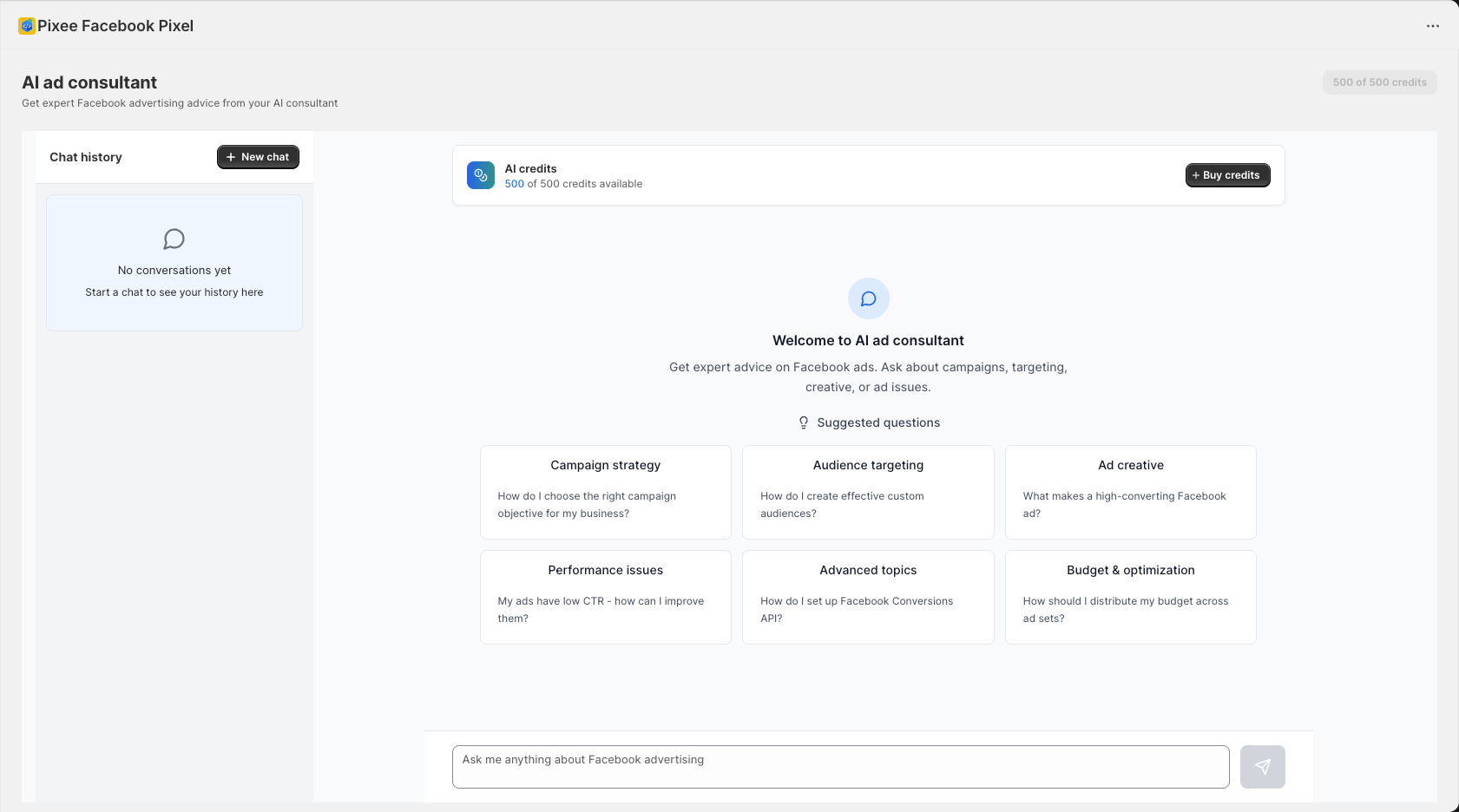
- You will be taken to the AI Ad Consultant chat interface
Using the Chat Interface
Starting a Conversation
- Type your question in the input field at the bottom
- Press Enter or click Send
- Wait for the AI to respond
Example Questions
The page provides suggested questions to get you started:
Campaign Strategy
- “How do I choose the right campaign objective for my business?”
- “What is the best campaign structure for e-commerce?”
- “Should I use Campaign Budget Optimization?”
Audience Targeting
- “How do I create effective custom audiences?”
- “What lookalike audience percentage should I use?”
- “How do I find my ideal customer on Facebook?”
Ad Creative
- “What makes a high-converting Facebook ad?”
- “Should I use video or image ads?”
- “What is the ideal ad copy length?”
Performance Issues
- “My ads have low CTR – how can I improve them?”
- “Why is my cost per purchase so high?”
- “My ads are not delivering – what should I check?”
Advanced Topics
- “How do I set up Facebook Conversions API?”
- “What is the learning phase and how does it affect my ads?”
- “How do I use A/B testing effectively?”
Budget and Optimization
- “How should I distribute my budget across ad sets?”
- “When should I scale my ad spend?”
- “What bid strategy should I use?”
Continuing Conversations
The AI remembers the context of your conversation:
- Ask a follow-up question
- Reference previous answers
- Build on the advice given
Example:
- You: “How do I create a custom audience?”
- AI: [Provides detailed answer]
- You: “Now how do I create a lookalike from that?”
- AI: [Continues with contextual advice]
Chat History
Viewing Past Conversations
- Previous conversations are saved
- View them in the chat history panel
- Click on a conversation to resume it
Starting a New Conversation
- Click New Chat to start fresh
- Previous context is cleared
- Begin with a new question
AI Credits
Understanding Credits
- Each message uses credits based on complexity
- Advanced plan includes 500 credits per month
- Credits reset on the 1st of each month
Checking Your Credits
Credits are displayed at the top of the chat:
- Remaining credits
- Option to buy more
Buying Additional Credits
If you run out of credits:
- Click Buy credits
- Select the quantity to purchase
- Complete the transaction
- Continue your conversation
Topics the Consultant Can Help With
Campaign Planning
- Objective selection
- Campaign structure
- Budget allocation
- Timeline planning
Audience Targeting
- Custom audiences
- Lookalike audiences
- Interest targeting
- Demographic targeting
- Behavioral targeting
- Exclusion strategies
Ad Creative
- Ad format selection
- Image best practices
- Video ad tips
- Copy writing
- CTA optimization
- A/B testing
Bidding and Budget
- Bid strategies
- Budget optimization
- Scaling strategies
- Cost control
Performance Analysis
- Metric interpretation
- Performance benchmarks
- Optimization recommendations
- Troubleshooting
Facebook Features
- Conversions API
- Pixel setup
- Product catalogs
- Dynamic ads
- Advantage+ campaigns
E-commerce Specific
- ROAS optimization
- Product promotion
- Seasonal campaigns
- Retargeting strategies
Best Practices
Getting Better Answers
- Be specific: Include details about your situation
- Provide context: Mention your industry, products, or goals
- Ask follow-ups: Dig deeper into topics
- Share metrics: Include numbers when discussing performance
Example: Specific vs. Vague
Vague: “How do I improve my ads?”
Specific: “I’m running a traffic campaign for my clothing store. My CTR is 0.8% and I’m targeting women 25-45 interested in fashion. How can I improve my click-through rate?”
Maximizing Value
- Prepare questions: Think about what you need before starting
- Take notes: Save important advice for reference
- Apply incrementally: Implement suggestions one at a time
- Follow up: Report results and ask for next steps
Limitations
The AI Consultant:
- Provides general advertising advice
- Cannot access your actual Facebook Ads account
- Cannot make changes to your campaigns
- May not have the latest platform updates
For account-specific analysis, use the AI Ad Diagnostic Tool.
Troubleshooting
Slow Responses
- Complex questions may take longer
- Check your internet connection
- Try breaking questions into smaller parts
Unclear Answers
- Ask for clarification
- Request step-by-step instructions
- Provide more context about your situation
Credits Running Low
- Plan your questions before chatting
- Use suggested questions when applicable
- Purchase additional credits if needed
Example Conversations
Campaign Strategy Example
You: I’m launching a new skincare product. What campaign objective should I start with?
AI: For a new product launch, I recommend starting with a Brand Awareness or Video Views campaign to introduce your product to potential customers. Here is a phased approach:
- Week 1-2: Run awareness campaigns to build interest
- Week 3-4: Switch to Traffic campaigns targeting engaged users
- Week 5+: Launch Conversions campaigns for purchases
This allows you to build an audience before optimizing for sales.
Troubleshooting Example
You: My ads are stuck in learning phase for over a week. What should I do?
AI: Ads typically exit learning phase after about 50 optimization events. If yours are stuck, here are potential causes and solutions:
- Budget too low: Increase daily budget to achieve 50 events faster
- Audience too small: Expand your targeting
- Too many ad sets: Consolidate to concentrate spend
- Frequent edits: Avoid making changes during learning
Try increasing your budget by 20-30% and avoid making edits for 4-5 days.
Next Steps
- AI Ad Diagnostic – Analyze your actual campaign data
- AI Ad Copy Generator – Create compelling ad copy
- Facebook Pixel Setup – Ensure proper tracking