
This guide provides an introduction to the Announcement Bar feature in SalesPulse, including how to access it and check activation status.
What is an Announcement Bar?
An announcement bar is a horizontal banner that appears at the top or bottom of your store. Use it to:
- Promote sales and special offers
- Share important store updates
- Highlight free shipping thresholds
- Display discount codes
- Create urgency with countdown timers
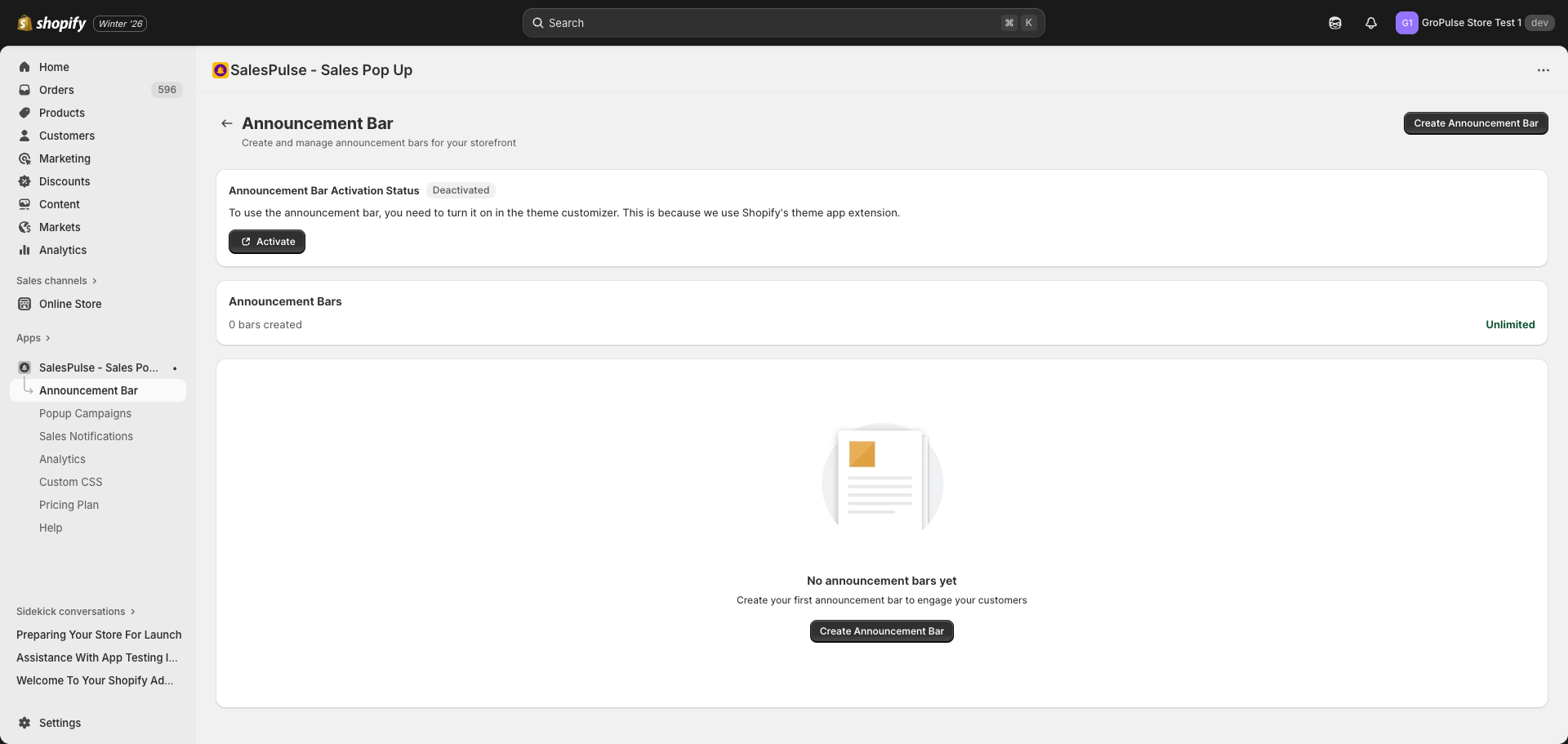
Accessing the Announcement Bar Feature
To access the Announcement Bar feature:
- Open your Shopify admin
- Navigate to Apps > SalesPulse – Sales Pop Up
- Click Announcement Bar in the left sidebar
Activation Status
Before your announcement bars can appear on your store, the feature must be activated in the Theme Customizer.
Checking Activation Status
The Announcement Bar page displays an Activation Status card at the top:
| Status | Description |
|---|---|
| Activated | The feature is enabled and bars will display on your store |
| Deactivated | The feature needs to be activated in the Theme Customizer |
How to Activate
If the status shows “Deactivated”:
- Click the Activate button on the status card
- This opens the Shopify Theme Customizer
- In the App Embeds panel, find Announcement Bar
- Toggle the switch to enable it
- Click Save in the top-right corner
Bar Management Overview
The main Announcement Bar page shows:
Empty State
When you have no announcement bars, you will see:
- A message: “No announcement bars yet”
- A prompt: “Create your first announcement bar to engage your customers”
- A Create Announcement Bar button
Bar List
When you have announcement bars created, you will see a list showing:
- Bar name
- Active/Inactive status
- Quick actions (edit, duplicate, delete)
Key Features
The Announcement Bar feature includes:
| Feature | Description |
|---|---|
| Template Library | Pre-designed templates to get started quickly |
| Content Settings | Configure messages and call-to-action buttons |
| Design Settings | Customize colors, fonts, and layout |
| Position Settings | Control bar placement and close button behavior |
| Targeting Rules | Choose which pages and devices show the bar |
| Countdown Timer | Add urgency with countdown timers |
| Coupon Codes | Display discount codes |
| Scheduling | Set start and end dates for campaigns |
| Animations | Add smooth entry and exit animations |
| A/B Testing | Test different variants to optimize performance (Pro plan) |
| Analytics | Track impressions, clicks, and conversions |
Last updated on February 18, 2026
Was this article helpful?
Powered by Support Genix