
Pixee Facebook Pixel offers three plans to meet different business needs. Choose the plan that best fits your requirements.
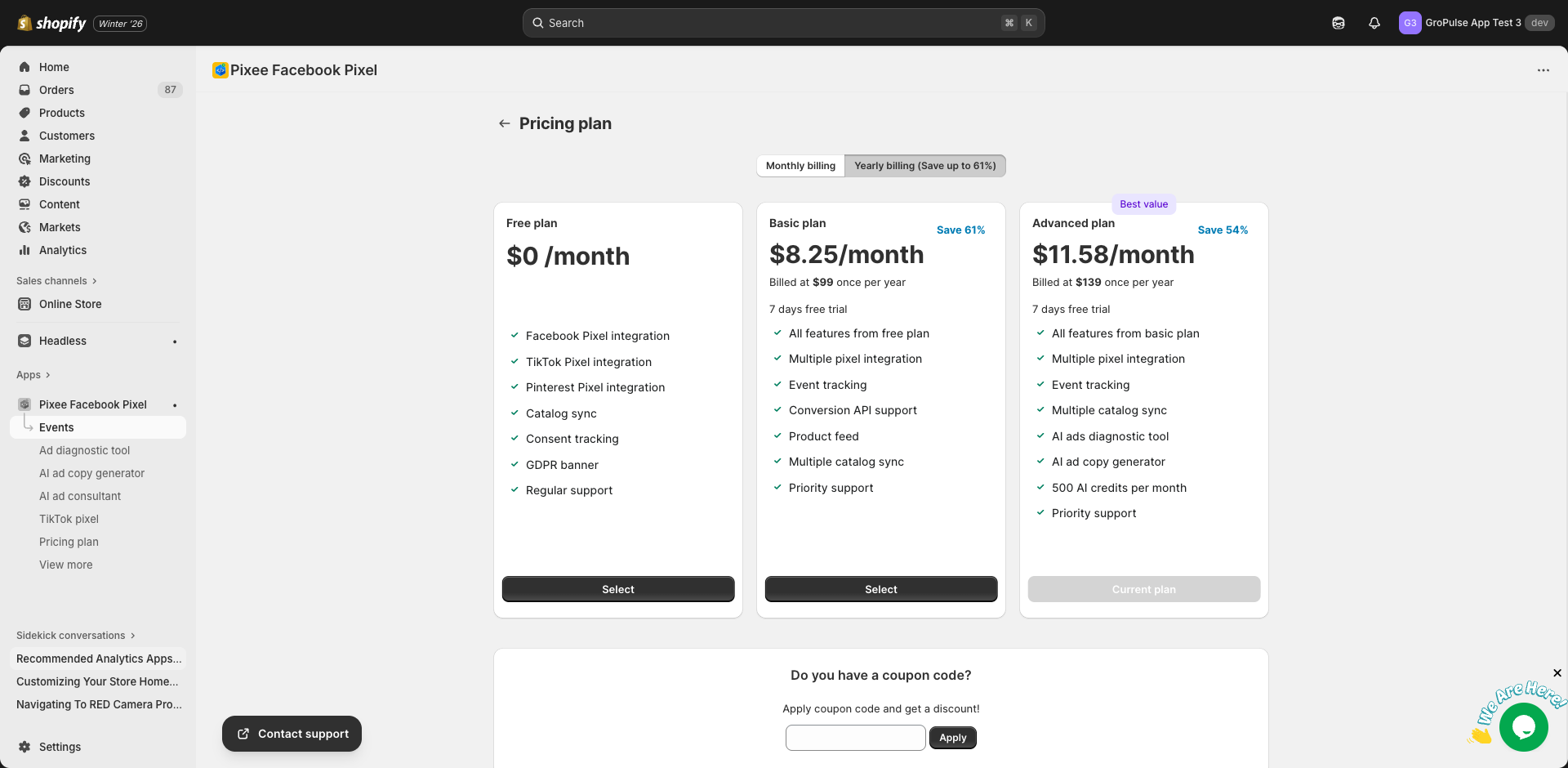
Plan Overview
| Feature | Free | Basic | Advanced |
|---|---|---|---|
| Price (Monthly) | $0 | $21/month | $25/month |
| Price (Yearly) | $0 | $99/year ($8.25/month) | $139/year ($11.58/month) |
| Trial Period | – | 7 days | 7 days |
Free Plan
Price: $0/month
Perfect for stores just getting started with pixel tracking.
Included Features
- Facebook Pixel integration (1 pixel)
- TikTok Pixel integration (1 pixel)
- Pinterest Pixel integration (1 pixel)
- Catalog sync (1 catalog)
- Consent tracking
- GDPR banner
- Regular support
Limitations
- Single pixel per platform
- Single catalog sync
- No event tracking configuration
- No Conversions API
- No product feed
- No AI features
Best For
- New Shopify stores
- Testing the app before upgrading
- Simple tracking needs
- Stores with a single brand/pixel
Basic Plan
Monthly: $21/month Yearly: $99/year (save 61%)
Free Trial: 7 days
Ideal for growing stores that need advanced tracking features.
Included Features
Everything in Free, plus:
- Multiple pixel integration (all platforms)
- Event tracking configuration
- Conversions API (CAPI) support
- Product feed creation
- Multiple catalog syncs
- Priority support
Best For
- Growing e-commerce stores
- Stores running multiple ad campaigns
- Businesses needing server-side tracking
- Stores with multiple brands or regions
Advanced Plan
Monthly: $25/month Yearly: $139/year (save 54%)
Free Trial: 7 days
Best Value – Complete solution with AI-powered features.
Included Features
Everything in Basic, plus:
- AI Ad Diagnostic Tool
- AI Ad Copy Generator
- AI Ad Consultant
- 500 AI credits per month
- Priority support
AI Features Details
| Feature | Description |
|---|---|
| AI Ad Diagnostic | Analyze Facebook campaigns with AI |
| AI Ad Copy Generator | Create compelling ad copy |
| AI Ad Consultant | Get expert advertising advice |
| AI Credits | 500 credits/month (resets monthly) |
Best For
- Stores actively running Facebook ads
- Businesses wanting to optimize ad performance
- Merchants seeking AI-powered insights
- Stores needing help with ad strategy
Comparing Plans
Pixel Features
| Feature | Free | Basic | Advanced |
|---|---|---|---|
| Facebook Pixel | 1 | Multiple | Multiple |
| TikTok Pixel | 1 | Multiple | Multiple |
| Pinterest Pixel | 1 | Multiple | Multiple |
| Conversions API | – | Yes | Yes |
Event Tracking
| Feature | Free | Basic | Advanced |
|---|---|---|---|
| Basic page tracking | Yes | Yes | Yes |
| Event configuration | – | Yes | Yes |
| Custom events | – | Yes | Yes |
Product Catalog
| Feature | Free | Basic | Advanced |
|---|---|---|---|
| Product Feed | – | Yes | Yes |
| Catalog Sync | 1 | Multiple | Multiple |
| Auto-sync | Yes | Yes | Yes |
AI Features
| Feature | Free | Basic | Advanced |
|---|---|---|---|
| AI Ad Diagnostic | – | – | Yes |
| AI Ad Copy Generator | – | – | Yes |
| AI Ad Consultant | – | – | Yes |
| Monthly AI Credits | – | – | 500 |
Support
| Feature | Free | Basic | Advanced |
|---|---|---|---|
| Email Support | Yes | Yes | Yes |
| Priority Response | – | Yes | Yes |
Yearly Savings
Save significantly by choosing yearly billing:
| Plan | Monthly Cost | Yearly Cost | Monthly Equivalent | Savings |
|---|---|---|---|---|
| Basic | $21/month | $99/year | $8.25/month | 61% |
| Advanced | $25/month | $139/year | $11.58/month | 54% |
Free Trial
Both Basic and Advanced plans include a 7-day free trial:
- Full access to all plan features
- No charge until trial ends
- Cancel anytime during trial
- Automatic conversion to paid plan after trial
Changing Plans
Upgrading
- Go to Plan in the app
- Select your desired plan
- Choose monthly or yearly billing
- Complete the subscription process
- New features are available immediately
Downgrading
- Go to Plan in the app
- Select a lower-tier plan
- Confirm the change
- Features are adjusted at the next billing cycle
Canceling
- Go to Plan in the app
- Click to cancel your subscription
- You retain access until the current billing period ends
- Your settings are preserved for 30 days
Applying Coupon Codes
If you have a promotional code:
- Go to Plan in the app
- Scroll to the coupon code section
- Enter your code
- Click Apply
- The discount will be reflected in your subscription
Billing
Payment Methods
Billing is handled through Shopify:
- Uses your Shopify billing account
- Appears on your Shopify invoice
- Same payment method as your Shopify subscription
Billing Cycle
- Monthly: Billed every 30 days
- Yearly: Billed once per year
Refunds
- Prorated refunds available for annual plans
- Contact support for refund requests
- Trial cancellations are free
AI Credits
Understanding AI Credits
- Credits are used for AI features
- Each AI action consumes credits
- Advanced plan includes 500 credits monthly
- Credits reset on the 1st of each month
Credit Usage
| Action | Credits Used |
|---|---|
| AI Ad Diagnostic analysis | 1 |
| AI Ad Copy generation | 1 |
| AI Ad Consultant message | Variable |
Purchasing Additional Credits
If you need more credits:
- Go to any AI feature page
- Click Buy credits
- Select the quantity
- Complete the purchase
- Credits are added immediately
Pricing: $1 per credit
Frequently Asked Questions
Can I switch between monthly and yearly?
Yes, you can switch billing periods at any time. The change takes effect at your next billing date.
What happens if I exceed my plan limits?
You will be prompted to upgrade to continue using features beyond your plan limits.
Do unused AI credits roll over?
No, AI credits reset on the 1st of each month. Unused credits do not carry over.
Can I try Advanced features before committing?
Yes, the 7-day free trial gives you full access to all Advanced features.
What happens to my data if I downgrade?
Your data is preserved. Features beyond your new plan limits become inaccessible but are not deleted.
Getting Started
Ready to choose a plan?
- Start with Free – Try basic features
- Go Advanced – Unlock AI features