
Configure your brand and company information to enhance your Home Page Schema. This information helps Google display detailed information about your business in search results.
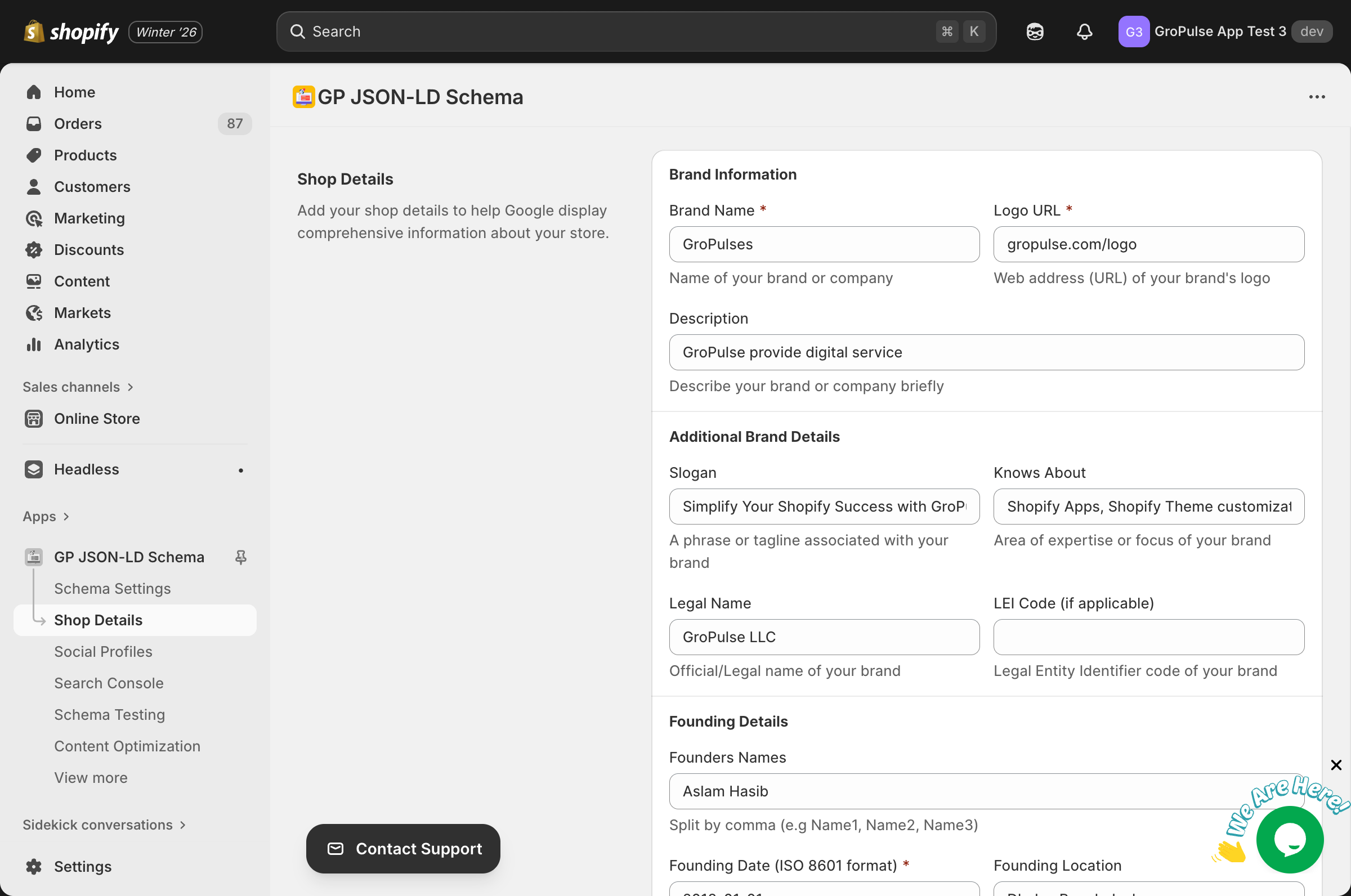
Overview
Shop Details provides structured information about your organization that appears in:
- Google Knowledge Panels
- Rich search results
- Brand recognition features
- Business information cards
Accessing Shop Details
- Navigate to Shop Details from the sidebar
- Fill in the form fields
- Click Save to apply changes
Brand Information
Brand Name (Required)
Your official brand or company name as you want it to appear in search results.
Best practices:
- Use your registered business name
- Keep it consistent across all platforms
- Avoid special characters unless part of your brand
Logo URL (Required)
The web address of your brand’s logo image.
Requirements:
- Use a high-quality image (min 112×112 pixels)
- Prefer PNG or WebP format
- Use your CDN or Shopify-hosted URL
- Ensure the URL is publicly accessible
Example:
https://cdn.shopify.com/s/files/1/0123/4567/files/logo.pngDescription
A brief description of your brand or company.
Best practices:
- Keep it under 200 characters
- Include your main products/services
- Use keywords naturally
Additional Brand Details
Slogan
A memorable phrase or tagline associated with your brand.
Example: “Quality products, delivered fast”
Knows About
The area of expertise or focus of your brand.
Example: “Sustainable fashion, eco-friendly materials”
Legal Name
The official/legal name of your business entity.
Example: “Acme Corporation Inc.”
LEI Code
Legal Entity Identifier code (if applicable). This is primarily for publicly traded companies or regulated financial entities.
Format: 20-character alphanumeric code
Founding Details
Founders Names
Names of your company founders, separated by commas.
Format: Name1, Name2, Name3
Example: “John Smith, Jane Doe”
Founding Date (Required)
The date when your brand was established in ISO 8601 format.
Format: YYYY-MM-DD
Example: “2020-01-15”
Founding Location
The city/location where your brand was established.
Example: “New York, NY, USA”
Brand Employment and Recognition
Number of Employees
Total count of individuals employed by your brand.
Example: “50” or “100-500”
Ownership Funding Info URL
URL to a page with ownership and funding details.
Example: “https://yourstore.com/about/investors”
Awards URL
URL to a page showcasing your brand’s awards or recognition.
Example: “https://yourstore.com/awards”
Ticker Symbol
Stock ticker symbols if your brand is publicly traded, separated by commas.
Format: Symbol1, Symbol2
Example: “ACME, ACM.L”
Required vs Optional Fields
| Field | Required | Impact |
|---|---|---|
| Brand Name | Yes | Core organization identity |
| Logo URL | Yes | Visual brand recognition |
| Founding Date | Yes | Business credibility |
| Description | No | Enhanced search display |
| Slogan | No | Brand messaging |
| Legal Name | No | Official business identity |
| Founders | No | Company history |
| Location | No | Geographic context |
Best Practices
Accuracy
- Use accurate, verifiable information
- Keep details consistent with your website
- Update information when it changes
Completeness
- Fill in as many fields as possible
- More information = better schema
- Complete profiles perform better
Formatting
- Follow the specified formats exactly
- Use proper date formatting (YYYY-MM-DD)
- Separate multiple items with commas
Troubleshooting
Logo not showing
- Verify the URL is publicly accessible
- Check the image format (PNG, JPG, WebP)
- Ensure minimum size requirements are met
- Test the URL in an incognito browser
Schema validation errors
- Check date format is ISO 8601 (YYYY-MM-DD)
- Verify URL fields contain valid URLs
- Remove special characters from text fields
- Test in Schema Testing tool
Changes not appearing in Google
- Schema updates take time to be re-crawled
- Request indexing in Google Search Console
- Wait 1-2 weeks for changes to appear
Related Guides
Need Help?
- Contact Support: gropulse.com/contact
- Live Chat: Available in the bottom-right corner of the app